
no service connection please help me
how to service connection?
iPhone 6s, iOS 15
how to service connection?
iPhone 6s, iOS 15
Hey there and welcome to Apple Support Communities raniel113,
We can certainly understand your concern and see you came to us from the article If you see a Cellular, Ultra Wideband, or Apple Pay Issue message after an iOS update or restart.
We recommend checking out these steps for more information on what to do if you have service issues with your device.
" If you see No Service, Searching, or SOS on your iPhone or iPad
If you see No Service or Searching in the status bar on your iPhone or iPad (Wi-Fi + Cellular), your device isn't connected to a cellular network. If you see SOS or "SOS only" in the status bar, your device can still make emergency calls.
Check your coverage area

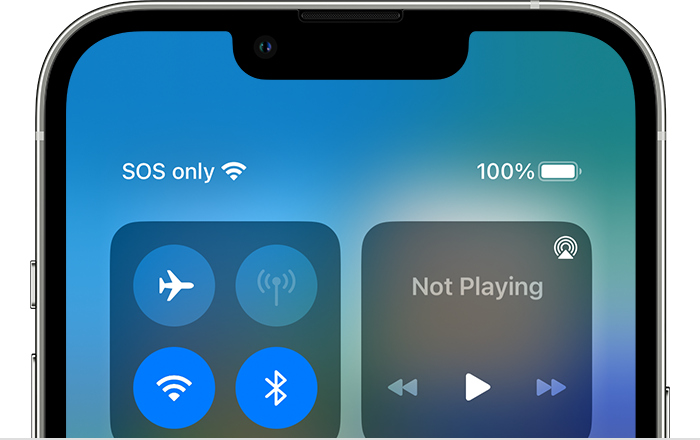
If you see SOS or SOS only
If you see SOS or "SOS only" in the status bar, your device isn't connected to a network, but you can still make emergency calls. This feature is available in Australia, Canada, and the United States.
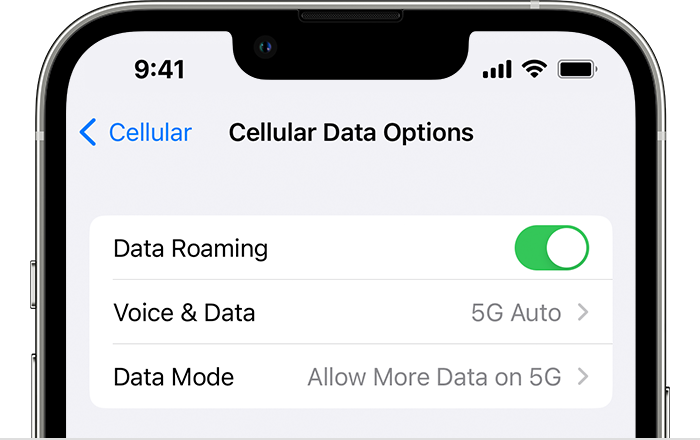
If you're on AT&T's 3G network
AT&T is phasing out their 3G network. If you see No Service in the status bar of your device and you have an iPhone 5s, iPhone 5c, or earlier or an iPad 2 Wi-Fi + Cellular or earlier, contact your carrier to discuss your options. If you have an iPhone 6 or later or an iPad (3rd generation) or later, follow these steps:
If you still see No Service after following these steps, contact your carrier.
iPhone and iPad devices that support 5G networks are not affected by the phasing out of 3G networks.
Restart your iPhone or iPad
Restart your device. If you're not sure how to do this, follow these steps to restart your iPhone or restart your iPad. "
For additional information, check out this link: If you see No Service, Searching, or SOS on your iPhone or iPad - Apple Support
These steps will help ensure your device is working with ease and can fix common issues like the ones you’re experiencing.
However, if you’re seeing one of the messages found in If you see a Cellular, Ultra Wideband, or Apple Pay Issue message after an iOS update or restart - Apple Support on your device and you’ve updated your iPhone using a computer and you’re cellular data is still disabled, you’ll need to contact Apple Support: Get Support
Kindest regards!
Hey there and welcome to Apple Support Communities raniel113,
We can certainly understand your concern and see you came to us from the article If you see a Cellular, Ultra Wideband, or Apple Pay Issue message after an iOS update or restart.
We recommend checking out these steps for more information on what to do if you have service issues with your device.
" If you see No Service, Searching, or SOS on your iPhone or iPad
If you see No Service or Searching in the status bar on your iPhone or iPad (Wi-Fi + Cellular), your device isn't connected to a cellular network. If you see SOS or "SOS only" in the status bar, your device can still make emergency calls.
Check your coverage area
If you see SOS or SOS only
If you see SOS or "SOS only" in the status bar, your device isn't connected to a network, but you can still make emergency calls. This feature is available in Australia, Canada, and the United States.
If you're on AT&T's 3G network
AT&T is phasing out their 3G network. If you see No Service in the status bar of your device and you have an iPhone 5s, iPhone 5c, or earlier or an iPad 2 Wi-Fi + Cellular or earlier, contact your carrier to discuss your options. If you have an iPhone 6 or later or an iPad (3rd generation) or later, follow these steps:
If you still see No Service after following these steps, contact your carrier.
iPhone and iPad devices that support 5G networks are not affected by the phasing out of 3G networks.
Restart your iPhone or iPad
Restart your device. If you're not sure how to do this, follow these steps to restart your iPhone or restart your iPad. "
For additional information, check out this link: If you see No Service, Searching, or SOS on your iPhone or iPad - Apple Support
These steps will help ensure your device is working with ease and can fix common issues like the ones you’re experiencing.
However, if you’re seeing one of the messages found in If you see a Cellular, Ultra Wideband, or Apple Pay Issue message after an iOS update or restart - Apple Support on your device and you’ve updated your iPhone using a computer and you’re cellular data is still disabled, you’ll need to contact Apple Support: Get Support
Kindest regards!
no service connection please help me

