Apple Watch Playing Playlist Shortcut

After 9.4 update on watch series 8, my Playlist shortcut on watch no longer works but I get a “MPAssistanterrorDomain error 0”.


This is the red (by default) shortcut that allows you to play a pre selected playlist. Prior to the 9.4 watch update, I could touch on this Shortcut on my watch 8 and my particular playlist would play on my phone.

Posted on Apr 16, 2023 7:57 AM

Reply
Question marked as Top-ranking reply

Posted on Apr 18, 2023 10:46 AM

Hey ParadiseEarth,


We'd be happy to help out. It your shortcut is no longer working, we'd suggest getting started by restarting both your Apple Watch and the iPhone it's paired with. If you continue to have issues, try unpairing your watch from your iPhone and setting it back up again.


For help with doing so, please review these steps:

How to unpair and erase your Apple Watch if you have your iPhone
1. Keep your Apple Watch and iPhone close together as you unpair them.
2. Open the Apple Watch app on your iPhone.
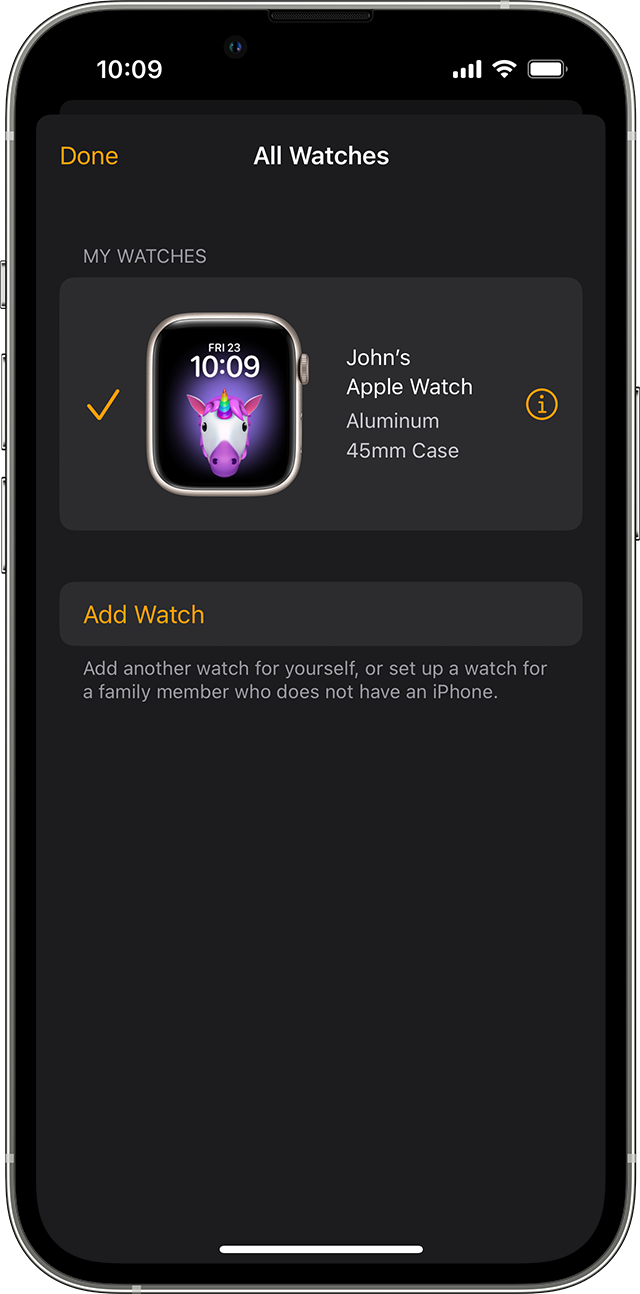
3. Go to the My Watch tab and tap All Watches.
4. Tap the info button  next to the watch that you want to unpair. 
5. Tap Unpair Apple Watch.
6.
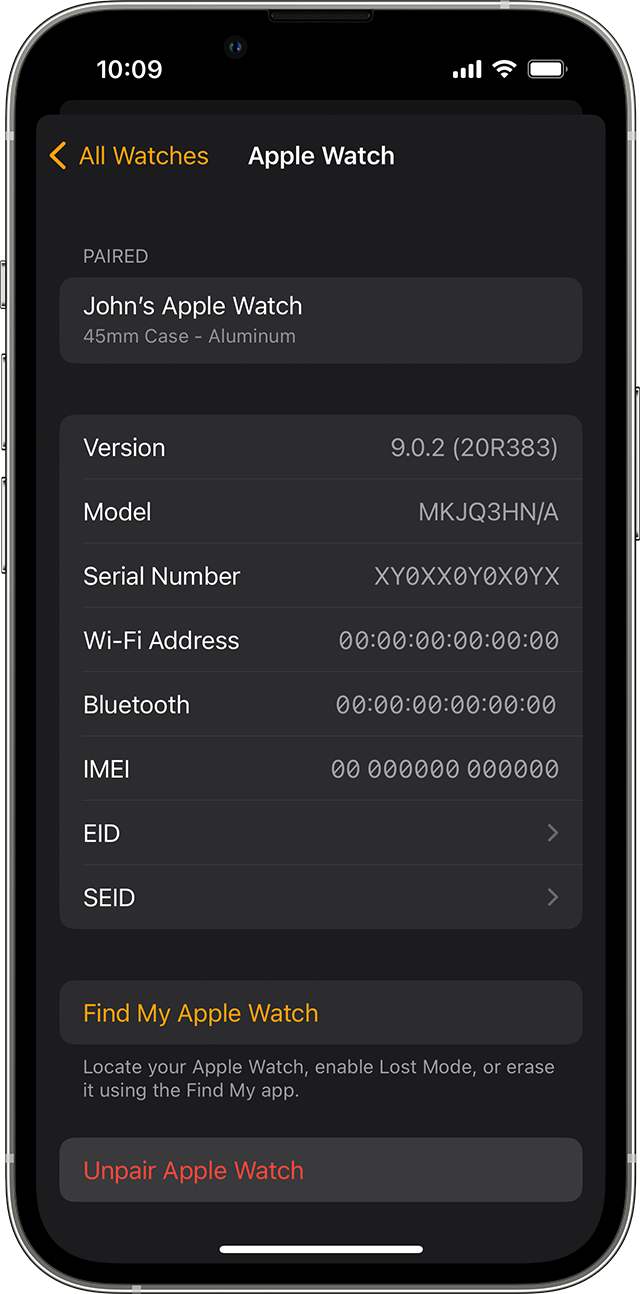
7. Tap Unpair [your Apple Watch name].
8. For GPS + Cellular models, choose whether to keep or remove your cellular plan. 
* If you want to pair your Apple Watch and iPhone again, keep your plan. 
* If you don't want to pair your Apple Watch and iPhone again, remove your plan. If you aren't going to pair with a different watch or iPhone, you might need to contact your carrier to cancel your cellular subscription. 
9. Type your Apple ID password to disable Activation Lock, then tap Unpair. 

Before erasing all content and settings on your Apple Watch, your iPhone creates a new backup of your Apple Watch. You can use the backup to restore a new Apple Watch. After your Apple Watch unpairs, you'll see the Start Pairing message.

Now you can set up your Apple Watch again or turn it off if you're selling it or giving it away.

This is all outlined further here: Unpair and erase your Apple Watch - Apple Support


We hope this helps out, but if not, it'd be best to recreate the shortcut.


Take care!


4 replies
Question marked as Top-ranking reply

Apr 18, 2023 10:46 AM in response to ParadiseEarth

Hey ParadiseEarth,


We'd be happy to help out. It your shortcut is no longer working, we'd suggest getting started by restarting both your Apple Watch and the iPhone it's paired with. If you continue to have issues, try unpairing your watch from your iPhone and setting it back up again.


For help with doing so, please review these steps:

How to unpair and erase your Apple Watch if you have your iPhone
1. Keep your Apple Watch and iPhone close together as you unpair them.
2. Open the Apple Watch app on your iPhone.
3. Go to the My Watch tab and tap All Watches.
4. Tap the info button  next to the watch that you want to unpair. 
5. Tap Unpair Apple Watch.
6.
7. Tap Unpair [your Apple Watch name].
8. For GPS + Cellular models, choose whether to keep or remove your cellular plan. 
* If you want to pair your Apple Watch and iPhone again, keep your plan. 
* If you don't want to pair your Apple Watch and iPhone again, remove your plan. If you aren't going to pair with a different watch or iPhone, you might need to contact your carrier to cancel your cellular subscription. 
9. Type your Apple ID password to disable Activation Lock, then tap Unpair. 

Before erasing all content and settings on your Apple Watch, your iPhone creates a new backup of your Apple Watch. You can use the backup to restore a new Apple Watch. After your Apple Watch unpairs, you'll see the Start Pairing message.

Now you can set up your Apple Watch again or turn it off if you're selling it or giving it away.

This is all outlined further here: Unpair and erase your Apple Watch - Apple Support


We hope this helps out, but if not, it'd be best to recreate the shortcut.


Take care!


Apr 19, 2023 7:15 AM in response to ParadiseEarth

Good afternoon ParadiseEarth,


Based on the troubleshooting you have already tried, it might be helpful for you to speak directly with Apple about this issue.  


They'll be in the best position to investigate this further.  Click the link below, choose the phone number for your region (or the closest one to it) from the list, and call when it is convenient. 


Contact Apple for support and service - Apple Support


Take care.


This thread has been closed by the system or the community team. You may vote for any posts you find helpful, or search the Community for additional answers.

Apple Watch Playing Playlist Shortcut

Welcome to Apple Support Community
A forum where Apple customers help each other with their products. Get started with your Apple Account.
