How to turn your Lock Screen wallpaper to a slide show or series of pictures
Can my lock screen’s wallpaper be changed to a slideshow
iPhone 7 Plus, iOS 15
Can my lock screen’s wallpaper be changed to a slideshow
iPhone 7 Plus, iOS 15
Hello afro2K,
You can rotate multiple photos as your wallpaper by following section "Rotate multiple photos as your Lock Screen wallpaper" in the article you previously referenced, Change the wallpaper on your iPhone - Apple Support.
Rotate multiple photos as your Lock Screen wallpaper
1. In the Settings app, tap Wallpaper.
2. Tap Add New Wallpaper.
3. Select Photo Shuffle from the top row of options.
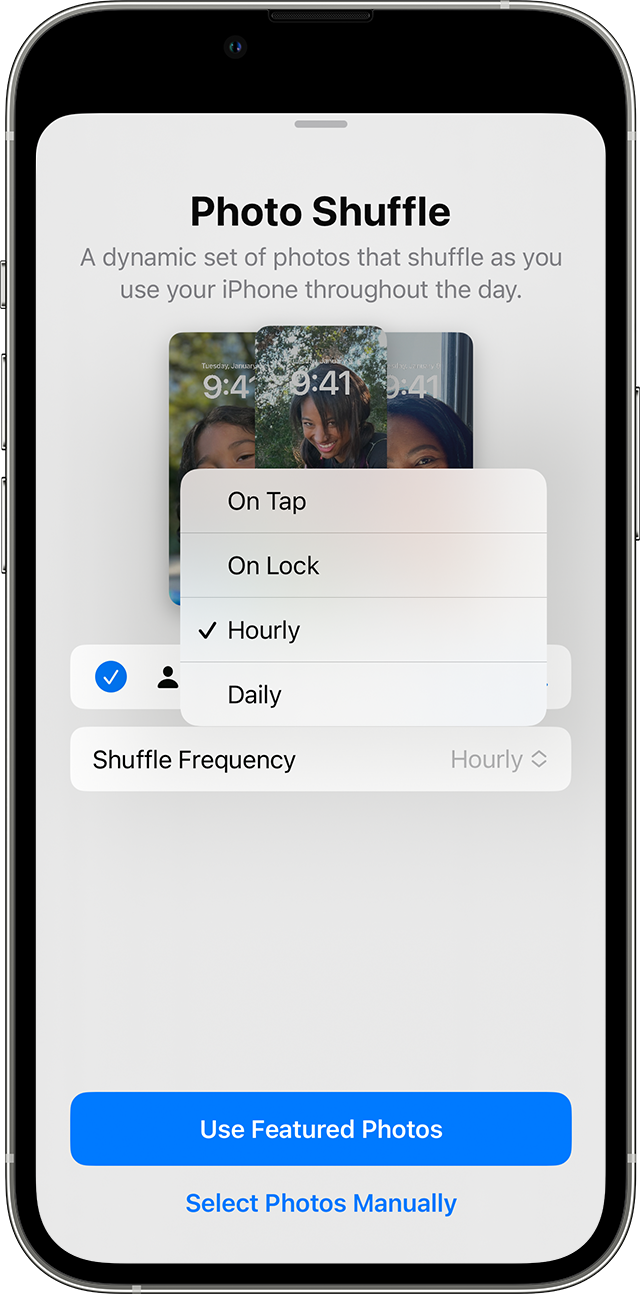
4. On the Photo Shuffle screen, set a frequency (On Tap, On Lock, Hourly, or Daily). Then choose a set of photos that will shuffle as you use your iPhone throughout the day.
5. Tap Done.
Regards.
Hello afro2K,
You can rotate multiple photos as your wallpaper by following section "Rotate multiple photos as your Lock Screen wallpaper" in the article you previously referenced, Change the wallpaper on your iPhone - Apple Support.
Rotate multiple photos as your Lock Screen wallpaper
1. In the Settings app, tap Wallpaper.
2. Tap Add New Wallpaper.
3. Select Photo Shuffle from the top row of options.
4. On the Photo Shuffle screen, set a frequency (On Tap, On Lock, Hourly, or Daily). Then choose a set of photos that will shuffle as you use your iPhone throughout the day.
5. Tap Done.
Regards.
How to turn your Lock Screen wallpaper to a slide show or series of pictures