Mail

It won’t let me connect my iCloud on my mail

Posted on Apr 17, 2023 1:54 PM

Reply
Question marked as Top-ranking reply

Posted on Apr 19, 2023 2:26 PM

Hi Caitlynbrooks,


It sounds like you're trying to turn on iCloud Mail.


If you're on your iPhone, you're going to need to take these steps:

Set up iCloud Mail on your iPhone, iPad, or iPod touch
1. On your iPhone, iPad, or iPod touch, go to Settings > [your name] > iCloud.
2. If you want to send and receive iCloud Mail on your device, do one of the following:
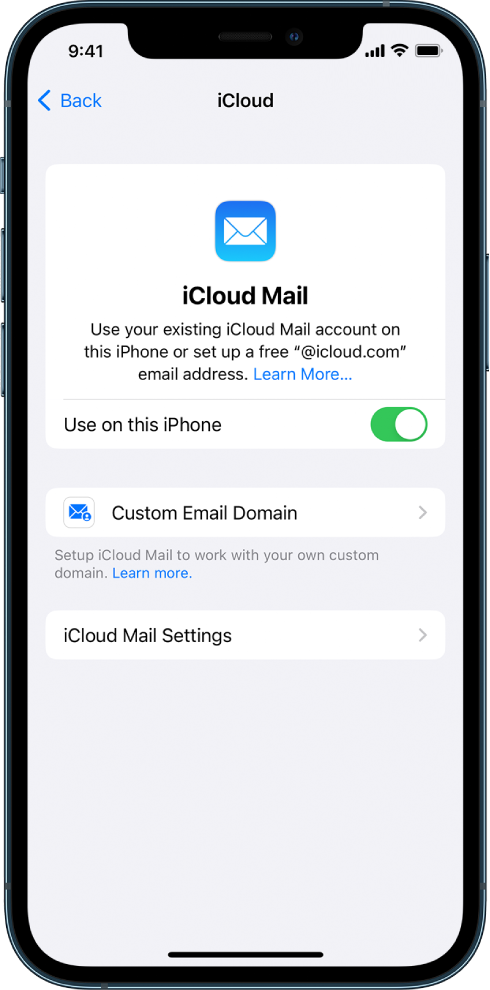
* iOS 16, iPadOS 16, or later: Tap Mail, then turn on Use on this [device].
*The Mail screen in iCloud settings. Use on this iPhone is turned on.
* iOS 15, iPadOS 15, or earlier: Turn on iCloud Mail (or Mail).
3. If you want to keep Mail settings up to date across your devices, turn on iCloud Drive. The following settings stay up to date:
* The order of your mailboxes (for all iOS and iPadOS devices)
* Email address suggestions (for all iOS, iPadOS, and macOS devices)
* VIPs (for all iOS, iPadOS, and macOS devices)
4. To view your iCloud Mail, open the Mail app. Tap a mailbox or folder in the iCloud section.

Set up iCloud Mail on all your devices


That should help you get mail. Let us know what happens.


Thanks for using the Apple Support Communities.


1 reply
Question marked as Top-ranking reply

Apr 19, 2023 2:26 PM in response to Caitlynbrooks

Hi Caitlynbrooks,


It sounds like you're trying to turn on iCloud Mail.


If you're on your iPhone, you're going to need to take these steps:

Set up iCloud Mail on your iPhone, iPad, or iPod touch
1. On your iPhone, iPad, or iPod touch, go to Settings > [your name] > iCloud.
2. If you want to send and receive iCloud Mail on your device, do one of the following:
* iOS 16, iPadOS 16, or later: Tap Mail, then turn on Use on this [device].
*The Mail screen in iCloud settings. Use on this iPhone is turned on.
* iOS 15, iPadOS 15, or earlier: Turn on iCloud Mail (or Mail).
3. If you want to keep Mail settings up to date across your devices, turn on iCloud Drive. The following settings stay up to date:
* The order of your mailboxes (for all iOS and iPadOS devices)
* Email address suggestions (for all iOS, iPadOS, and macOS devices)
* VIPs (for all iOS, iPadOS, and macOS devices)
4. To view your iCloud Mail, open the Mail app. Tap a mailbox or folder in the iCloud section.

Set up iCloud Mail on all your devices


That should help you get mail. Let us know what happens.


Thanks for using the Apple Support Communities.


This thread has been closed by the system or the community team. You may vote for any posts you find helpful, or search the Community for additional answers.

Mail

Welcome to Apple Support Community
A forum where Apple customers help each other with their products. Get started with your Apple Account.