Download OS X Server on old XServe

Hi,


I am trying to install OS X Server on my XServe (Early 2009) where I just reinstalled Mavericks.

I cannot find the OS X Server app on the App Store (logged in, purchased the app before).

Now there is this support article by Apple here: https://support.apple.com/en-us/HT203137

where they link the respective versions for Mountain Lion and Mavericks.

That link takes me to the App Store Preview page but I cannot get Safari to open the App Store, nor do I get any button to click on, the price is simply shown on the page instead of on a button.


I'm lost here, any advice is greatly appreciated!

Xserve, OS X 10.11

Posted on Apr 19, 2023 3:56 AM

Reply
Question marked as Top-ranking reply

Posted on Apr 21, 2023 6:32 AM

Hi KMB_12,


thanks for your reply!

Unfortunately that didn't help - I could see earlier versions of macOS there but not the Server package.


However, I finally figured out a way nevertheless:

I downloaded Firefox 78 ESR from here

https://archive.mozilla.org/pub/firefox/releases/78.0esr/

Using Firefox I could then get the link from the Support Article mentioned above (How to reinstall OS X Server for Mountain Lion or Mavericks from the Mac App Store - Apple Support) to open directly in the Mac App Store.


I even managed to save a copy of the Installer PKG as described here https://derflounder.wordpress.com/2013/08/22/downloading-apples-server-app-installer-package/

in case I ever needed it again.


Hope this helps someone facing the same issue.


Strangely enough Firefox would display the link while Safari wouldn't.


Thanks again!

Similar questions

2 replies
Question marked as Top-ranking reply

Apr 21, 2023 6:32 AM in response to KMB_12

Hi KMB_12,


thanks for your reply!

Unfortunately that didn't help - I could see earlier versions of macOS there but not the Server package.


However, I finally figured out a way nevertheless:

I downloaded Firefox 78 ESR from here

https://archive.mozilla.org/pub/firefox/releases/78.0esr/

Using Firefox I could then get the link from the Support Article mentioned above (How to reinstall OS X Server for Mountain Lion or Mavericks from the Mac App Store - Apple Support) to open directly in the Mac App Store.


I even managed to save a copy of the Installer PKG as described here https://derflounder.wordpress.com/2013/08/22/downloading-apples-server-app-installer-package/

in case I ever needed it again.


Hope this helps someone facing the same issue.


Strangely enough Firefox would display the link while Safari wouldn't.


Thanks again!

Apr 20, 2023 5:02 PM in response to t0biasvogel

Hey t0biasvogel,


We'd recommend checking to see if that purchase is hidden. This article explains how: Hide purchases from the App Store - Apple Support


"Unhide apps on your Mac

  1. On your Mac, open the App Store.
  2. Click your name at the bottom of the sidebar, then click Account Settings or View Information at the top of the screen. If prompted, sign in with your Apple ID.
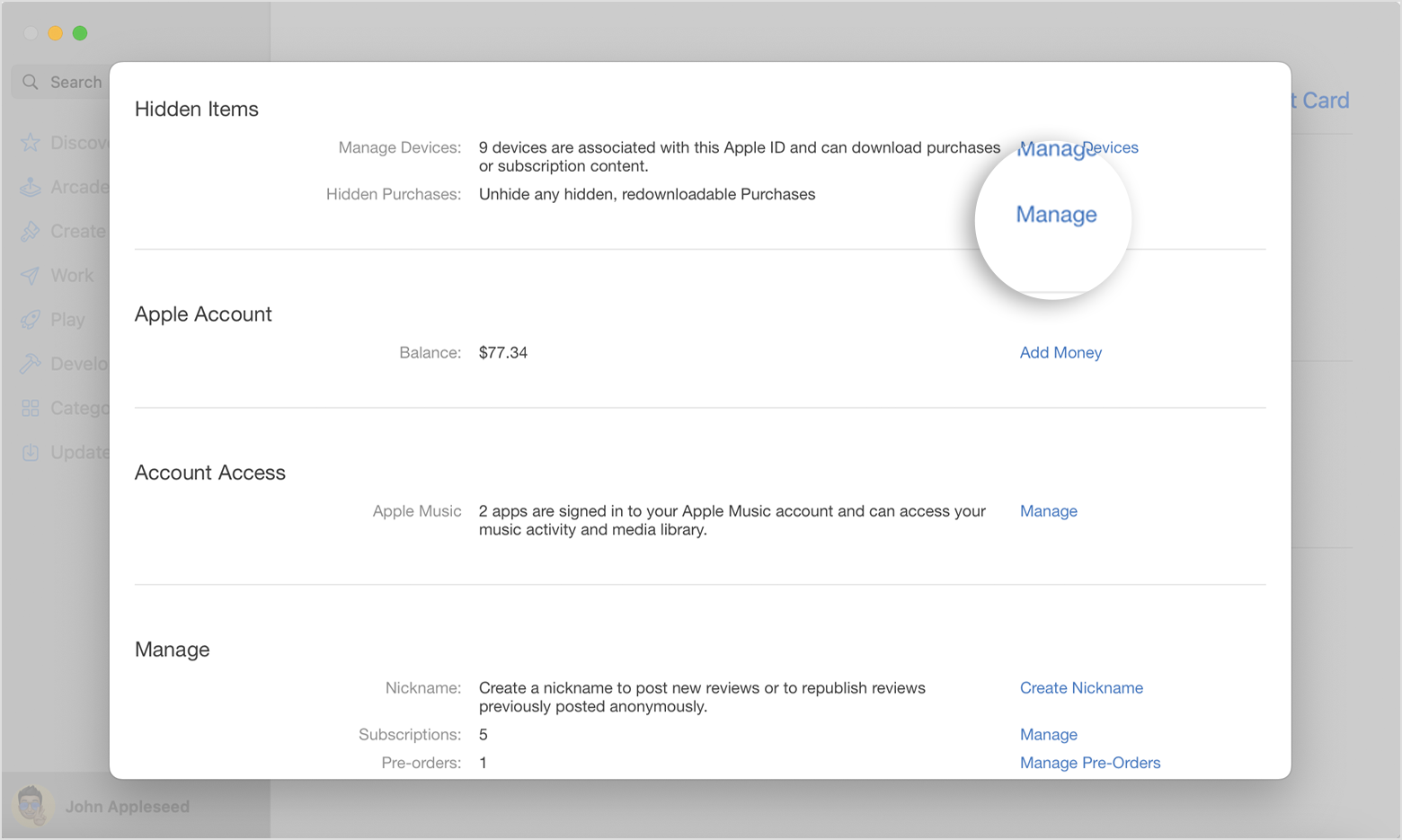
  3. Scroll to Hidden Items or Hidden Purchases, then click Manage.

Click the Manage button in the Hidden Items section.


4. Find the app that you want to unhide.

5. Click Unhide, then click Done. The app reappears in your Purchased list. You can click the download button to redownload the app to your Mac."


Thanks!


This thread has been closed by the system or the community team. You may vote for any posts you find helpful, or search the Community for additional answers.

Download OS X Server on old XServe

Welcome to Apple Support Community
A forum where Apple customers help each other with their products. Get started with your Apple Account.