Choosing a trustworthy device

I have just bought a new iPad mini with WiFi and 64 Gb simm card. The main purpose of this purchase is to establish this NEW iPad mini as the TRUSTED DEVICE with its own "private" cellphone number, to be the verification device for NINE [9] other devices that we have, including 2 iPhone SE, 2 iPad mini, 3 AppleTV+ and 2 iMacs.


The reason behind this move is because we travel, and as we go to various countries around the world, we get their local country simm cards for local service with little or no charge, but when I am asked for a verification code, it will not be accesible with different "foreign" carrier simms.


If I have established ONE device which is "trustworthy" and that is the one that Apple (and others) have as the chosen device for the verification code, that would save a lot of stress and frustration. And I travel always with my iPad mini, which would have configured only ONE cellphone number.


So the question is simple: How does one CHANGE a designated device which has already been chosen throughout the years to a new iPad mini?


I am hoping, no: trusting that one of you community expert can get back to me and explain and tell me how to change one device to another as a trustworthy device for the verification codes. Thanks for any help and/or suggestion that can be offered.

iPad mini (6th generation)

Posted on Apr 20, 2023 1:46 PM

Reply
4 replies

Apr 22, 2023 4:30 PM in response to rbfrank

Hi rbfrank,


To get started, we'd like to clarify how trusted devices work. There is not one specific trusted device per se, any Mac, iPhone, iPad, iPod touch, or Apple Watch that you’ve already signed in to using two-factor authentication is a trusted device. Additionally, ALL trusted devices will receive the authorization code if/when a new device tries to sign into your Apple ID.


"About trusted phone numbers and trusted devices

With two-factor authentication, a trusted device or trusted phone number helps verify your identity when you sign in to a new device or browser."


"What is a trusted device?

A trusted device is an iPhone, iPad, iPod touch, Apple Watch, or Mac that you've already signed in to using two-factor authentication. It's a device that we know is yours and that can be used to verify your identity by displaying a verification code from Apple when you sign in on a different device or browser."


You can check what devices are signed into your Apple ID and manage them as well using the tips here:


Cheers!

Apr 23, 2023 11:03 AM in response to rbfrank

Hey rbfrank,


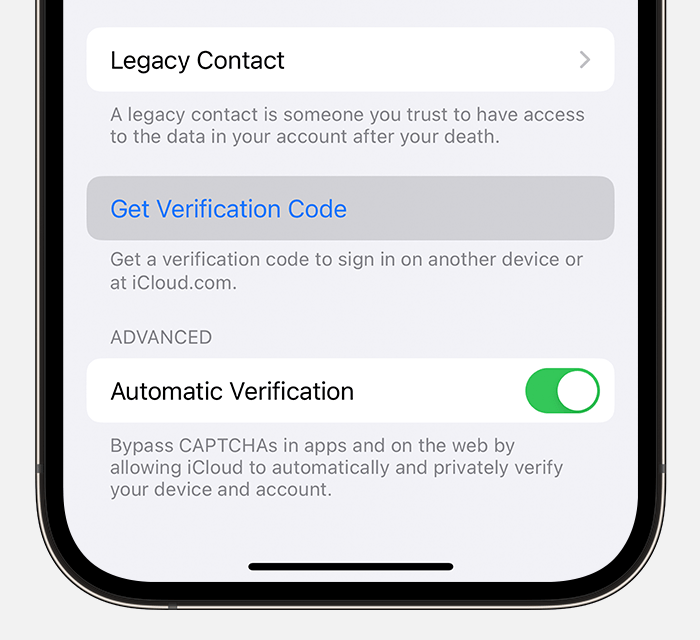
This article has some more information that may be helpful. You may be able to get a code from Settings on your trusted device.


"From your iPhone, iPad, or iPod touch

If your device is online:

  1. Go to Settings > [your name].
  2. Tap Password & Security > Get Verification Code.
  3. On iPhone, tap Get Verification Code

If your device is offline:

  1. Go to Settings > [your name].
  2. Tap Password & Security. 
  3. A message says "Account Details Unavailable." Tap Get Verification Code."


"If you can’t sign in, reset your password, or receive verification codes, you can request account recovery to regain access to your account."


Get a verification code and sign in with two-factor authentication - Apple Support


Please don't hesitate to let us know if you need additional assistance.


Thank you for using Apple Support Communities. Have a good one.

Apr 23, 2023 4:44 AM in response to DerekM87

Hi Derek, and thank you for your response. The major issue I see is that we have [due to lack of knowledge] only ONE device as designated trustworthy, and it is my iPhone. Here's the problem: I LOST THE SIMM CARD of that phone while I was removing it to install a different US SIMM card, and I decided not to take any chjances and ordered theat SIMM card to be BLOCKED until further notice.

Now, whenever I try to log in to Apple ID on any of my "trusted devices", it sends a VERIFICATION CODE only - and I repeat: ONLY to my "blocked" phone. I am completely off the grid of Apple. So I cannot activate my new iPad (which I just bought a few days ago). And I don't know what to do next!

Is there a protoicol to follow to change the "verification code" or add another device using email instead of phone numbers?

Thanks for any advice you can provide.

Apr 23, 2023 12:16 PM in response to mario49

Thank you Mario. I really, really do not want to request a new password, as the problem is not one having to do with the password. Also, I would really, really try NOT to have a "request for a recovery of the account".

What I do not understand is why all the helpful data tells me that any of my trustworthy devices can help, but I do not know which they are as I cannot access the Apple ID and see which devices are "approved".

As it stands, I have (or my accouint has) 9 devices on Apple ID, but I only have -as I know- one device approved, which is my "foreign" phone with a foreign SIMM card, [starting with +507] and the phone is TURNED OFF as I am traveling out of country 9In the USA now) and using my US cellphone. --- which is registered but Iit appears that it is NOT a "trustworthy device", ergo; no access.

It almost sounds like a "catch 22". There must be a way for the Apple Support folks to be supplied with all pertinent information and assign me a "new" device so I can log in. The issue is that I cannot log in to my accoiunt without a verification code.

I am hoping that iPad support might be able to do something.


Thanks anyway.

This thread has been closed by the system or the community team. You may vote for any posts you find helpful, or search the Community for additional answers.

Choosing a trustworthy device

Welcome to Apple Support Community
A forum where Apple customers help each other with their products. Get started with your Apple Account.