Ipad pro Safari storage jumping back and forth. i jumps back and forth between 80 GB and a minute later 500mb then jumps back to 80gb. How can I tell how much storage is available?
According to the settings my Ipad Storage allocation for Safar
According to the settings my Ipad Storage allocation for Safar
Thank you for the additional info and screenshot. This certainly helps with understanding precisely what you see.
You’ll note that the graphic shows a small amount of free space - however, the expected unused free space (~60GB) does not proportionally correspond with the graphic. Given the inconsistencies that you describe, something isn’t as it should be.
System storage includes a lot of cached data. Unless you are approaching the limits of available free space, you shouldn’t encounter issues. iPadOS16 appears to make more use of available storage for temporary system caches. While your iPad should automatically and optimally manage its available system resources, sometimes it can need a little help. To try to resolve your issue, it would be worthwhile to clear temporary system storage.
For Safari:
Settings > Safari > Clear History & Website Data
For other browsers, you’ll need to find the relevant section of the App settings - which may be within the App itself.
Otherwise, transient system caches can be significantly reduced by performing a forced-restart of your iPad - although caches, by their nature, will again accumulate and be automatically managed by the operating system.
After clearing your Website data, the iPad will require a restart. As previously outlined:
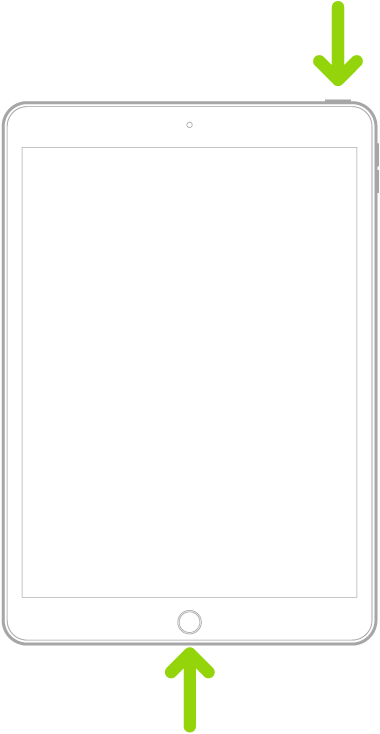
Force restart iPad (models with the Home button)
Press and hold the top button and the Home button at the same time. When the Apple logo appears, release both buttons.
Having restarted your iPad, please post another screenshot showing the iPad storage graphic.
Thank you for the additional info and screenshot. This certainly helps with understanding precisely what you see.
You’ll note that the graphic shows a small amount of free space - however, the expected unused free space (~60GB) does not proportionally correspond with the graphic. Given the inconsistencies that you describe, something isn’t as it should be.
System storage includes a lot of cached data. Unless you are approaching the limits of available free space, you shouldn’t encounter issues. iPadOS16 appears to make more use of available storage for temporary system caches. While your iPad should automatically and optimally manage its available system resources, sometimes it can need a little help. To try to resolve your issue, it would be worthwhile to clear temporary system storage.
For Safari:
Settings > Safari > Clear History & Website Data
For other browsers, you’ll need to find the relevant section of the App settings - which may be within the App itself.
Otherwise, transient system caches can be significantly reduced by performing a forced-restart of your iPad - although caches, by their nature, will again accumulate and be automatically managed by the operating system.
After clearing your Website data, the iPad will require a restart. As previously outlined:
Force restart iPad (models with the Home button)
Press and hold the top button and the Home button at the same time. When the Apple logo appears, release both buttons.
Having restarted your iPad, please post another screenshot showing the iPad storage graphic.
Assuming that you cleared website data and performed a forced restart as directed - something is clearly not as it should be.
As the problem persists, I suggest that you reset your iPad settings. While this reset will not cause any loss of data, as a precaution, it is always wise to ensure that you have a current iCloud or iTunes backup before performing the reset:
How to back up your iPhone, iPad, and iPod touch - Apple Support
When you are happy to proceed, you can perform the reset from iPad settings:
Settings > General > Transfer or Reset iPad > Reset > Reset All Settings
Begin with a forced-restart of your iPad - as this will often clear an isolated software issue. The restart will also purge transient/temporary files.
Force restart iPad (models with Face ID or with Touch ID in the top button)
If your iPad doesn’t have the Home button, do the following:
Force restart iPad (models with the Home button)
Press and hold the top button and the Home button at the same time. When the Apple logo appears, release both buttons.
Some additional information would be helpful:
A screenshot showing the iPad Storage graphic will usefully clarify your available storage - and distribution of used storage by category:
Settings > General > iPad Storage
Is it not possible to tell how much space is available on an iPad Pro, I’ve had this space issue with many apps on ipad, including the iPad books app using 80 gb, Affinity Photo using using similar amnts of storage, even iPad photo using many GB of storage which is inconsistent with the number of photos.
iPad storage stats are a joke, just shut up and use Apple cloud, huh!
Ok
The reason available storage availability is important because I will be on the road and want to make vdos with my ipad, and dont want it telling me its full and you need to buy more icloud space. This defeats the purpose of the device for me.
Thanx
Tha
nk you for responding, for me your option 2 was my choice but after reboot see pics.
No change still 80 gb and 500 mb, notice the timestamp in upper left.
regards
Ipad model number MPF22LL/A, os 16, iPad Pro (10.5-inch)
thanx
must log in anew after every response. :-(
This is 3rd time restart as per your instructions… no change, still jumping between 80gb and 500 mb. What is clear to me, I cant rely on this device.
The requested graphic is missing from your latest screenshot… without which I cannot compare before and after you cleared website data.
Oops wrong graphic, but same result.
Thank you again for your efforts.
Ok thank you Lotuspilot for your consideration, this will take some time, but will respond.
Look at these 2 screen shots less than 1 minute apart, one showing 80GB, but when digging down shows 500 mb
Ipad pro Safari storage jumping back and forth. i jumps back and forth between 80 GB and a minute later 500mb then jumps back to 80gb. How can I tell how much storage is available?