
Family shared music
I cannot see music my family organizer is sharing with me
iPhone 11
I cannot see music my family organizer is sharing with me
iPhone 11
Hey there and welcome to Apple Support Communities merrilyfromlos angeles,
We can certainly understand your concern and can help provide some insight.
We recommend checking out these steps for more information on what to do if you can't see your family shared content.
" If you can't find your family's shared content
Check your settings, and ask your family members to check their settings. If you still can't find the app or other content, learn what to do.
Check your Family Sharing settings
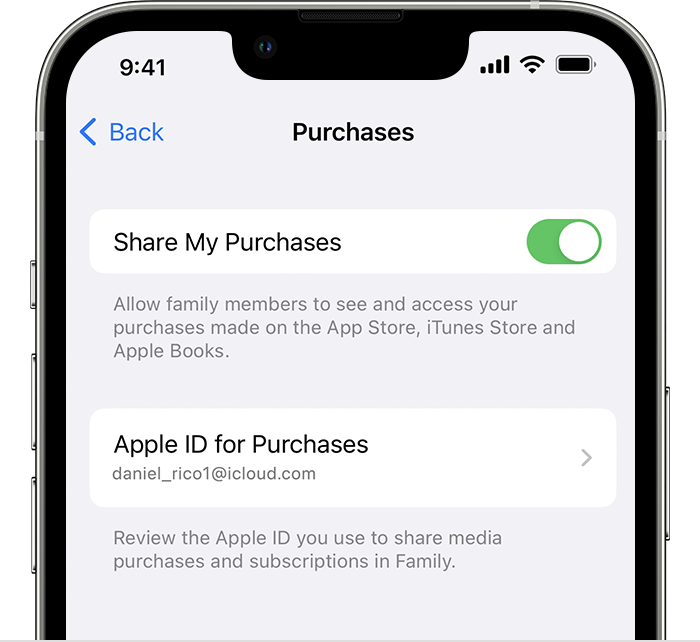
Make sure that you're using the same Apple ID for Family Sharing and Media & Purchases. And make sure that purchase sharing is turned on. Then ask your family members to check their settings too.
On your iPhone or iPad with iOS 16 or later
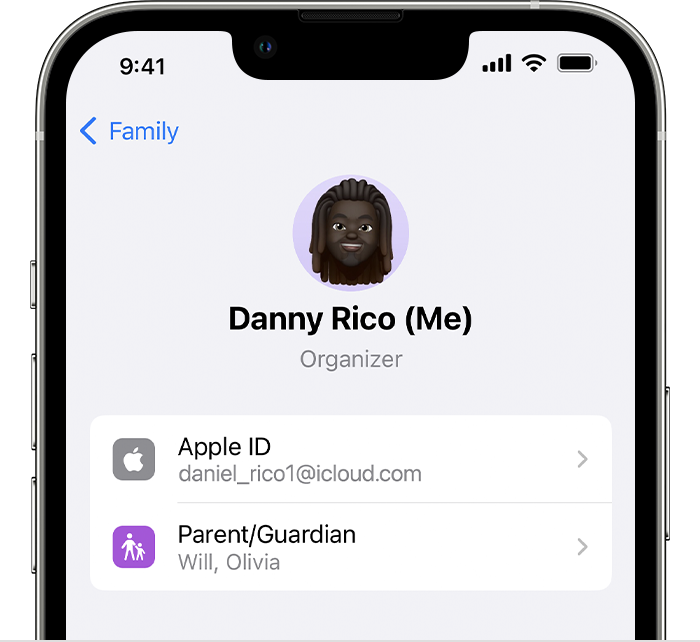
4. Tap Purchases.
5. Tap Apple ID for Purchases and make sure that you're signed in with with the same Apple ID that you use for Family Sharing. If not, tap Share using secondary Apple ID and enter the Apple ID and password for that Apple ID.
 "
"
For additional information, check out this link: If you can't find your family's shared content - Apple Support
If you are referring to SharePlay with your Apple Music content, then this link will help as well: Use SharePlay with Apple Music on your iPhone or iPad - Apple Support
These steps will help ensure your device is working with ease and can fix common issues like the ones you’re experiencing.
Kindest regards!
Hey there and welcome to Apple Support Communities merrilyfromlos angeles,
We can certainly understand your concern and can help provide some insight.
We recommend checking out these steps for more information on what to do if you can't see your family shared content.
" If you can't find your family's shared content
Check your settings, and ask your family members to check their settings. If you still can't find the app or other content, learn what to do.
Check your Family Sharing settings
Make sure that you're using the same Apple ID for Family Sharing and Media & Purchases. And make sure that purchase sharing is turned on. Then ask your family members to check their settings too.
On your iPhone or iPad with iOS 16 or later
4. Tap Purchases.
5. Tap Apple ID for Purchases and make sure that you're signed in with with the same Apple ID that you use for Family Sharing. If not, tap Share using secondary Apple ID and enter the Apple ID and password for that Apple ID.
"
For additional information, check out this link: If you can't find your family's shared content - Apple Support
If you are referring to SharePlay with your Apple Music content, then this link will help as well: Use SharePlay with Apple Music on your iPhone or iPad - Apple Support
These steps will help ensure your device is working with ease and can fix common issues like the ones you’re experiencing.
Kindest regards!
Family shared music

