
Boot camp stuck in windows

Have been using boot camp on my iMac for long time. Yesterday my Mac screen froze. When I rebooted it booted on windows. Now not only will it not boot with macOS but it is not even seeing the Mac disk. Any suggestions to find the Mac disk etc.

Posted on Apr 21, 2023 9:36 PM

Reply
Question marked as Top-ranking reply

Posted on Apr 22, 2023 3:26 AM

First, try both methods to boot into Windows.


  1. Hold the OPT key while restarting
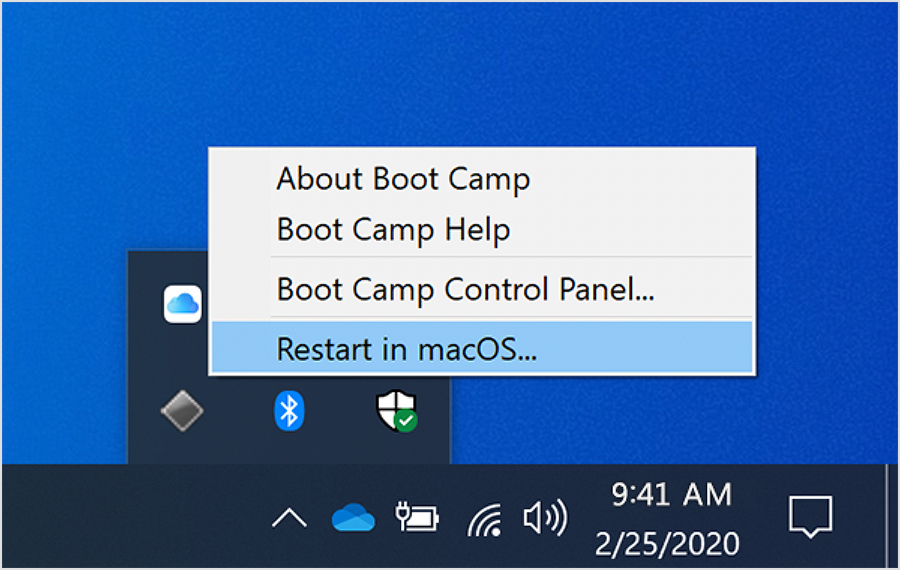
  2. Click the black diamond on the taskbar as seen below


Failing that, try booting into macOS Recovery (hold CMD + R on startup) or Internet Recovery (CMD + OPT + R) if the normal one won't work. You may need to erase your Mac and restore from a backup.


  1. Use Disk Utility to erase an Intel-based Mac - Apple Support
  2. Restore your Mac from a backup - Apple Support

Similar questions

3 replies
Question marked as Top-ranking reply

Apr 22, 2023 3:26 AM in response to ChubbaKing

First, try both methods to boot into Windows.


  1. Hold the OPT key while restarting
  2. Click the black diamond on the taskbar as seen below


Failing that, try booting into macOS Recovery (hold CMD + R on startup) or Internet Recovery (CMD + OPT + R) if the normal one won't work. You may need to erase your Mac and restore from a backup.


  1. Use Disk Utility to erase an Intel-based Mac - Apple Support
  2. Restore your Mac from a backup - Apple Support

This thread has been closed by the system or the community team. You may vote for any posts you find helpful, or search the Community for additional answers.

Boot camp stuck in windows

Welcome to Apple Support Community
A forum where Apple customers help each other with their products. Get started with your Apple Account.