app privacy report
app network activity shows me Apple Watch even tho I haven't used watch?
iPhone 13 Pro, iOS 16
app network activity shows me Apple Watch even tho I haven't used watch?
iPhone 13 Pro, iOS 16
Hello duda12,
Let's use the steps below to make sure that your Apple Watch is all up to date:
Get ready to update
Next, check these things:
1. Make sure that your iPhone is updated to the latest version of iOS.
2. Make sure that your Apple Watch is at least 50 percent charged.
3. Make sure that your iPhone is connected to Wi-Fi.
Keep your iPhone near your Apple Watch throughout the update. It could take from several minutes to an hour for the update to complete, so you might want to update overnight or wait until you have time.
Update your Apple Watch using your iPhone
You can wait until Apple Watch notifies you when a new update is available. Tap Update Tonight in the notification, then go to your iPhone to confirm that you want to update overnight. At the end of the day, leave your Apple Watch and iPhone charging overnight so the update can complete.
Or you can update your Apple Watch with your iPhone manually:
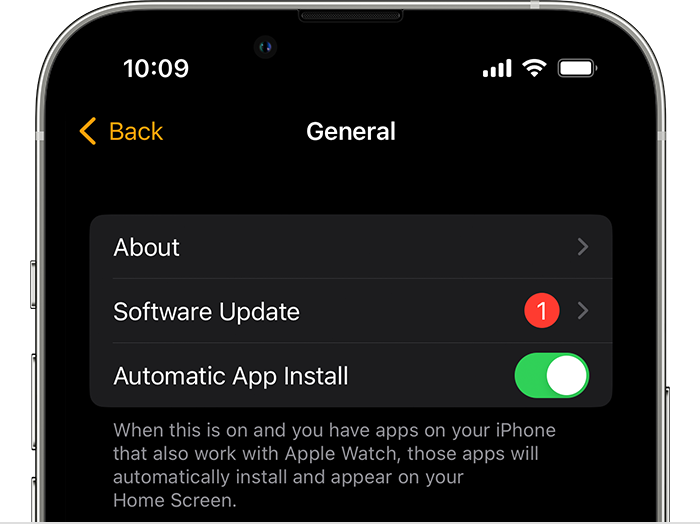
1. On your iPhone, open the Apple Watch app, then tap the My Watch tab.
2. Tap General > Software Update.
3. Download the update. If asked for your iPhone passcode or Apple Watch passcode, enter it.
4. Wait for the progress wheel to appear on your Apple Watch. It could take from several minutes to an hour for the update to complete.
Leave your Apple Watch on its charger while the update completes. Don't restart your iPhone or Apple Watch, and don't quit the Apple Watch app. When the update completes, your Apple Watch restarts on its own.
You can also find those steps in this resource: Update your Apple Watch - Apple Support Updating should help to further isolate a potential software conflict.
Should you still continue to see that unexpected entry, you'll want to reach out to Apple Support: Apple Support They'll be in the best position to look into this further.
Take care.
duda12,
If the steps above do not help you isolate or resolve the issue we recommend continuing by reaching out to Apple Support in your region. You can do so here: Get Support
Regards.
Wow, I hope you get some answers for this! I wonder if the response you received was AI generated because I have seen other answers that were not even close to right like this one was.
Have you figured out why this is happening, yet?
** I have not watch))) and never connected 🙄
not yet, but i thinks its happening time to time. how can i check whose apple watch was connected to my iphone and when?
app privacy report