
Why doesn’t my iPhone want to screen mirror?
help me trouble shoot my iPhone’s screen mirror issue?
iPhone 8 Plus, iOS 16
help me trouble shoot my iPhone’s screen mirror issue?
iPhone 8 Plus, iOS 16
Hello dehalie,
Thank you for reaching out to Apple Support Communities, and we'll be happy to help in any way we can. We understand you're having issues with mirroring your iPhone screen. Try the steps here to see if they resolve the issue: Use AirPlay to stream video or mirror the screen of your iPhone or iPad - Apple Support
"Use AirPlay to stream or share content from your Apple devices to your Apple TV, AirPlay-compatible smart TV, or Mac. Stream a video. Share your photos. Or mirror exactly what's on your device's screen.
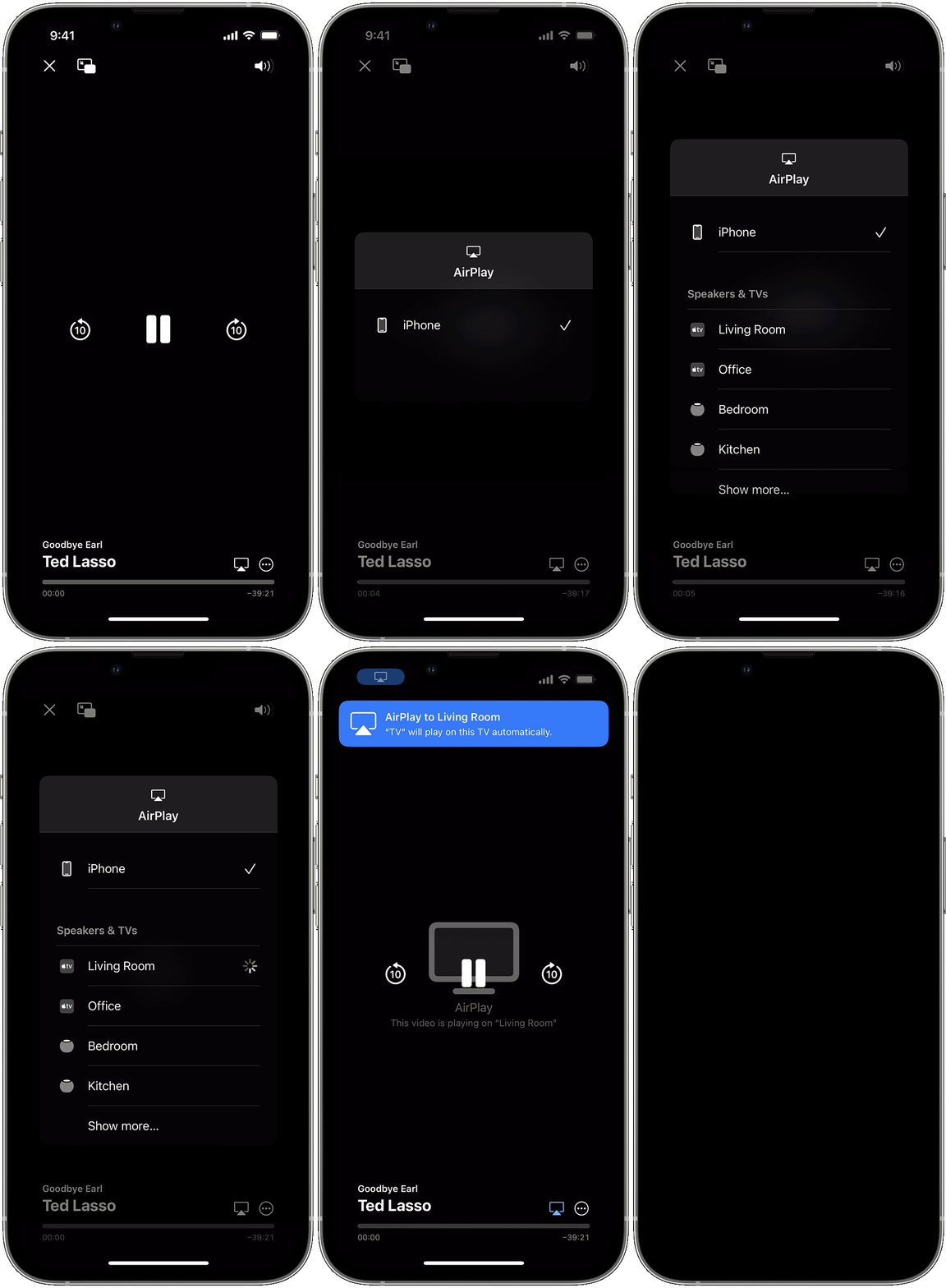
Stream video from your iPhone or iPad to a TV or Mac
 . In some apps, you might need to tap a different button first.1 For example, in the Photos app, tap Share
  , then tap AirPlay .
To stop streaming, tap AirPlay  in the app that you're streaming from, then tap your iPhone or iPad from the list.

If video automatically streams to an AirPlay device
Your device might automatically stream video to the Apple TV, AirPlay-compatible smart TV, or Mac that you frequently use. If you open a video app and see  in the upper-left corner, then an AirPlay device is already selected.
To use AirPlay with a different device, tap , then tap another device. Or tap again to stop streaming with AirPlay.

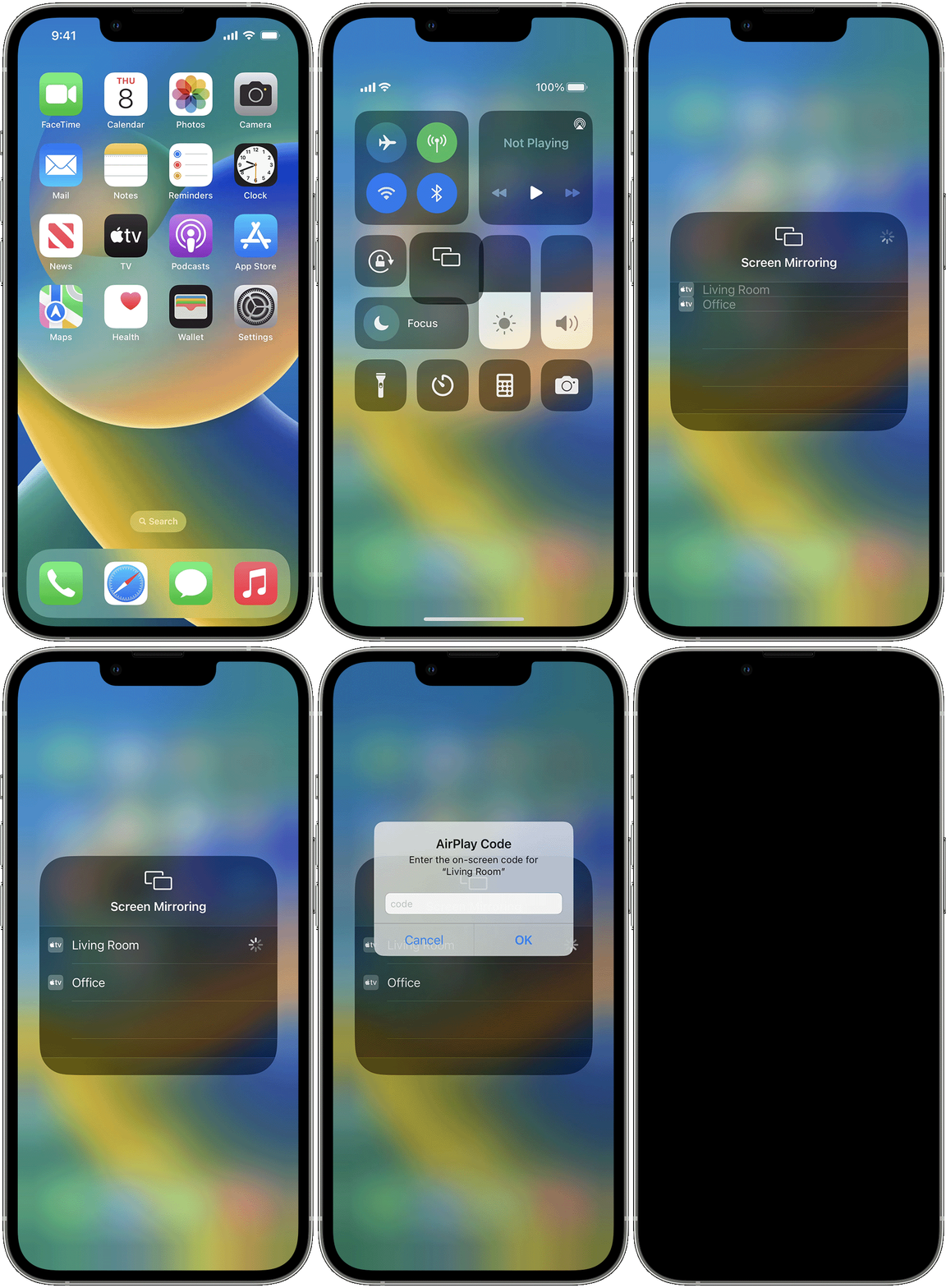
Mirror your iPhone or iPad to a TV or Mac
 .
.To stop mirroring your iPhone or iPad, open Control Center, tap Screen Mirroring, then tap Stop Mirroring. Or press the Menu button on your Apple TV Remote.
We hope this helps.
Cheers!
Hello dehalie,
Thank you for reaching out to Apple Support Communities, and we'll be happy to help in any way we can. We understand you're having issues with mirroring your iPhone screen. Try the steps here to see if they resolve the issue: Use AirPlay to stream video or mirror the screen of your iPhone or iPad - Apple Support
"Use AirPlay to stream or share content from your Apple devices to your Apple TV, AirPlay-compatible smart TV, or Mac. Stream a video. Share your photos. Or mirror exactly what's on your device's screen.
Stream video from your iPhone or iPad to a TV or Mac
. In some apps, you might need to tap a different button first.1 For example, in the Photos app, tap Share , then tap AirPlay .To stop streaming, tap AirPlay in the app that you're streaming from, then tap your iPhone or iPad from the list.
If video automatically streams to an AirPlay device
Your device might automatically stream video to the Apple TV, AirPlay-compatible smart TV, or Mac that you frequently use. If you open a video app and see in the upper-left corner, then an AirPlay device is already selected.
To use AirPlay with a different device, tap , then tap another device. Or tap again to stop streaming with AirPlay.
Mirror your iPhone or iPad to a TV or Mac
.To stop mirroring your iPhone or iPad, open Control Center, tap Screen Mirroring, then tap Stop Mirroring. Or press the Menu button on your Apple TV Remote.
We hope this helps.
Cheers!
Why doesn’t my iPhone want to screen mirror?

