Playlist updates on Apple Music
The NPR music playlists (such as New Music Friday) are not updating in Apple Music. Can anyone suggest a fix? I already restarted the iPhone, and they’re not updating on my iPad either.
iPhone XR
The NPR music playlists (such as New Music Friday) are not updating in Apple Music. Can anyone suggest a fix? I already restarted the iPhone, and they’re not updating on my iPad either.
iPhone XR
Hi Little_Scholar,
Thanks for reaching out using Apple Support Communities. We're here to help.
We understand you're noticing that a playlist is not updating changes on your iPhone.
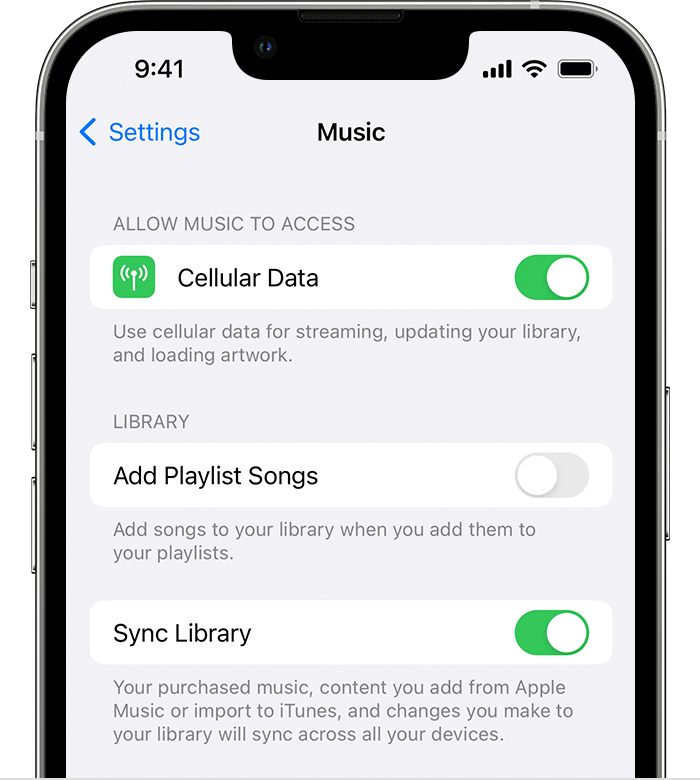
Are you an Apple Music or iTunes Match subscriber? If so, you'll want to ensure Sync Library with Apple Music is enabled on your iPhone.
The article below will assist you with this.
Use Sync Library to access your music library across your
To perform the recommended troubleshooting steps via the link above, complete the steps in the section titled "How to turn on Sync Library on your iPhone or iPad."
1. Make sure that your iPhone or iPad is signed in with the same Apple ID that you use with your Apple Music subscription.
2. Go to Settings.
3. Tap Music.
4. Turn on Sync Library.
5. Turn on Sync Library on your other devices.
After ensuring your Apple Music subscription is active and the sync library is enabled, recheck the playlist for updates. If not updated, check to see if there is a status message indicating that updates are pending.
Another thing to remember is that some music may not be eligible to match and sync with iCloud Music Library. Examples of tracks that this could apply to would-be tracks not purchased from iTunes that were bought with a different Apple ID or are too large. Try adding other types of songs to this playlist to see if the issue only occurs with certain songs.
Please let us know the outcome after giving the above steps a try.
Thanks for using the Apple Support Communities.
Cheers!
Hi Little_Scholar,
Thanks for reaching out using Apple Support Communities. We're here to help.
We understand you're noticing that a playlist is not updating changes on your iPhone.
Are you an Apple Music or iTunes Match subscriber? If so, you'll want to ensure Sync Library with Apple Music is enabled on your iPhone.
The article below will assist you with this.
Use Sync Library to access your music library across your
To perform the recommended troubleshooting steps via the link above, complete the steps in the section titled "How to turn on Sync Library on your iPhone or iPad."
1. Make sure that your iPhone or iPad is signed in with the same Apple ID that you use with your Apple Music subscription.
2. Go to Settings.
3. Tap Music.
4. Turn on Sync Library.
5. Turn on Sync Library on your other devices.
After ensuring your Apple Music subscription is active and the sync library is enabled, recheck the playlist for updates. If not updated, check to see if there is a status message indicating that updates are pending.
Another thing to remember is that some music may not be eligible to match and sync with iCloud Music Library. Examples of tracks that this could apply to would-be tracks not purchased from iTunes that were bought with a different Apple ID or are too large. Try adding other types of songs to this playlist to see if the issue only occurs with certain songs.
Please let us know the outcome after giving the above steps a try.
Thanks for using the Apple Support Communities.
Cheers!
Hey Little_Scholar,
Thanks following up. Next, we'd recommend reaching out to our support team for some additional options.
Get Support
Cheers.
Hi J_Johnnyboy -
Thanks for this suggestion, but Sync Library was already turned on. Since the playlist updates would be coming from NPR (not from Apple Music or from me), I have to assume there's some kind of glitch with the updating process. I did check this playlist in my free Spotify account and it did update on Friday, as it is supposed to do every week. Strange.
Thanks,
Little_Scholar
Playlist updates on Apple Music