Separate playlists in Apple Music with Family Sharing

My daughter and I share Apple Music through family sharing. She keeps deleting my playlists from her phone. How do we delegate playlists so that we each can have our own?


Creating separate playlists that don’t automatically go to each other’s phones- my daughter deletes every playlist I make!


[Re-Titled by Moderator]

Posted on May 1, 2023 3:38 PM

Reply
Question marked as Top-ranking reply

Posted on May 3, 2023 4:01 PM

Hi Lori-GracesMom,


Thanks for posting in Apple Support Communities.


You mentioned that you share Apple Music using Family Sharing, but it sounds like you're sharing an Apple ID if you can see each other's playlists. You should have different Apple IDs when you go to Settings >[your name] on an iOS and System Settings (Preferences) and look at the very top of this panel.


You can create a new Apple ID, if necessary.


Create your Apple ID on iPhone, iPad, or iPod touch

You can create a new Apple ID when you set up your device, or set it up later in the App Store.
Create your Apple ID when you set up your device
1. Tap "Forgot password or don't have an Apple ID?"
2. Tap Create a Free Apple ID.
3. Create an Apple ID when setting up a new iPhone
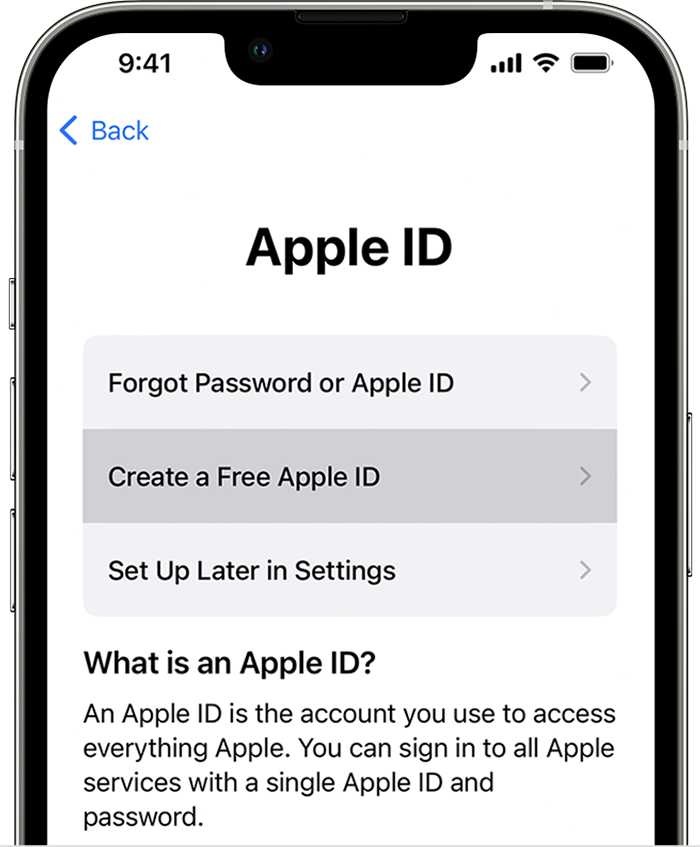
4. Select your birthday and enter your name. Tap Next.
5. Tap "Use your current email address," or tap "Get a free iCloud email address."
6. Follow the onscreen steps to verify your email address, create a strong password, set your device region, and set up two-factor authentication. If you choose to skip this step, you'll be prompted to do this later in Settings.

How to create a new Apple ID - Apple Support


If you're not sharing an Apple ID, are you choosing to do a one-time share?


Provide more details on this issue.


Regards.


1 reply
Question marked as Top-ranking reply

May 3, 2023 4:01 PM in response to Lori-GracesMom

Hi Lori-GracesMom,


Thanks for posting in Apple Support Communities.


You mentioned that you share Apple Music using Family Sharing, but it sounds like you're sharing an Apple ID if you can see each other's playlists. You should have different Apple IDs when you go to Settings >[your name] on an iOS and System Settings (Preferences) and look at the very top of this panel.


You can create a new Apple ID, if necessary.


Create your Apple ID on iPhone, iPad, or iPod touch

You can create a new Apple ID when you set up your device, or set it up later in the App Store.
Create your Apple ID when you set up your device
1. Tap "Forgot password or don't have an Apple ID?"
2. Tap Create a Free Apple ID.
3. Create an Apple ID when setting up a new iPhone
4. Select your birthday and enter your name. Tap Next.
5. Tap "Use your current email address," or tap "Get a free iCloud email address."
6. Follow the onscreen steps to verify your email address, create a strong password, set your device region, and set up two-factor authentication. If you choose to skip this step, you'll be prompted to do this later in Settings.

How to create a new Apple ID - Apple Support


If you're not sharing an Apple ID, are you choosing to do a one-time share?


Provide more details on this issue.


Regards.


This thread has been closed by the system or the community team. You may vote for any posts you find helpful, or search the Community for additional answers.

Separate playlists in Apple Music with Family Sharing

Welcome to Apple Support Community
A forum where Apple customers help each other with their products. Get started with your Apple Account.