Verifying email address
Why my iPhone doesn't want to verify an email address
iPhone 5s, iOS 12
Why my iPhone doesn't want to verify an email address
iPhone 5s, iOS 12
Hi keneilwe85,
This typically happens if the Mail app is unable to confirm the information for your email account. If you're using the iPhone 5s on iOS 12 listed in your profile, contact your email provider to make sure their account will work with that iOS version. Otherwise, gather the details from your email provider and try to set it up manually. This may help if your provider requires different security protocols.
Add an email account to your iPhone, iPad, or iPod touch - Apple Support
How to set up your email account manually
If you need to set up your email account manually, make sure that you know the email settings for your account. If you don’t know them, you can look them up or contact your email provider. Then follow these steps:
1. Go to Settings > Mail, then tap Accounts.
2. Tap Add Account, tap Other, then tap Add Mail Account.
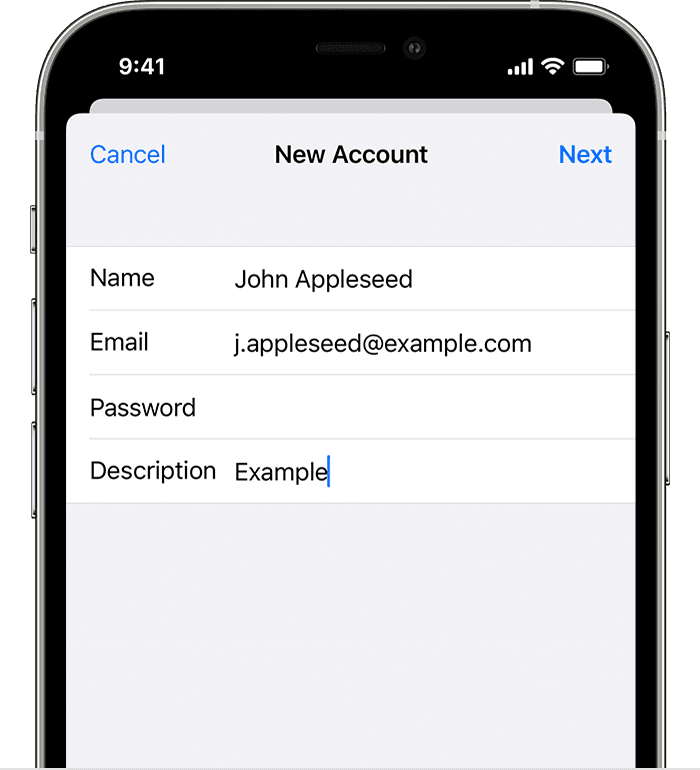
3. Enter your name, email address, password, and a description for your account.
4. Tap Next. Mail will try to find the email settings and finish your account setup. If Mail finds your email settings, tap Done to complete your account setup.
If Mail doesn't find your settings, enter account settings manually
If Mail can't find your email settings, then you need to enter them manually. Tap Next, then follow these steps:
1. Choose IMAP or POP for your new account. If you aren’t sure which one to choose, contact your email provider.
2. Enter the information for Incoming Mail Server and Outgoing Mail Server. Then tap Next. If you don't have this information, try to look it up.
3. If your email settings are correct, tap Save to finish. If the email settings are incorrect, you'll be asked to edit them.
If you still can't set up your email account or save your email settings, contact your email provider.
Kindest Regards.
Hi keneilwe85,
This typically happens if the Mail app is unable to confirm the information for your email account. If you're using the iPhone 5s on iOS 12 listed in your profile, contact your email provider to make sure their account will work with that iOS version. Otherwise, gather the details from your email provider and try to set it up manually. This may help if your provider requires different security protocols.
Add an email account to your iPhone, iPad, or iPod touch - Apple Support
How to set up your email account manually
If you need to set up your email account manually, make sure that you know the email settings for your account. If you don’t know them, you can look them up or contact your email provider. Then follow these steps:
1. Go to Settings > Mail, then tap Accounts.
2. Tap Add Account, tap Other, then tap Add Mail Account.
3. Enter your name, email address, password, and a description for your account.
4. Tap Next. Mail will try to find the email settings and finish your account setup. If Mail finds your email settings, tap Done to complete your account setup.
If Mail doesn't find your settings, enter account settings manually
If Mail can't find your email settings, then you need to enter them manually. Tap Next, then follow these steps:
1. Choose IMAP or POP for your new account. If you aren’t sure which one to choose, contact your email provider.
2. Enter the information for Incoming Mail Server and Outgoing Mail Server. Then tap Next. If you don't have this information, try to look it up.
3. If your email settings are correct, tap Save to finish. If the email settings are incorrect, you'll be asked to edit them.
If you still can't set up your email account or save your email settings, contact your email provider.
Kindest Regards.
Verifying email address