
Mini home pod says configure all the time and not responding
Has anyone else had this annoying problem it says it’s updating but it’s been 4 days. What should I do
Has anyone else had this annoying problem it says it’s updating but it’s been 4 days. What should I do
Hi willfrommi,
If your HomePod mini is not working properly, let's follow the guidance below:
"Check your Wi-Fi connection
HomePod and HomePod mini automatically connect to the same Wi-Fi network as your iPhone or iPad. To check your Wi-Fi signal strength:
 and scroll down to Wi-Fi Network. The Wi-Fi signal strength indicator
  appears next to your network name.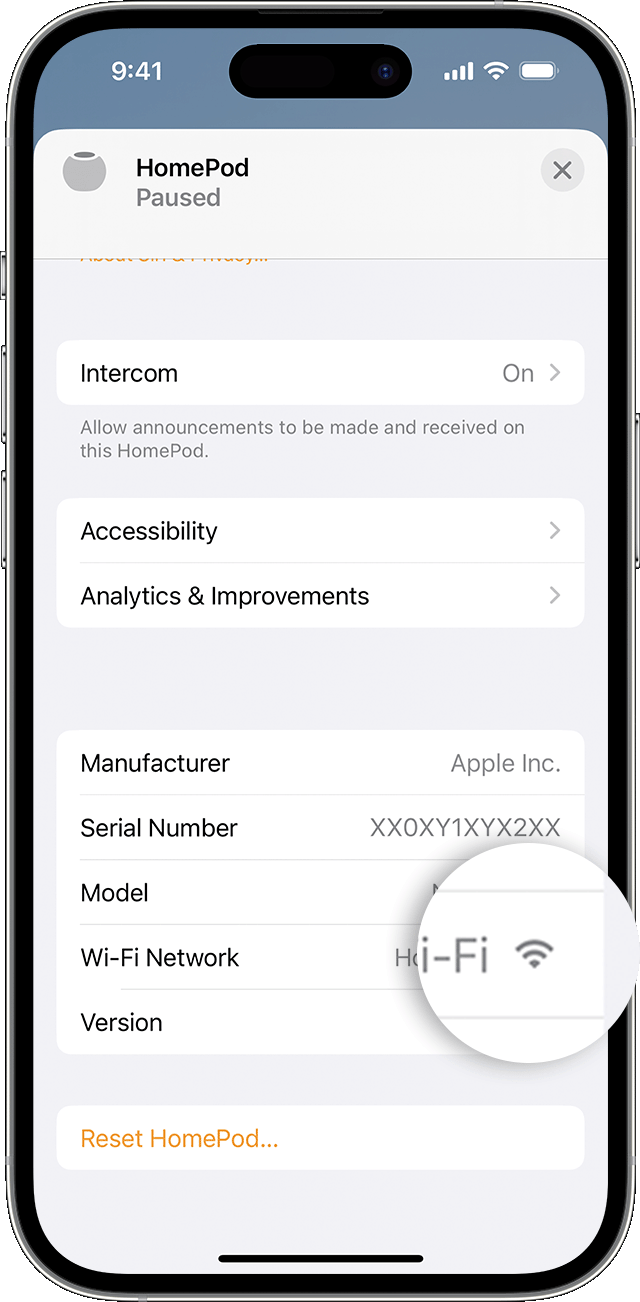
If the signal strength indicator shows two bars or fewer  , your Wi-Fi signal strength is weak. Try moving your HomePod speaker closer to your router and remove potential sources of wireless interference.
If the signal strength indicator shows an exclamation point  , learn what to do.
Learn what to do if Siri on your HomePod says it can't connect to the internet

HomePod and HomePod mini support captive portal Wi-Fi networks that require additional sign-in steps, for example, those provided by hotels or dorms. Use your iPhone or iPad to connect to the network, then follow the onscreen instructions for setup.
The Wi-Fi signal strength indicator isn't supported on HomePod speakers connected to networks that block peer-to-peer traffic, like some captive networks.

Restart HomePod or HomePod mini
and scroll down.If you don't see an option to restart your HomePod, unplug it from power, then plug it back in and try again.
If HomePod still doesn't respond, reset it.
If HomePod or HomePod mini still isn't responding
If you still have issues using HomePod, contact Apple Support.
"
If HomePod or HomePod mini isn't responding - Apple Support
Cheers.
Hi willfrommi,
If your HomePod mini is not working properly, let's follow the guidance below:
"Check your Wi-Fi connection
HomePod and HomePod mini automatically connect to the same Wi-Fi network as your iPhone or iPad. To check your Wi-Fi signal strength:
and scroll down to Wi-Fi Network. The Wi-Fi signal strength indicator appears next to your network name.If the signal strength indicator shows two bars or fewer , your Wi-Fi signal strength is weak. Try moving your HomePod speaker closer to your router and remove potential sources of wireless interference.
If the signal strength indicator shows an exclamation point , learn what to do.
Learn what to do if Siri on your HomePod says it can't connect to the internet
HomePod and HomePod mini support captive portal Wi-Fi networks that require additional sign-in steps, for example, those provided by hotels or dorms. Use your iPhone or iPad to connect to the network, then follow the onscreen instructions for setup.
The Wi-Fi signal strength indicator isn't supported on HomePod speakers connected to networks that block peer-to-peer traffic, like some captive networks.
Restart HomePod or HomePod mini
and scroll down.If you don't see an option to restart your HomePod, unplug it from power, then plug it back in and try again.
If HomePod still doesn't respond, reset it.
If HomePod or HomePod mini still isn't responding
If you still have issues using HomePod, contact Apple Support.
"
If HomePod or HomePod mini isn't responding - Apple Support
Cheers.
Mini home pod says configure all the time and not responding

