
I need tracking my AirPods I have the case but can’t find the AirPods
I need help tracking my AirPods I have the case but I cannot find the AirPods
AirPods Pro
I need help tracking my AirPods I have the case but I cannot find the AirPods
AirPods Pro
Hey there and welcome to Apple Support Communities Djj_,
We can certainly understand your concern and see you came to us from the article About firmware updates for AirPods.
We recommend checking out these steps for more information on how to locate your AirPods.
" Locate AirPods in Find My
You can use Find My on your iPhone, iPad, Apple Watch, or Mac to help you locate your AirPods if they’re lost. You can also find your AirPods on the web at iCloud.com/find.
Intro to using Find My with AirPods
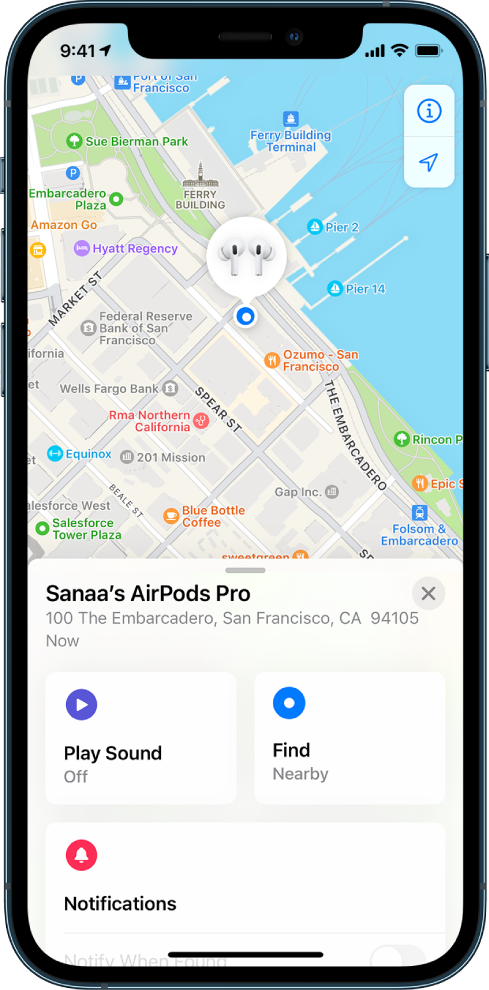
See the location of your AirPods on a map
You can see the current or last known location of your AirPods in the Find My app.
 , tap Devices, then tap your AirPods.
 , then tap your AirPods (requires a Wi-Fi or cellular connection)., click Devices, then select your AirPods.
For most AirPods models, when your AirPods are separated, you see the location of only one at a time. To find them both, first locate the one that you see on the map, put it back in its case, then refresh the map to locate the other one.
If you have AirPods Pro (2nd generation), you see the location of each of your AirPods and the charging case on the map."
For additional information, check out this link: Locate AirPods in Find My - Apple Support
These steps will help ensure your device is working with ease and can fix common issues like the ones you’re experiencing.
Kindest regards!
Hey there and welcome to Apple Support Communities Djj_,
We can certainly understand your concern and see you came to us from the article About firmware updates for AirPods.
We recommend checking out these steps for more information on how to locate your AirPods.
" Locate AirPods in Find My
You can use Find My on your iPhone, iPad, Apple Watch, or Mac to help you locate your AirPods if they’re lost. You can also find your AirPods on the web at iCloud.com/find.
Intro to using Find My with AirPods
See the location of your AirPods on a map
You can see the current or last known location of your AirPods in the Find My app.
, tap Devices, then tap your AirPods., then tap your AirPods (requires a Wi-Fi or cellular connection)., click Devices, then select your AirPods.For most AirPods models, when your AirPods are separated, you see the location of only one at a time. To find them both, first locate the one that you see on the map, put it back in its case, then refresh the map to locate the other one.
If you have AirPods Pro (2nd generation), you see the location of each of your AirPods and the charging case on the map."
For additional information, check out this link: Locate AirPods in Find My - Apple Support
These steps will help ensure your device is working with ease and can fix common issues like the ones you’re experiencing.
Kindest regards!
I need tracking my AirPods I have the case but can’t find the AirPods

