My Apple Watch SE is locked and keypad unresponsive
I have an Apple Watch SE - the watch is locked - I know my passcode - but the touchpad is unresponsive and I have been unsuccessful in trying to power off the watch. Any suggestions?
I have an Apple Watch SE - the watch is locked - I know my passcode - but the touchpad is unresponsive and I have been unsuccessful in trying to power off the watch. Any suggestions?
Thanks for reaching out tampabaytriathlete,
It sounds like your Apple Watch is unresponsive. We can help.
Let's see if it helps to Restart your Apple Watch:
How to restart your Apple Watch if you have watchOS 9
1. If your Apple Watch is charging, take it off the charger.
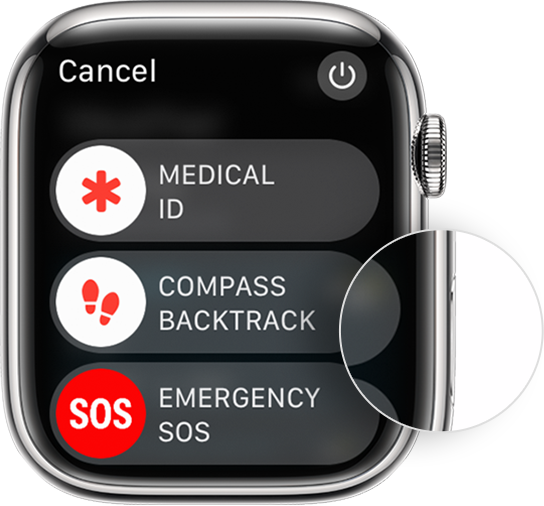
2. Press and hold the side button until you see the power buttonin the upper-right corner of the display.
3. Tap the power button.
4. Drag the Power Off slider.
5. After your watch turns off, press and hold the side button again until you see the Apple logo.
How to restart your Apple Watch if you have watchOS 8 or earlier
1. If your Apple Watch is charging, take it off the charger.
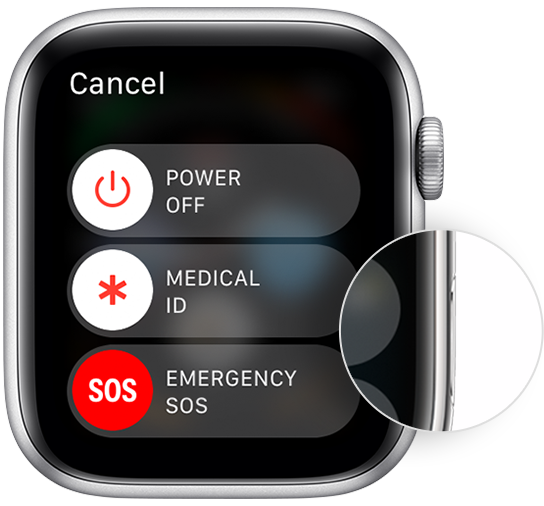
2. Press and hold the side button until you see the Power Off slider.
3. Drag the Power Off slider.
4. After your watch turns off, press and hold the side button again until you see the Apple logo.
Force restart your Apple Watch
You should force restart your Apple Watch as a last resort and only if it's not responding.
Don’t force restart your Apple Watch if you're updating watchOS. After you see the Apple logo and progress wheel, leave your watch alone and on its charger until the update finishes.
To force restart your Apple Watch, press and hold both the side button and Digital Crown for at least 10 seconds, then release both buttons when you see the Apple logo.
Hope that helps.
Take care.
Thanks for reaching out tampabaytriathlete,
It sounds like your Apple Watch is unresponsive. We can help.
Let's see if it helps to Restart your Apple Watch:
How to restart your Apple Watch if you have watchOS 9
1. If your Apple Watch is charging, take it off the charger.
2. Press and hold the side button until you see the power button
3. Tap the power button.
4. Drag the Power Off slider.
5. After your watch turns off, press and hold the side button again until you see the Apple logo.
How to restart your Apple Watch if you have watchOS 8 or earlier
1. If your Apple Watch is charging, take it off the charger.
2. Press and hold the side button until you see the Power Off slider.
3. Drag the Power Off slider.
4. After your watch turns off, press and hold the side button again until you see the Apple logo.
Force restart your Apple Watch
You should force restart your Apple Watch as a last resort and only if it's not responding.
Don’t force restart your Apple Watch if you're updating watchOS. After you see the Apple logo and progress wheel, leave your watch alone and on its charger until the update finishes.
To force restart your Apple Watch, press and hold both the side button and Digital Crown for at least 10 seconds, then release both buttons when you see the Apple logo.
Hope that helps.
Take care.
My Apple Watch SE is locked and keypad unresponsive