Not getting notifications on iPhone

Hello.


Yesterday night I noticed that I stopped receiving notifications no my iPhone. Even the red bubble number does not appear besides de app, only if I open the app (and then the system recognizes that I have a message or something and the number pops up).


Anyone with the same problem/ know how to solve it?


[Re-Titled by Moderator]

iPhone 11

Posted on May 11, 2023 4:54 AM

Reply
Question marked as Top-ranking reply

Posted on May 11, 2023 6:34 AM

Have you enabled Scheduled Summary?


Settings > Notifications > [Select the App that you are having trouble receiving immediate notifications]


See the pic below for a few examples. Please select immediate delivery.
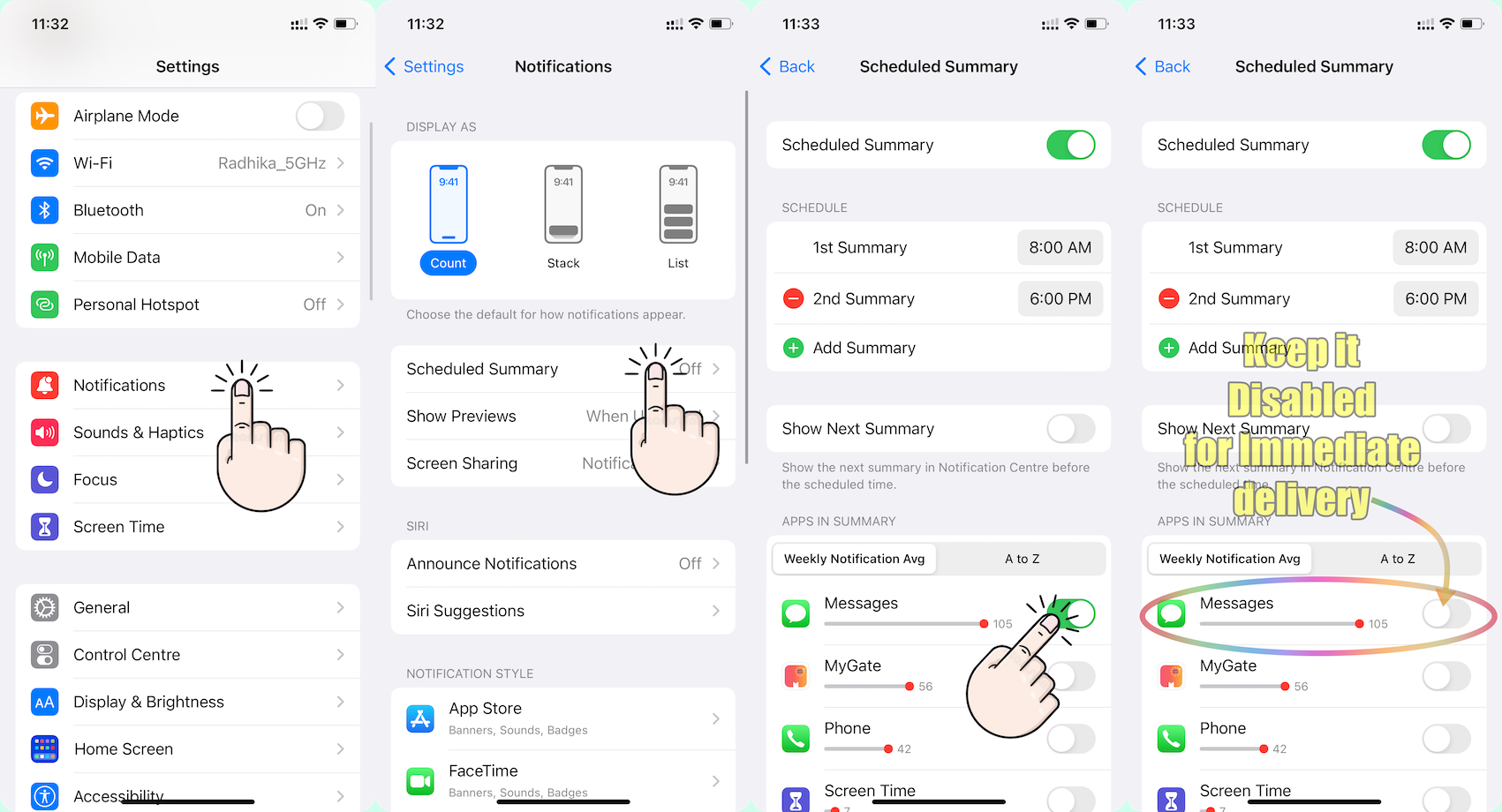


Go to Settings and tap Notifications. Select an app under Notification Style. Under Alerts, choose the alert style that you want. If you turn on Allow Notifications, choose when you want the notifications delivered — immediately or in the scheduled notification summary.


Use notifications on your iPhone, iPad, and iPod touch


Change notification settings on iPhone

  1. Go to Settings > Notifications.
  2. To schedule a notifications summary, tap Scheduled Summary, then turn on Scheduled Summary. ... 
  3. To choose when you want most notification previews to appear, tap Show Previews, select an option—Always, When Unlocked, or Never—then tap.

More items...


Change notification settings on iPhone - Apple Support (IN)


You can allow access to Notification Center on the Lock Screen. Go to Settings > Face ID & Passcode (on an iPhone with Face ID) or Touch ID & Passcode (on other iPhone models). Enter your passcode. Scroll down and turn on Notification Center (below Allow Access When Locked).


View and respond to notifications on iPhone - Apple Support (IN)


51 replies
Question marked as Top-ranking reply

May 11, 2023 6:34 AM in response to jonh6969

Have you enabled Scheduled Summary?


Settings > Notifications > [Select the App that you are having trouble receiving immediate notifications]


See the pic below for a few examples. Please select immediate delivery.



Go to Settings and tap Notifications. Select an app under Notification Style. Under Alerts, choose the alert style that you want. If you turn on Allow Notifications, choose when you want the notifications delivered — immediately or in the scheduled notification summary.


Use notifications on your iPhone, iPad, and iPod touch


Change notification settings on iPhone

  1. Go to Settings > Notifications.
  2. To schedule a notifications summary, tap Scheduled Summary, then turn on Scheduled Summary. ... 
  3. To choose when you want most notification previews to appear, tap Show Previews, select an option—Always, When Unlocked, or Never—then tap.

More items...


Change notification settings on iPhone - Apple Support (IN)


You can allow access to Notification Center on the Lock Screen. Go to Settings > Face ID & Passcode (on an iPhone with Face ID) or Touch ID & Passcode (on other iPhone models). Enter your passcode. Scroll down and turn on Notification Center (below Allow Access When Locked).


View and respond to notifications on iPhone - Apple Support (IN)


Oct 29, 2023 8:28 AM in response to jonh6969

I had a similar problem with my iphone. I was not getting alerts, even after doing all the usual troubleshooting. Discovered it was a Siri setting interfering with things. I had to turn off Siri announcements. Settings > Siri & Search > Announce Notifications: Turn this off. Siri never announced anything for me and prevented me from getting my alerts

Dec 13, 2023 10:56 AM in response to jonh6969

I had this same issue for weeks and literally just found a solution. It turns out that my Mac had "Do Not Disturbed" turned on, and upon looking into it further, it was affecting my phone also. So even though my iPhone was not showing that "Do Not Disturbed" was turned on, because it was turned onto my Mac which is synced with my phone, it was affecting how my phone operated. I've turned off the "Do Not Disturb" on my Mac and it solved the problem.

Jan 2, 2024 2:25 AM in response to jonh6969

My notifications in Gmail and messages weren’t showing (ie no numbers over the app icons)

Never knew when I had a message or email.


Fixed it.


Go to Focus (slide finger from upper right to lower left.

Click on Settings

Under Do Not Disturb there’s an Apps box

where you can add an app.

Mine was empty/blank.

I added both my Gmail and Messages apps and my notifications finally started showing up. Good luck


This thread has been closed by the system or the community team. You may vote for any posts you find helpful, or search the Community for additional answers.

Not getting notifications on iPhone

Welcome to Apple Support Community
A forum where Apple customers help each other with their products. Get started with your Apple Account.
