
My number is registered to my Apple ID but it is not associated with my iPhone
What does this mean?
[Edited by Moderator]
What does this mean?
[Edited by Moderator]
Hello Grammy2five5,
Welcome to Apple Support Communities.
We understand that you want to add your phone number to iMessage. We are happy to help.
These steps may help. Please try these steps: Add or remove your phone number in Messages or FaceTime - Apple Support
"Set up your phone number
On your iPhone:
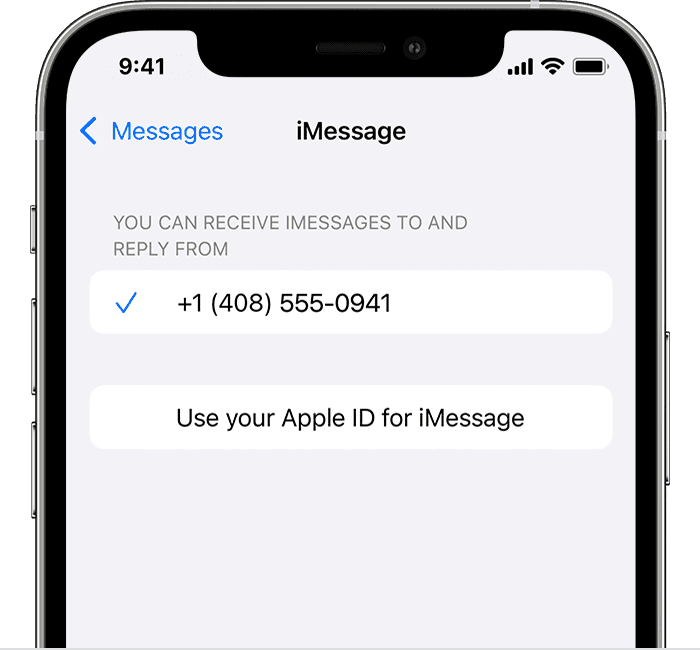
3. In the "You can receive iMessages to and Reply From" section, make sure that your phone number and Apple ID are selected.
4. Go to Settings > FaceTime and make sure that your phone number and Apple ID are selected in the "You can be reached by FaceTime at" section.
On your other devices, you can now turn on the phone number that you just set up:
Let us know if you have further questions.
Take care.
Hello Grammy2five5,
Welcome to Apple Support Communities.
We understand that you want to add your phone number to iMessage. We are happy to help.
These steps may help. Please try these steps: Add or remove your phone number in Messages or FaceTime - Apple Support
"Set up your phone number
On your iPhone:
3. In the "You can receive iMessages to and Reply From" section, make sure that your phone number and Apple ID are selected.
4. Go to Settings > FaceTime and make sure that your phone number and Apple ID are selected in the "You can be reached by FaceTime at" section.
On your other devices, you can now turn on the phone number that you just set up:
Let us know if you have further questions.
Take care.
Thank you.....I followed the above directions. I appreciate your assistance.
Grammy2five5,
We're glad to hear that those steps were able to be of assistance for you! Thanks for keeping us posted.
Cheers.
My number is registered to my Apple ID but it is not associated with my iPhone


