Safari is blocking something I need to see. Is says to disable pop up blocker. I can't figure out how to do this. I used to have an icon that I could use. It has disappeared. Help please.

Safari is blocking something I need to see. Is says to disable pop up blocker. I can't figure out how to do this. I used to have an icon that I could use. It has disappeared. Help please.


iMac 27″, macOS 10.13

Posted on May 12, 2023 6:24 AM

Reply
Question marked as Top-ranking reply

Posted on May 15, 2023 11:44 AM

Hi tllang,


Thanks for using Apple Support Communities. We understand you have some questions regarding pop-ups, and we're happy to help. You can see how to allow pop-ups in Safari here:


1. In the Safari app  on your Mac, go to the website.
2. Choose Safari > Settings, then click Websites.
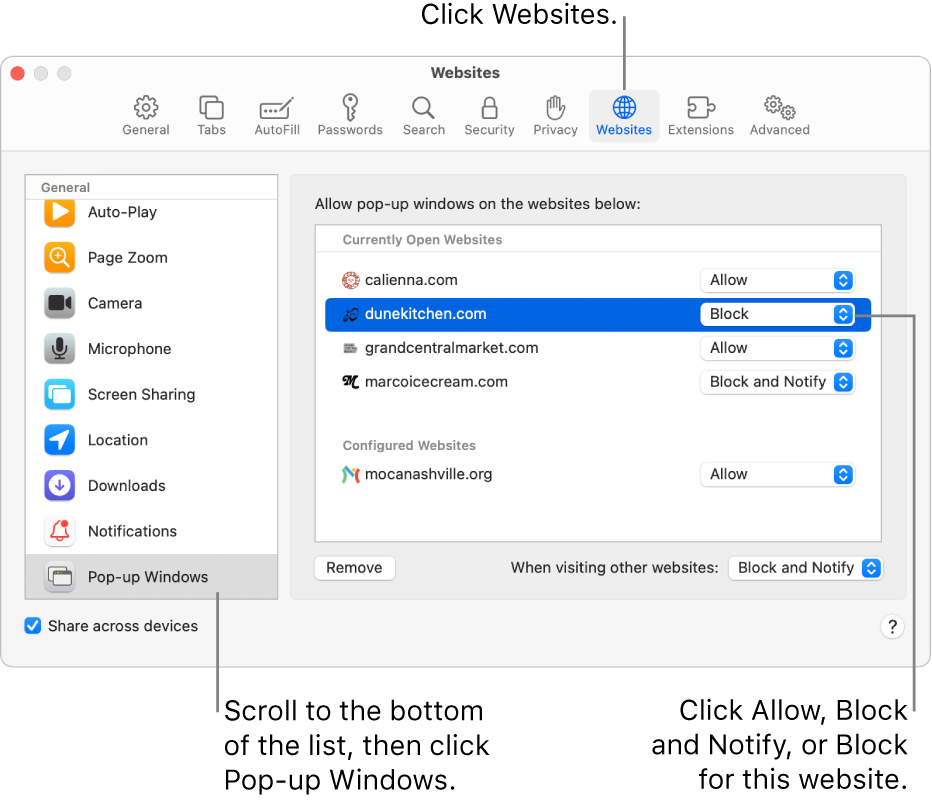
3. Safari settings for websites, with Pop-up Windows selected at the bottom of the sidebar, and a currently open website selected.
4. Click Pop-up Windows on the left.
5. If you don’t see Pop-up Windows, be sure to scroll to the bottom of the list.
6. In the pop-up menu for the website, choose one of the following:
* Allow: Pop-ups for the website appear.

See more about those steps here: Allow or block pop-ups in Safari on Mac


Thanks.


1 reply
Question marked as Top-ranking reply

May 15, 2023 11:44 AM in response to tllang

Hi tllang,


Thanks for using Apple Support Communities. We understand you have some questions regarding pop-ups, and we're happy to help. You can see how to allow pop-ups in Safari here:


1. In the Safari app  on your Mac, go to the website.
2. Choose Safari > Settings, then click Websites.
3. Safari settings for websites, with Pop-up Windows selected at the bottom of the sidebar, and a currently open website selected.
4. Click Pop-up Windows on the left.
5. If you don’t see Pop-up Windows, be sure to scroll to the bottom of the list.
6. In the pop-up menu for the website, choose one of the following:
* Allow: Pop-ups for the website appear.

See more about those steps here: Allow or block pop-ups in Safari on Mac


Thanks.


This thread has been closed by the system or the community team. You may vote for any posts you find helpful, or search the Community for additional answers.

Safari is blocking something I need to see. Is says to disable pop up blocker. I can't figure out how to do this. I used to have an icon that I could use. It has disappeared. Help please.

Welcome to Apple Support Community
A forum where Apple customers help each other with their products. Get started with your Apple Account.