Music.apple.com limits number of songs to playback on large playlists

I have a playlist with ~600 songs, organized alphabetically by artist name. No problem shuffling playlist on iPhone, but on PC web browser at music.apple.com the playlist only plays first ~100 songs. Only artists with names starting A,B, C play on shuffle.


Any way to shuffle from the whole playlist which has > 100 songs, when on music.apple.com?

Posted on May 12, 2023 7:25 AM

Reply
3 replies

May 15, 2023 12:35 PM in response to JJJJRRR

Greetings JJJJRRR,


When shuffling music at the Apple Music website, you can shuffle specific playlists or albums. Here's how to complete this:


You can shuffle all songs and albums in your library (play them in random order) or just shuffle a playlist or album. You can also repeat individual songs, playlists, or albums.
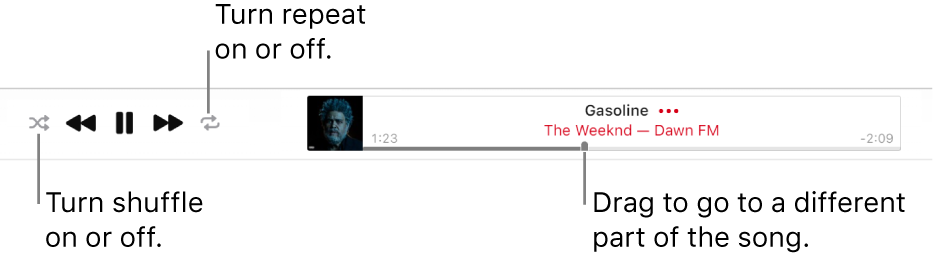
The top of Apple Music with a song playing. The playback controls are at the far left. The Shuffle button is to the left of the playback controls and the Repeat button is to the right of the controls. Drag the playhead to go to a different part of the song.
1. At music.apple.com , do any of the following to play music:

Stream recommended songs from Apple Music
Play songs from your library

Note: A song needs to be playing before you can use shuffle or repeat.

2. Do any of the following:
Turn shuffle on: Click the Shuffle button 
• When shuffle is on, the button changes color and songs play in random order.
Repeat all songs in the current view (for example, a playlist): Click the Repeat button . Repeat is on when the button changes color.
Repeat the currently playing song: Click the Repeat button until the number 1 appears .
• Turn repeat off: Click the Repeat button until the button changes color.


This information is from Shuffle or repeat songs in Apple Music on the web - Apple Support.


Sincerely.


May 19, 2023 12:05 PM in response to 1ssmith

Let me try to clarify.


The shuffle function works on music.apple.com for playlists.


However, when the playlist is >100 songs it will ONLY includes the first ~100 songs.


Question:

Is there a way to listen to songs 200-600 when playing a larger playlist (ex. 600 song playlist)? Music.apple.com will not let me listen to any songs beyond song #100!


I noticed all the official Apple playlists are about 100 songs or less. Maybe this restriction is one of the reasons?


Thanks

This thread has been closed by the system or the community team. You may vote for any posts you find helpful, or search the Community for additional answers.

Music.apple.com limits number of songs to playback on large playlists

Welcome to Apple Support Community
A forum where Apple customers help each other with their products. Get started with your Apple Account.