Does not give me the option to reject the call on my iPhone

I phone 13

When I get an incoming call, it does not give me the option to reject the call. It’s an answer only option or I go to the on and off switch and press it.


[Re-Titled by Moderator]

iPhone 13

Posted on May 15, 2023 6:45 AM

Reply
Question marked as Top-ranking reply

Posted on May 17, 2023 11:46 AM

Hi ndunia39,


We would love to help with the issue you're having, to see if we can get it resolved for you. First, we recommend checking to see if any iOS updates are available for your device, and installing any available updates.


Update your iPhone or iPad - Apple Support


If your device is updates, let's make sure you're seeing the options to decline a call as they should be on your device.


"Decline a call and send it directly to voicemail


Do one of the following:

  • Press the side button twice quickly.
  • Tap the Decline Call button.
  • Swipe up on the call banner.

You can also swipe down on the call banner for more options."
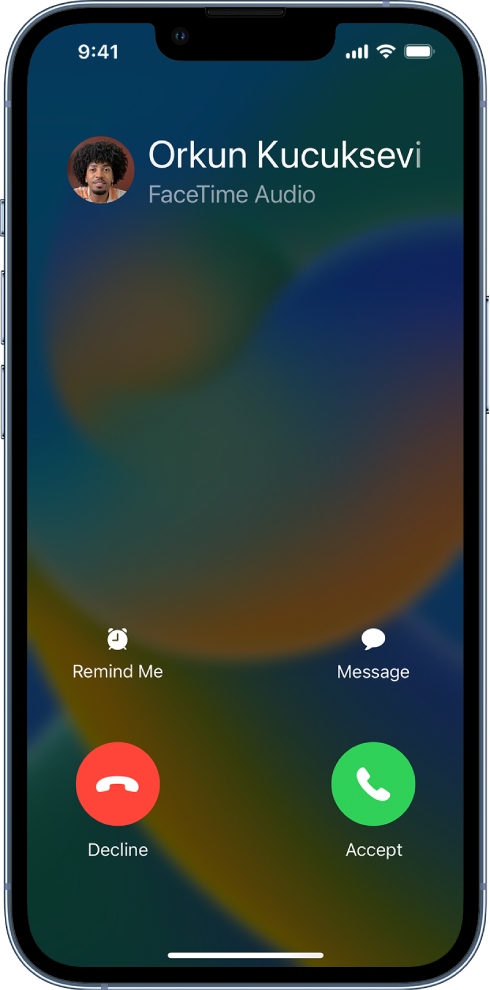
A screen showing a notification of an incoming call at the top. The Decline and Accept buttons are at the top right.


Reference: Answer or decline incoming calls on iPhone - Apple Support


If you do not see the option to decline a call, please reply and let us know what the options you're seeing for an incoming call show as on your device. We'll be glad to assist further!


Cheers!


2 replies
Question marked as Top-ranking reply

May 17, 2023 11:46 AM in response to dunia39

Hi ndunia39,


We would love to help with the issue you're having, to see if we can get it resolved for you. First, we recommend checking to see if any iOS updates are available for your device, and installing any available updates.


Update your iPhone or iPad - Apple Support


If your device is updates, let's make sure you're seeing the options to decline a call as they should be on your device.


"Decline a call and send it directly to voicemail


Do one of the following:

  • Press the side button twice quickly.
  • Tap the Decline Call button.
  • Swipe up on the call banner.

You can also swipe down on the call banner for more options."

A screen showing a notification of an incoming call at the top. The Decline and Accept buttons are at the top right.


Reference: Answer or decline incoming calls on iPhone - Apple Support


If you do not see the option to decline a call, please reply and let us know what the options you're seeing for an incoming call show as on your device. We'll be glad to assist further!


Cheers!


This thread has been closed by the system or the community team. You may vote for any posts you find helpful, or search the Community for additional answers.

Does not give me the option to reject the call on my iPhone

Welcome to Apple Support Community
A forum where Apple customers help each other with their products. Get started with your Apple Account.