Synch iPhone 11
How do you synch an iPhone 11 with a laptop with Outlook 2013
Windows, Windows 10
How do you synch an iPhone 11 with a laptop with Outlook 2013
Windows, Windows 10
Hi LeeLRobert,
We see you've referenced Sync your iPhone, iPad, or iPod using your computer which links you to syncing with Finder and syncing with iTunes. On your PC, you can connect your iPhone and sync with iTunes. Here's how to do this:
1. Connect your device to your computer.
You can connect your device using a USB or USB-C cable or a Wi-Fi connection. To turn on Wi-Fi syncing, see Sync iTunes content on PC with devices on Wi-Fi.
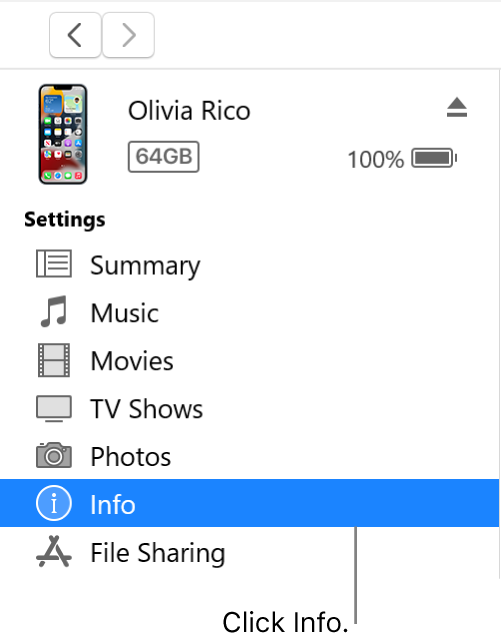
2. In the iTunes appon your PC, click the Device button near the top left of the iTunes window.
3. Click Info.
4. Select the items you want to sync.
5. Click Apply.
This information is from this article Sync app info from your PC to devices with iTunes - Apple Support.
Take care.
The solution was to delete all the Contact accounts on my iPhone and then only add back one for Outlook and one for my email account (Earthlink).
FYI: Outlook 2013 is no longer supported by Microsoft.
Synch iPhone 11