Iphone Passcode Issue
6 hours back the passcode of my iphone 13 pro max was working fine but suddenly now it stopped working. I am entering correct passcode as I've been using the same for years.
It's so wierd.
iPhone 13 Pro Max, iOS 16
The Apple Support Community will permanently close on November 20, 2026. Starting today, the site will no longer accept new posts and is available in a read-only state.
You can continue to find trusted guidance and support on the official Apple Support site.
We want to thank the community members who have contributed their time and expertise to help others with their Apple products.
The Apple Support Community will permanently close on November 20, 2026. Starting today, the site will no longer accept new posts and is available in a read-only state.
You can continue to find trusted guidance and support on the official Apple Support site.
We want to thank the community members who have contributed their time and expertise to help others with their Apple products.
6 hours back the passcode of my iphone 13 pro max was working fine but suddenly now it stopped working. I am entering correct passcode as I've been using the same for years.
It's so wierd.
iPhone 13 Pro Max, iOS 16
Hello suleman_tahir,
You'll want to use the steps below to restart your iPhone:
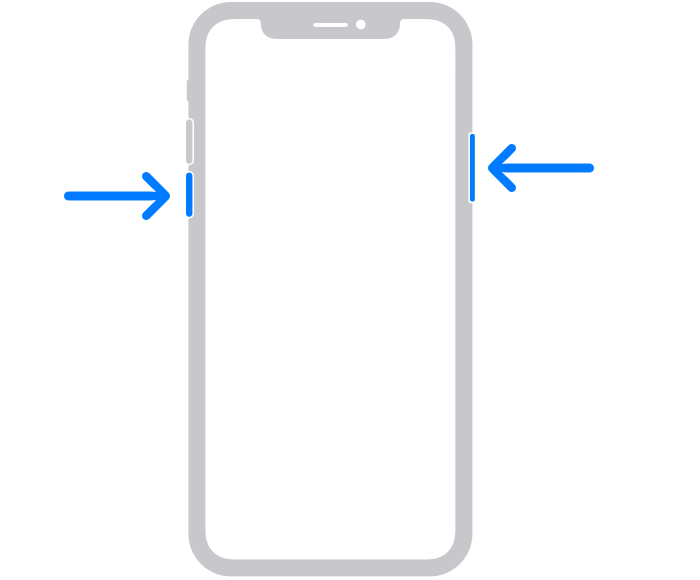
1. Press and hold either volume button and the side button until the power-off slider appears.
2. Drag the slider, then wait 30 seconds for your device to turn off. If your device is frozen or unresponsive, force restart your device.
3. To turn your device back on, press and hold the side button (on the right side of your iPhone) until you see the Apple logo.
You can also find those steps in this resource: Restart your iPhone - Apple Support Restarting can sometimes help address odd behaviors.
Should that still persist, you'll want to reach out to Apple Support: Apple Support They'll be in the best position to look into this further.
Take care.
Hello suleman_tahir,
You'll want to use the steps below to restart your iPhone:
1. Press and hold either volume button and the side button until the power-off slider appears.
2. Drag the slider, then wait 30 seconds for your device to turn off. If your device is frozen or unresponsive, force restart your device.
3. To turn your device back on, press and hold the side button (on the right side of your iPhone) until you see the Apple logo.
You can also find those steps in this resource: Restart your iPhone - Apple Support Restarting can sometimes help address odd behaviors.
Should that still persist, you'll want to reach out to Apple Support: Apple Support They'll be in the best position to look into this further.
Take care.
Iphone Passcode Issue