Nobody will be deliberately stopping you from accessing your saved documents - but some technical issue may be preventing something from working as it should.
Unfortunately there is too little information to attribute a specific cause to your difficulties. If you iPad is not behaving as expected, try a forced-restart - as this will often clear an isolated software issue:
Force restart iPad (models with Face ID or with Touch ID in the top button)
If your iPad doesn’t have the Home button, do the following:
- Press and quickly release the volume button nearest to the top button.
- Press and quickly release the volume button farthest from the top button.
- Press and hold the top button.
- When the Apple logo appears, release the top button.

Force restart iPad (models with the Home button)
Press and hold the top button and the Home button at the same time. When the Apple logo appears, release both buttons.
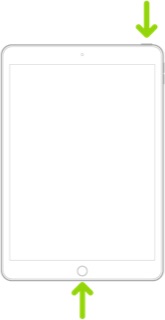
If the problem persists, ensure that you have updated your iPad to the most recent supported version of iPadOS - at the time of writing, for supported models, this being iPadOS 16.4.1(a) - or for some older models, iPadOS 15.7.5.
If you need additional help, please post details of your iPad model and the installed version of iOS/iPadOS. You can find this information in iPad settings:
Settings > General > About
Similarly, some additional information about the problem will help others to understand what might be occurring - and have some opportunity to offer advice specific to your issue. This user tip, authored by one of the senior contributors, may help you to describe the problem:
Writing an effective Apple Support Commun… - Apple Community

