External drive dialog box disappears

When connecting an external drive/SD card/USB thumb drive, the dialog box asking to trust connection pops up for a very quick flash then disappears preventing the drives from being mounted.


Is there any way to fix this, or to disable the security step and have all drives mount without approval?


Thanks

MacBook Pro 15″, macOS 10.13

Posted on May 18, 2023 2:54 AM

Reply
Question marked as Top-ranking reply

Posted on Aug 16, 2023 4:13 PM

I agree P. Phillips' responses were less than helpful, however, the link does give a hint to a solution that worked for me.

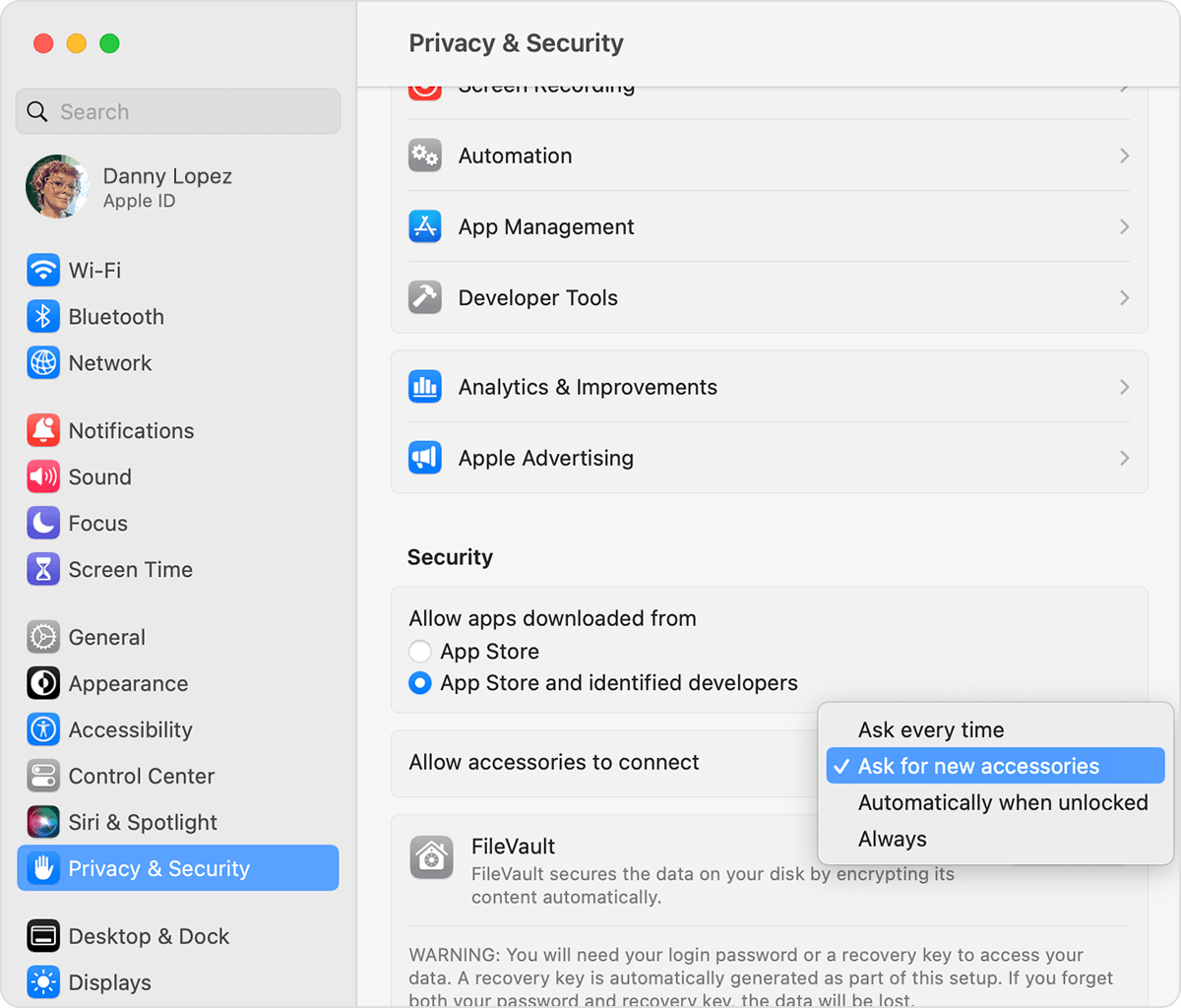
I too was having the issue where it would flash for a second and then disappear. While I'm not sure how to fix that issue, I was able to workaround the issue and access the drive by going to System Settings -> Privacy and changing the "Allow Accessories to Connect" from "Ask For New Accessories" (which I think is the default) to "Automatically When Unlocked". This did allow my SD card to mount so I could access it. You could always revert back if you're concerned with security.

Hope this helps Mike and Lewis!

Similar questions

20 replies
Question marked as Top-ranking reply

Aug 16, 2023 4:13 PM in response to mikeisgoingcrazy

I agree P. Phillips' responses were less than helpful, however, the link does give a hint to a solution that worked for me.

I too was having the issue where it would flash for a second and then disappear. While I'm not sure how to fix that issue, I was able to workaround the issue and access the drive by going to System Settings -> Privacy and changing the "Allow Accessories to Connect" from "Ask For New Accessories" (which I think is the default) to "Automatically When Unlocked". This did allow my SD card to mount so I could access it. You could always revert back if you're concerned with security.

Hope this helps Mike and Lewis!

Aug 17, 2023 1:47 AM in response to mikeisgoingcrazy

Excerpt from previously supplied link


Change the setting for allowing accessories to connect

By default, your Mac laptop with Apple silicon asks that you allow a new or unknown accessory to connect. To change this setting:

  1. Choose the Apple menu  > System Settings.
  2. Click Privacy & Security.
  3. Scroll down and click the pop-up menu next to "Allow accessories to connect," then choose which option you want. Learn more about the options.

Aug 15, 2023 11:18 AM in response to Owl-53

I think you may be misunderstanding the issue. There is a system glitch where the dialog to allow an external device to connect pops up for just a fraction of a second which makes it impossible to respond or hit 'allow'. Then it disappears and the external drive will not mount. This is also happening on my Time Machine drive that ive used for years without issue. It only started becoming an issue a couple months ago.

This thread has been closed by the system or the community team. You may vote for any posts you find helpful, or search the Community for additional answers.

External drive dialog box disappears

Welcome to Apple Support Community
A forum where Apple customers help each other with their products. Get started with your Apple Account.