Timelapse not saving videos

I am trying to record videos from time lapse but my iphone 14 is not saving them to the gallery. I have tried restarting my phone and my phone has enough storage but still i am not able to save the video.


iPhone 14, iOS 16

Posted on May 20, 2023 6:42 AM

Reply
Question marked as Top-ranking reply

Posted on May 22, 2023 12:39 PM

Hi pranjalbhadu,


It sounds like you are having issues with saving time-lapse video. We know how important this is for you, and we will help get you to the right place for answers. Did you confirm that it was device storage and not iCloud storage that you had enough of? Videos need device storage to save to the iPhone.

Check to see how much storage you have
See how much storage you have left on your device and in iCloud, and which apps use the most space.
Device storage
1. Go to Settings.
2. Tap General.
3. Tap [device] Storage.
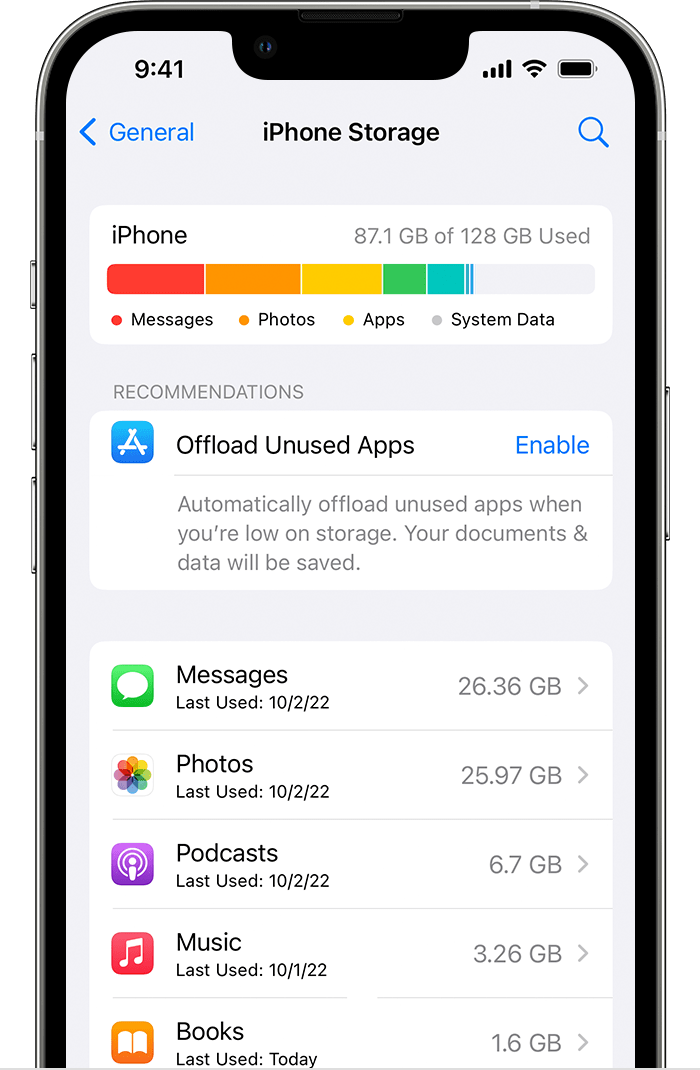
You might see recommendations for optimizing your storage, a list of your apps, and the amount of space that each one uses.

iCloud storage
1. Go to Settings.
2. Tap your name.
3. Tap iCloud.
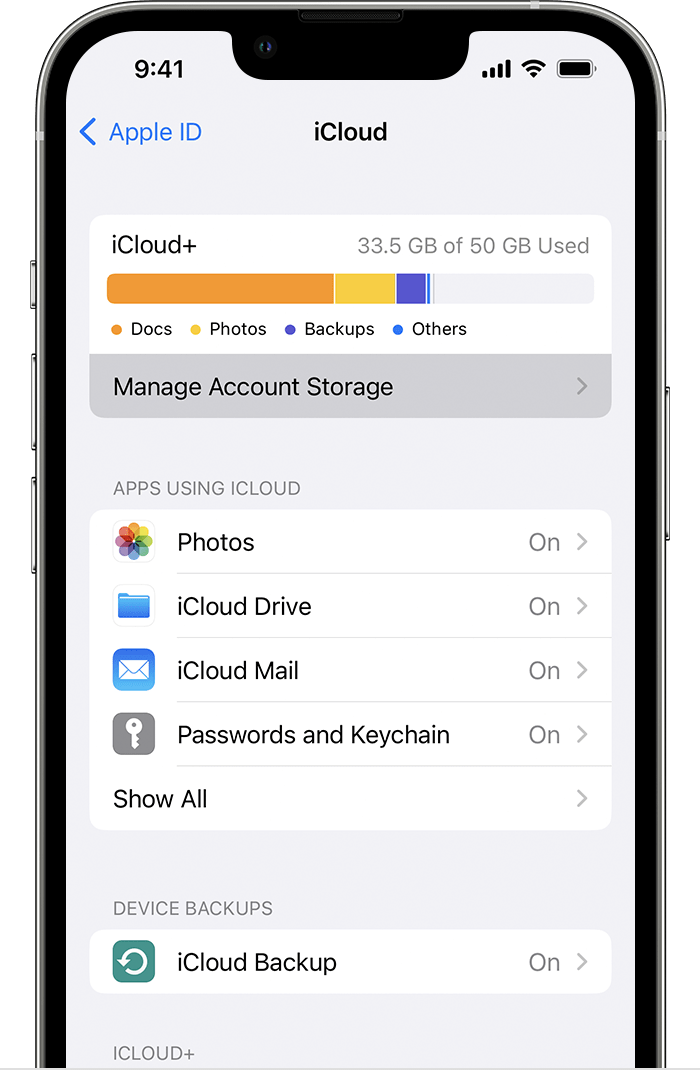
You see how much space you have left in iCloud and if you need to upgrade your storage plan. Tap Manage Account Storage to see how apps are using your storage. 

This info is located in this support article:

Manage your photo and video storage - Apple Support


If you do have enough device storage, then please make sure your device is running the latest iOS version 16.5. Then test it to see if the issue has been resolved.


As with any update, it's always a good idea to create a backup beforehand:

How to back up your iPhone, iPad, and iPod touch - Apple Support


How to Update your iPhone, iPad, or iPod touch:

Update your iPhone or iPad - Apple Support


All the best!


2 replies
Question marked as Top-ranking reply

May 22, 2023 12:39 PM in response to pranjalbhadu

Hi pranjalbhadu,


It sounds like you are having issues with saving time-lapse video. We know how important this is for you, and we will help get you to the right place for answers. Did you confirm that it was device storage and not iCloud storage that you had enough of? Videos need device storage to save to the iPhone.

Check to see how much storage you have
See how much storage you have left on your device and in iCloud, and which apps use the most space.
Device storage
1. Go to Settings.
2. Tap General.
3. Tap [device] Storage.
You might see recommendations for optimizing your storage, a list of your apps, and the amount of space that each one uses.

iCloud storage
1. Go to Settings.
2. Tap your name.
3. Tap iCloud.
You see how much space you have left in iCloud and if you need to upgrade your storage plan. Tap Manage Account Storage to see how apps are using your storage. 

This info is located in this support article:

Manage your photo and video storage - Apple Support


If you do have enough device storage, then please make sure your device is running the latest iOS version 16.5. Then test it to see if the issue has been resolved.


As with any update, it's always a good idea to create a backup beforehand:

How to back up your iPhone, iPad, and iPod touch - Apple Support


How to Update your iPhone, iPad, or iPod touch:

Update your iPhone or iPad - Apple Support


All the best!


This thread has been closed by the system or the community team. You may vote for any posts you find helpful, or search the Community for additional answers.

Timelapse not saving videos

Welcome to Apple Support Community
A forum where Apple customers help each other with their products. Get started with your Apple Account.