Music or radio app reopening after it’s been closed!

If I’ve been using Airpods to listen to the radio while walking then remove them and close the radio app, if I get into my car which auto syncs with my phone, the app will resume playing in the background(not audible) and is then using my mobile data. How is this possible when the app is closed and mobile data is turned off?


iPhone 12 mini, iOS 16

Posted on May 20, 2023 7:58 AM

Reply

Similar questions

3 replies

May 22, 2023 11:25 PM in response to Brittany1416

I assume it does connect through CarPlay. I have a Fiesta which connects the phone on SYNC via Bluetooth. As for times it connects, it’s difficult to remember. What I do know is that when I’ve put my airpods in their case after using BBC Sounds for example on mobile data, I swipe up to close the app. A widget appears in the control centre showing BBC sounds player. It’s so difficult to explain as I don’t think about it until I pick my phone up and it’s already showing the app playing yet no sound anywhere. I can’t be sure it’s using mobile data but if I’m in the car, and it’s playing it must be using mobile data as they’ll be no wifi when I’m driving. Plus I’m having texts to remind me I’ve nearly used all my data which is unusual as I only use the data for listening to radio/ podcasts when walking (around 30 mins a day) I don’t want to switch mobile data off as I do want to use it when walking . I’ll try and remember the circumstances the next time it happens.

Brittany1416 wrote:

Hello Calebrachoa,

To help us get a better understanding of the issue, we’d like to ask a few questions.

1. Is your iPhone connecting to your car though CarPlay?
2. Does this only happen when your device connects to your car, or does it happen at other times as well?
3. How are you confirming those apps are using mobile data? Are you using the process outlined in the "View how much data you're using" part of this link? Use cellular data on your iPhone or iPad


View how much data you're using 

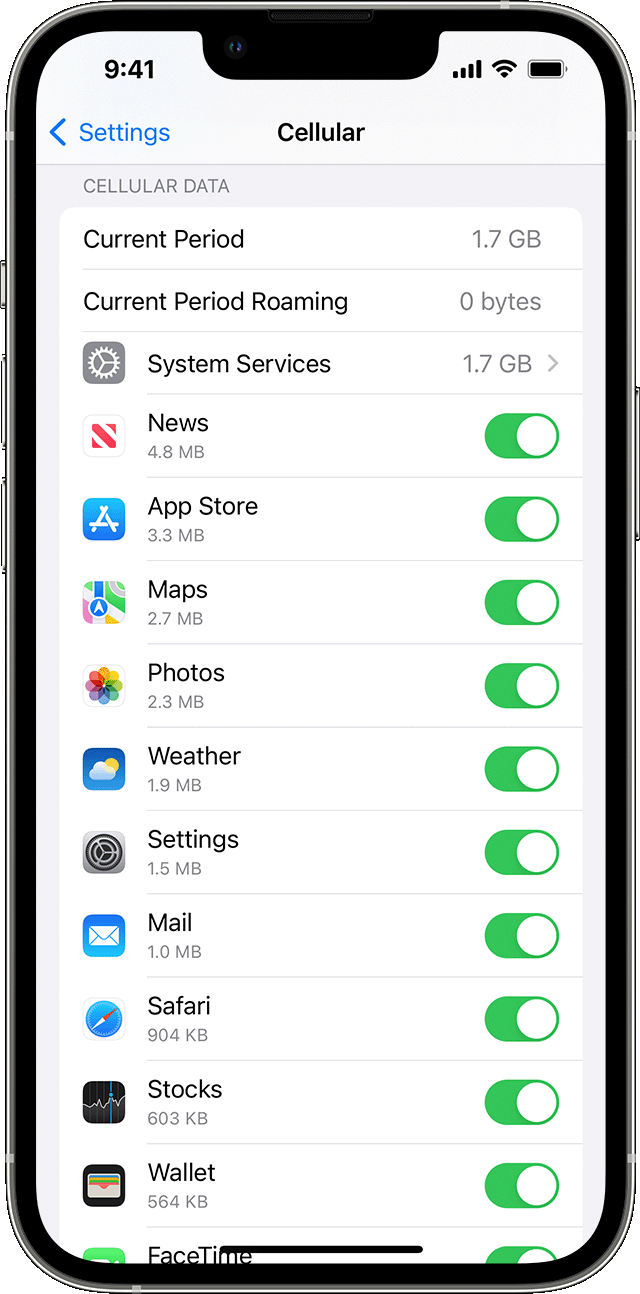
To see how much cellular data you've used, go to Settings > Cellular or Settings > Mobile Data. If you're using an iPad, you might see Settings > Cellular Data instead.


https://support.apple.com/library/content/dam/edam/applecare/images/en_US/iOS/ios-16-iphone-13-pro-settings-cellular-cellular-data-info.png
 

* Scroll down to find which apps are using cellular data. If you don't want an app to use cellular data, you can turn it off for that app. When cellular data is off, apps will use only Wi-Fi for data.
* To see the cellular data usage for individual System Services, go to Settings > Cellular or Settings > Mobile Data. Then tap System Services, in the list under Cellular Data. Cellular data can't be turned on or off for individual System Services.
* You can view the data-usage statistics for an app from a current period, or view app data statistics for apps that use data when you were roaming. To reset these statistics, go to Settings > Cellular or Settings > Mobile Data, and tap Reset Statistics.
* When you’re using an iPhone with Dual SIM, you can see how much cellular data you’ve used with your selected


May 22, 2023 1:26 PM in response to Calebrachoa

Hello Calebrachoa,


To help us get a better understanding of the issue, we’d like to ask a few questions.


1. Is your iPhone connecting to your car though CarPlay?

2. Does this only happen when your device connects to your car, or does it happen at other times as well?

3. How are you confirming those apps are using mobile data? Are you using the process outlined in the "View how much data you're using" part of this link? Use cellular data on your iPhone or iPad


View how much data you're using 

To see how much cellular data you've used, go to Settings > Cellular or Settings > Mobile Data. If you're using an iPad, you might see Settings > Cellular Data instead.

An iPhone screen showing cellular data usage 

* Scroll down to find which apps are using cellular data. If you don't want an app to use cellular data, you can turn it off for that app. When cellular data is off, apps will use only Wi-Fi for data.
* To see the cellular data usage for individual System Services, go to Settings > Cellular or Settings > Mobile Data. Then tap System Services, in the list under Cellular Data. Cellular data can't be turned on or off for individual System Services.
* You can view the data-usage statistics for an app from a current period, or view app data statistics for apps that use data when you were roaming. To reset these statistics, go to Settings > Cellular or Settings > Mobile Data, and tap Reset Statistics.
* When you’re using an iPhone with Dual SIM, you can see how much cellular data you’ve used with your selected cellular data number.
To get the most accurate cellular data usage from a current period, contact your carrier.


The above details will help us plan how to proceed.


Thanks!

May 23, 2023 7:12 AM in response to Calebrachoa

Hey Calebrachoa,


Thanks for those details, however if you're not absolutely certain this app is using mobile data unexpectedly, please use the steps provided in our last response in order to determine with certainty if this is the case. We don't want to make assumptions while troubleshooting.


Also, you'll know if you're using CarPlay because the CarPlay system will appear on your car's display, instead of the built in OS from the manufacturer, it also does look like the 2017 - 2019 Fiesta supports CarPlay as outlined here: iOS - CarPlay - Available Models - Apple


Next, you mentioned mobile data being off, so to clarify, are you saying that you go to Settings > Cellular and turn off cellular data for this app prior to getting in the car?


Keep us posted on the results after using the steps in our previous response to determine with certainty that mobile data is being used by this app while it's not in use. Also, if the issue is isolated only to this particular app, make sure it's updated. If it is, try reinstalling the app and testing further.


Take care!


This thread has been closed by the system or the community team. You may vote for any posts you find helpful, or search the Community for additional answers.

Music or radio app reopening after it’s been closed!

Welcome to Apple Support Community
A forum where Apple customers help each other with their products. Get started with your Apple Account.