ANC on AirPods Pro 2 downgraded

How come that Apple releases updates that worsen their products?

I just replaced my old AirPods Pro 2 for new ones, as ANC was just disappointing. Clearly there was some damage. Got a replacement, which made me enjoy the silence on a full train again.

Joy didn’t last for long, and after short time (and update) I again hear everything around me. The sound of little movements from people around me get through my music easily. The ANC on the AirPods 1 got worse after an update, too. Does Apple actively reduce quality of their products, so that people are inclined to buy the next one? **** shame.

AirPods Pro (2nd generation)

Posted on May 30, 2023 2:28 AM

Reply
Question marked as Top-ranking reply

Posted on May 31, 2023 10:51 AM

Hi gino__,


If the Active Noise Cancellation has degraded, it may just be that the AirPods need to be cleaned, as the increase in background sounds is a symptom as shown here:

If Active Noise Cancellation isn't working as expected on your AirPods Pro - Apple Support

1. Make sure that you have the latest software on your connected iPhone, iPad, iPod touch, or Mac.
2. Put both AirPods Pro in your ears and check that Active Noise Cancellation (ANC) is turned on.
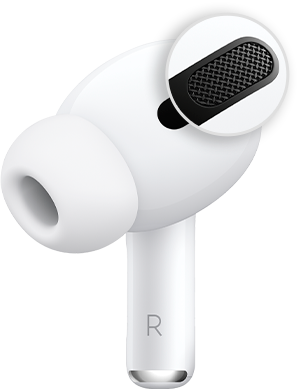
3. Clean the mesh located on the top of your AirPods Pro. Sometimes Active Noise Cancellation can be affected if debris or earwax builds up in the area shown below.
If this happens, you might experience: 
• A loss of bass sound
An increase in background sounds, such as street or airplane noise

If the steps above do not resolve the issue, you'll want to contact Apple Support, so they can take a further look at what's happening.

Get Support


Take care!

1 reply
Question marked as Top-ranking reply

May 31, 2023 10:51 AM in response to gino__

Hi gino__,


If the Active Noise Cancellation has degraded, it may just be that the AirPods need to be cleaned, as the increase in background sounds is a symptom as shown here:

If Active Noise Cancellation isn't working as expected on your AirPods Pro - Apple Support

1. Make sure that you have the latest software on your connected iPhone, iPad, iPod touch, or Mac.
2. Put both AirPods Pro in your ears and check that Active Noise Cancellation (ANC) is turned on.
3. Clean the mesh located on the top of your AirPods Pro. Sometimes Active Noise Cancellation can be affected if debris or earwax builds up in the area shown below.
If this happens, you might experience: 
• A loss of bass sound
An increase in background sounds, such as street or airplane noise

If the steps above do not resolve the issue, you'll want to contact Apple Support, so they can take a further look at what's happening.

Get Support


Take care!

This thread has been closed by the system or the community team. You may vote for any posts you find helpful, or search the Community for additional answers.

ANC on AirPods Pro 2 downgraded

Welcome to Apple Support Community
A forum where Apple customers help each other with their products. Get started with your Apple Account.