how do I reset my appletv password when I’ve forgotten my appletv password
how do I reset my appletv password when I’ve forgotten my appletv password
iPhone 13 Pro Max, iOS 16
how do I reset my appletv password when I’ve forgotten my appletv password
iPhone 13 Pro Max, iOS 16
Hello irasema160,
Thanks for that info and for choosing the Apple Support Communities. If we understand correctly, you are needing to reset the password for the account you use on your Apple TV. This would be the same password as your Apple ID used on your other devices, so if you don't remember this, you can reset your password with the steps in this Apple resource If you forgot your Apple ID password - Apple Support
starting with these steps:
"Reset your Apple ID password on your iPhone or other trusted Apple device
1. Go to Settings.
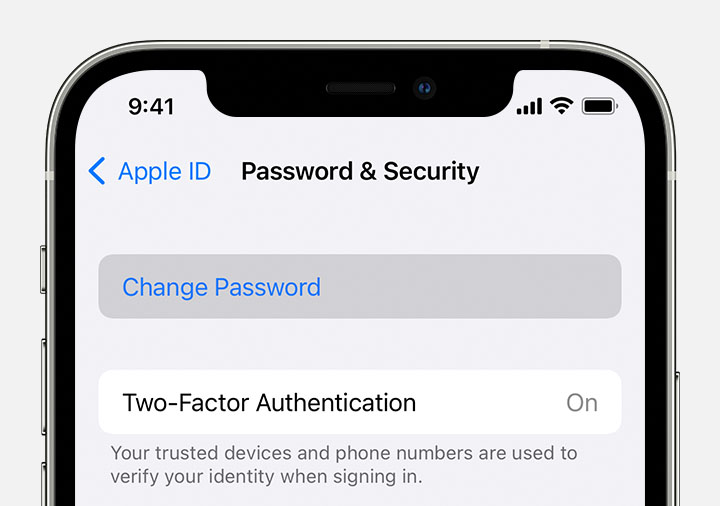
2. Tap your name > Password & Security > Change Password.
3. Follow the onscreen instructions to reset your password.
4.
You can also follow this process on a trusted iPad, iPod touch, or Apple Watch.
To reset your password on your trusted Mac, choose Apple menu > System Settings (or System Preferences) > Sign in with your Apple ID (or Apple ID). Then click Password & Security, Change Password, and follow the onscreen instructions."
Cheers!
Hello irasema160,
Thanks for that info and for choosing the Apple Support Communities. If we understand correctly, you are needing to reset the password for the account you use on your Apple TV. This would be the same password as your Apple ID used on your other devices, so if you don't remember this, you can reset your password with the steps in this Apple resource If you forgot your Apple ID password - Apple Support
starting with these steps:
"Reset your Apple ID password on your iPhone or other trusted Apple device
1. Go to Settings.
2. Tap your name > Password & Security > Change Password.
3. Follow the onscreen instructions to reset your password.
4.
You can also follow this process on a trusted iPad, iPod touch, or Apple Watch.
To reset your password on your trusted Mac, choose Apple menu > System Settings (or System Preferences) > Sign in with your Apple ID (or Apple ID). Then click Password & Security, Change Password, and follow the onscreen instructions."
Cheers!
how do I reset my appletv password when I’ve forgotten my appletv password