Battery drain iPhone SE 3rd Generation ios16.5
Just got new SE, battery just lost 12% in 4 hours! My old 1st gen SE didn’t lose anything overnight.
iPhone SE, iOS 16
Just got new SE, battery just lost 12% in 4 hours! My old 1st gen SE didn’t lose anything overnight.
iPhone SE, iOS 16
Hi lelpep,
When you set it up, did you restore a backup? As Curt explained, it's not unusual for your iPhone to use more resources after you restore a backup or set it up for the first time. It will continue to index the file system and load your data in the background. However, it usually settles down after a few days.
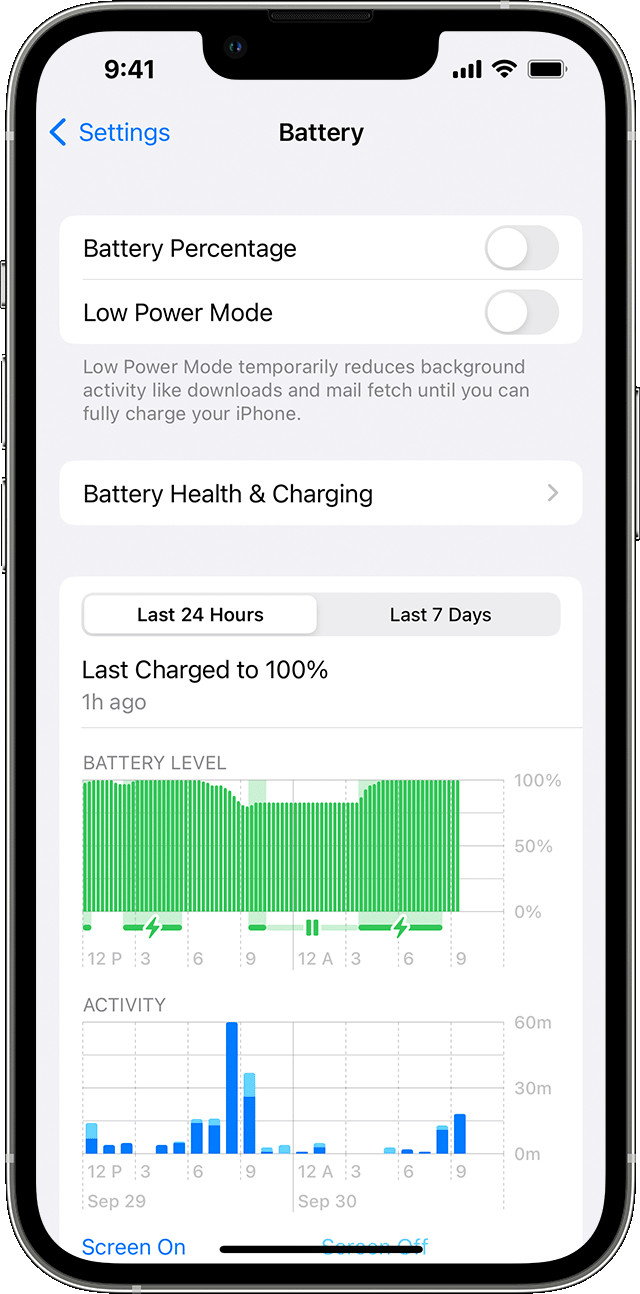
If your battery is still draining significantly without use, look at the Battery Usage report on your iPhone to determine the biggest sources of the drain. The "check battery" section of this article will guide you.
About the battery usage on your iPhone, iPad, and iPod touch - Apple Support
Check battery usage
To see an overview of your battery level and activity for the last 24 hours and up to the last 10 days, go to Settings > Battery.
When you tap one of the time periods above the Activity graph (Last 24 Hours or Last [X] Days), you can see which apps contributed to your battery usage during that time period, and the proportion of battery used for the app.
To see how long each app was in use on screen (the dark blue bars) or in the background (the light blue bars), tap Show Activity. Under each app, you might see these usage types:
* Background Activity means that most of the app's battery usage — such as playing music or tracking location — happened while the app was in the background.
* No Cell Coverage and Low Signal means that your device was searching for a signal or being used with a low signal.
* Connected to Charger means the app was used only when your device was charging.
You can also see when your device was last connected to a charger and the last charge level. With iOS 16, you can see if charging paused because of Optimized Battery Charging, Clean Energy Charging, or temperature.
If you let us know the top five apps or processes reported to use your battery, we're happy to offer suggestions to continue to optimize your battery.
Cheers.
Hi lelpep,
When you set it up, did you restore a backup? As Curt explained, it's not unusual for your iPhone to use more resources after you restore a backup or set it up for the first time. It will continue to index the file system and load your data in the background. However, it usually settles down after a few days.
If your battery is still draining significantly without use, look at the Battery Usage report on your iPhone to determine the biggest sources of the drain. The "check battery" section of this article will guide you.
About the battery usage on your iPhone, iPad, and iPod touch - Apple Support
Check battery usage
To see an overview of your battery level and activity for the last 24 hours and up to the last 10 days, go to Settings > Battery.
When you tap one of the time periods above the Activity graph (Last 24 Hours or Last [X] Days), you can see which apps contributed to your battery usage during that time period, and the proportion of battery used for the app.
To see how long each app was in use on screen (the dark blue bars) or in the background (the light blue bars), tap Show Activity. Under each app, you might see these usage types:
* Background Activity means that most of the app's battery usage — such as playing music or tracking location — happened while the app was in the background.
* No Cell Coverage and Low Signal means that your device was searching for a signal or being used with a low signal.
* Connected to Charger means the app was used only when your device was charging.
You can also see when your device was last connected to a charger and the last charge level. With iOS 16, you can see if charging paused because of Optimized Battery Charging, Clean Energy Charging, or temperature.
If you let us know the top five apps or processes reported to use your battery, we're happy to offer suggestions to continue to optimize your battery.
Cheers.
Hello lelpep,
Have you recently updated the iPhone?
Some things to keep in mind after updating your iPhone is that it is not unusual for your battery life to be shorter for a couple days after updating. Your iPhone needs to download app data, sync contacts, index search results and in general complete the digital housekeeping required for a new iOS version. This can cause a bit of a drain that you don't typically see happening.
Tap on Settings > Battery > Battery Health. If the Battery Health is over 80%, then the battery is still fine.
There are some adjustments that can be made to help improve battery life.
First, you can adjust the display settings on your device. Take a look at the steps outlined here: Adjust the brightness and color temperature on your iPhone, iPad, or iPod touch - Apple Support
A Wi-Fi connection uses less battery power than a cellular network. When you’re using your device to access the internet, make sure that Wi-Fi is on if possible. Go to Settings > Wi-Fi and choose a Wi-Fi network.
If you’re using cellular, make sure to use the fastest available network. For example, a 4G network uses less battery than a 3G network. The faster your network connection is, the less time and energy it’ll take to access things on your device.
Another step you can take is to adjust your notifications. Notifications that show up on your lock screen will wake your device each time, which can affect battery life. To minimize the battery usage from notifications, go to Settings > Notifications.
You can also turn off Background App Refresh. Some apps frequently refresh or run in the background on your device. To minimize the effect on your battery life, turn off Background App Refresh. You can go to Settings > [App Name] > Background App Refresh.
You can also turn on low power mode. This reduces power consumption until you turn it off or charge your iPhone to 80%. When low power mode is on, certain settings and features like mail fetch, Hey Siri, Background App Refresh, and some visual effects are reduced or disabled. Go to Settings > Battery to enable Low Power Mode. Check out this article which explains Low Power Mode in more detail: Use Low Power Mode to save battery life on your iPhone - Apple Support
You should also be aware that as your iPhone battery ages, it’s not unusual for you to have to charge it more frequently. To learn more about what you can expect from your iPhone battery, check out this link: iPhone Battery and Performance - Apple Support
When charging your iPhone, we do recommend that you use Apple Certified accessories to do so. This will help prevent any unexpected behavior as well. This article shows you how to choose your iPhone accessories: About iPhone, iPad, and iPod accessories - Apple Support
Have a good day.
lelpep Said:
"my 3rd gen se does exactly the same, but was gotten worse in the last 6 months"
-------
Troubleshooting iPhone Battery Draining:
I. Report this to Apple:
Do your Part: Provide Apple with feedback on this, letting them know about this issue. Apple may not get back to you directly, but the more feedback they receive on this, the more they will know what is occurring, and what bug fixes to include in updates to come.
II. Tips on this:
Unfortunately, there is no way to determine when nor why the Battery Health decreased.
A. Battery Drain Info:
The iPhone battery will drain, unless it is plugged in and charging. With lots installed, the charge would be slower. As for how fast it would drain the battery, that would depend on the battery health and the volume (sound) you use.
B.. Troubleshooting the Battery:
Thank you for your reply. This is a brand new phone, I updated the iOS when setting it up. Set up exactly the same as my old SE 1st Generation which would only lose perhaps 5% overnight. This new one goes from 80% down to 6% overnight.
my 3rd gen se does exactly the same, but was gotten worse in the last 6 months
Battery drain iPhone SE 3rd Generation ios16.5