Unlink Apple ID with FB game app.
I need to unlink my Apple ID with a Facebook game app.
iPhone 11, iOS 16
I need to unlink my Apple ID with a Facebook game app.
iPhone 11, iOS 16
Hello Schuvette,
If you used Sign in with Apple to sign in to the game, you may be able to remove it in your Sign in with Apple settings, but you'll need to connect with the game developer or Facebook for guidance on unlinking it from their end.
This article will show you how to manage the apps that you've used with Sign in with Apple from your Apple device: Manage the apps that you use with Sign in with Apple - Apple Support
Stop using Sign in with Apple with an app
1. On your iPhone, go to Settings, then tap your name.
2. Tap Password & Security > Apps Using Apple ID.
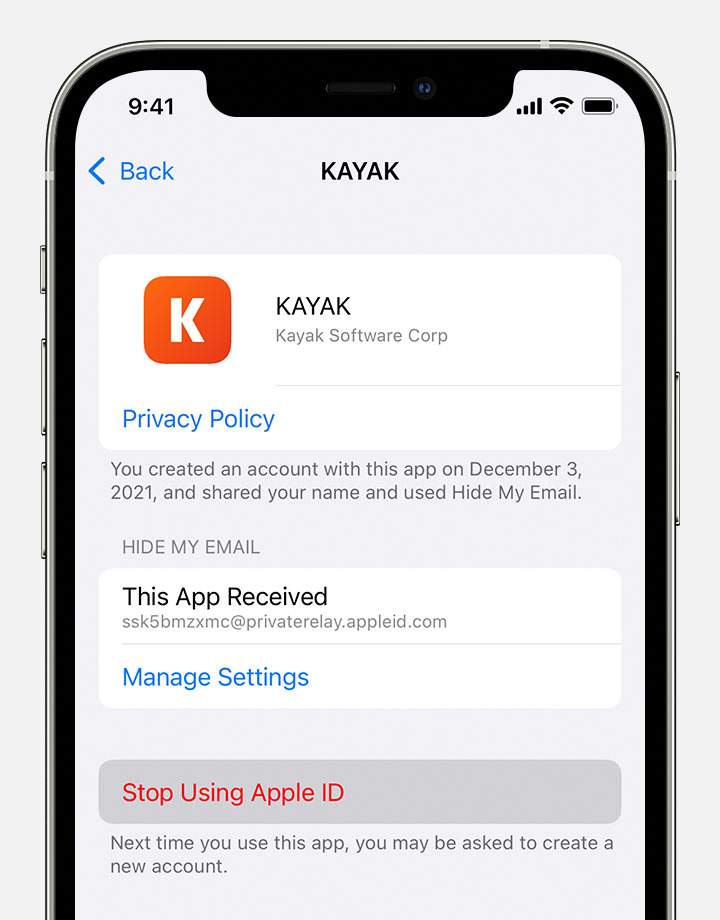
3. Select the app or developer, then tap Stop Using Apple ID.
What happens if you stop using Sign in with Apple with an app
When you stop using your Apple ID with an app, you're signed out of the app on your device. The next time you visit the app or its associated website, you can either select Sign in with Apple to sign in again, or create a new account.
If you choose to use Sign in with Apple again, you're signed in to the same account that you previously used. Some apps might let you create a new password for your existing account so you can sign in again without using your Apple ID.
We hope this helps.
All Our Best.
Hello Schuvette,
If you used Sign in with Apple to sign in to the game, you may be able to remove it in your Sign in with Apple settings, but you'll need to connect with the game developer or Facebook for guidance on unlinking it from their end.
This article will show you how to manage the apps that you've used with Sign in with Apple from your Apple device: Manage the apps that you use with Sign in with Apple - Apple Support
Stop using Sign in with Apple with an app
1. On your iPhone, go to Settings, then tap your name.
2. Tap Password & Security > Apps Using Apple ID.
3. Select the app or developer, then tap Stop Using Apple ID.
What happens if you stop using Sign in with Apple with an app
When you stop using your Apple ID with an app, you're signed out of the app on your device. The next time you visit the app or its associated website, you can either select Sign in with Apple to sign in again, or create a new account.
If you choose to use Sign in with Apple again, you're signed in to the same account that you previously used. Some apps might let you create a new password for your existing account so you can sign in again without using your Apple ID.
We hope this helps.
All Our Best.
Unlink Apple ID with FB game app.