Can't find ausampler on the audio units list

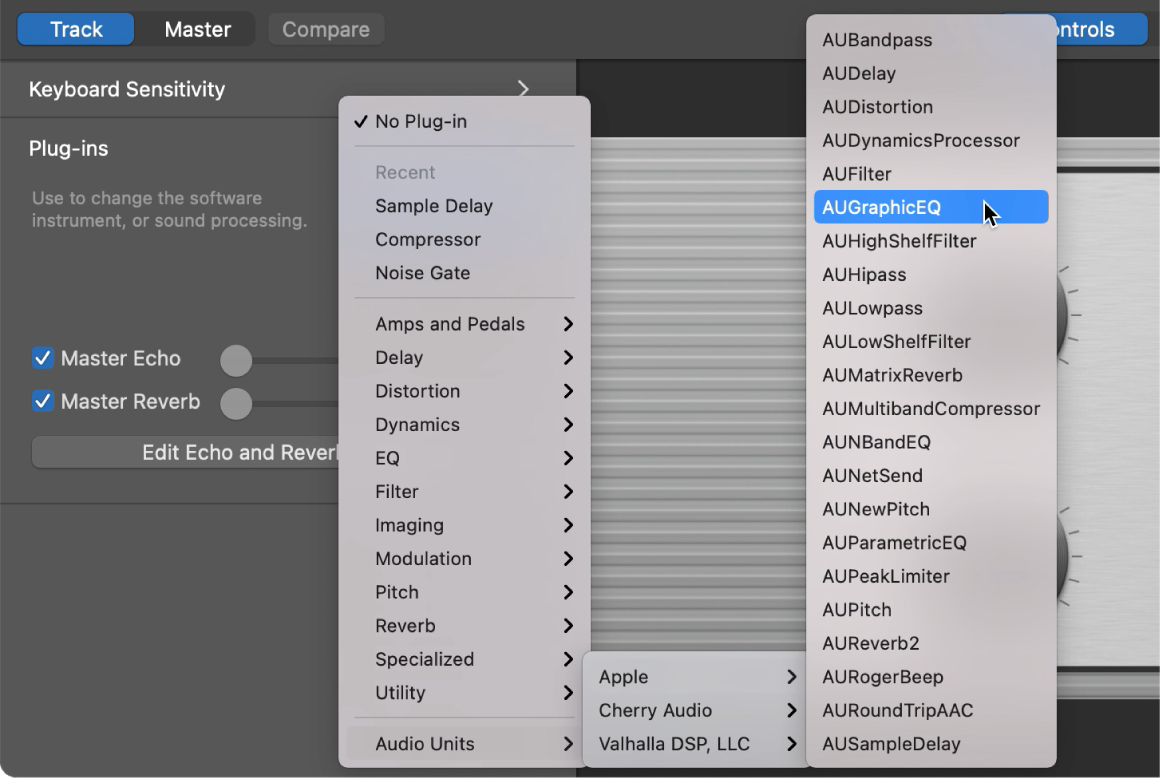
Just bought a new macbook air 2020 mac os ventura and installed the latest version available of garageband. When i go to the modules of an audio track then hit audio units => Apple => there's a bunch of instruments (ex : aunewpitch ; ausampledelay...) but ausampler is nowhere to be found on my older 2015 macbook this instrument was available.

I'm pretty sure i'm looking in the right place so i'd be more inclined to ask if there's a way to install ausampler or add it to some files library... I'm really stuck and desperately need this function. Thanking you in advance for your help !

MacBook Air 13″, macOS 13.0

Posted on Jun 6, 2023 3:39 AM

Reply
4 replies

Jun 8, 2023 7:36 AM in response to lotfi_boualit

Hi lotfi_boualit,


It might help to try the steps in this link to ensure you've installed all additional GarageBand content and patches: Get more sounds and loops for GarageBand on Mac - Apple Support


You can also try the steps in the link above to reinstall the Sound Library.


If you've covered all of this and still don't see AUSampler, use this link to reach us directly: Get Support


Best wishes.

Jun 7, 2023 4:27 PM in response to lotfi_boualit

Hello lotfi_boualit,


We are running a MacBook Pro with macOS Ventura 13.4 and GarageBand 10.4.8, and AUSampler is a preinstalled plug-in for GarageBand for us. You should see it under Audio Units with these instructions.


Use Audio Units plug-ins with GarageBand on Mac - Apple Support

Add an Audio Units effect plug-in
* In GarageBand on Mac, in the Plug-ins area of the Smart Controls pane, click an empty plug-in slot, choose an effect category, then choose a plug-in from the Audio Units submenu.
The plug-in window opens, showing the plug-in’s controls. 
Choosing an Audio Units plug-in from the Audio Units pop-up menu in the Plug-ins area.


All Our Best.


Oct 15, 2023 7:48 AM in response to ryane77

Hi,


ausampler is not in the list for me either, and I've made sure I've downloaded all of the additional sounds etc.


Under plugins > Audio Units > apple > there is a ausampledelay, but no ausampler (as in your screenshot).


If you can please let me know what I need to do to access the sampler that would be much appreciated!


Many thanks


Adam

This thread has been closed by the system or the community team. You may vote for any posts you find helpful, or search the Community for additional answers.

Can't find ausampler on the audio units list

Welcome to Apple Support Community
A forum where Apple customers help each other with their products. Get started with your Apple Account.