stuck on Activation Required

hello everyone

I found my old ipod 7th generation and needed a photo off of it but when i plugged it in and it turned on, after a while it got really warm and screen said

"Activation Required"

the only button being Dismiss.

HOWEVER, when i click "Dismiss" the same popup comes up again.

I see the hello screen and cant press home button to enter my password

someone please help me fix this issue i

iPod, iOS 15

Posted on Jun 10, 2023 10:43 AM

Reply
Question marked as Top-ranking reply

Posted on Jun 11, 2023 3:16 PM

Thanks for posting in the Apple Support Communities IntelCorei7Gaming,


If your iPod touch isn't responding, or allowing you to dismiss the on-screen message, the following steps may help:


If your iPod touch has a frozen screen, doesn't respond when you touch it, or becomes stuck when you turn it on, learn what to do.

* iPod touch screen is black or frozen
* iPod is stuck on the Apple logo

If your screen is black or frozen
Follow the steps for your device.

On your iPod touch (7th generation)
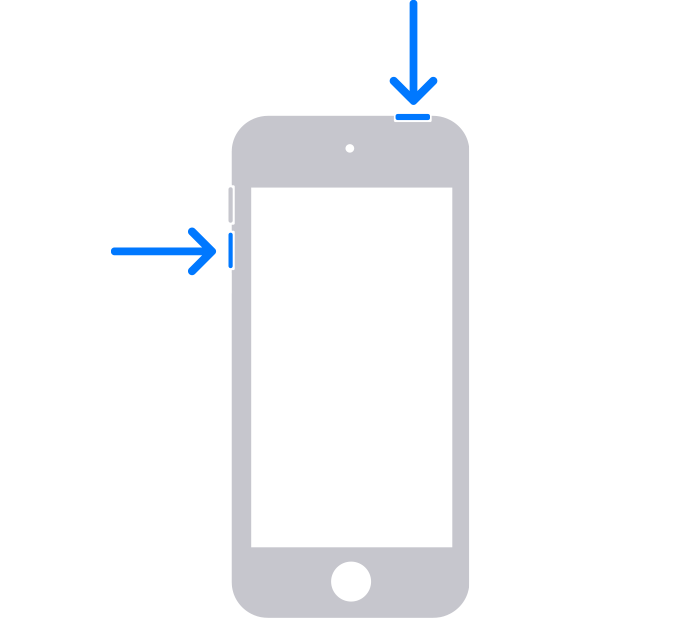
1: Press and hold both the top button and the volume down button until you see the Apple logo.
An iPod touch with arrows pointing to the top button and the volume down button.
2: If your iPod touch doesn't turn on, follow these steps to check your hardware and charge your device. You might need to charge for up to an hour.

3: If your iPod touch still doesn't turn on, contact Apple Support.


If your iPod touch won't turn on or is frozen - Apple Support


Cheers!


Similar questions

2 replies
Question marked as Top-ranking reply

Jun 11, 2023 3:16 PM in response to IntelCorei7Gaming

Thanks for posting in the Apple Support Communities IntelCorei7Gaming,


If your iPod touch isn't responding, or allowing you to dismiss the on-screen message, the following steps may help:


If your iPod touch has a frozen screen, doesn't respond when you touch it, or becomes stuck when you turn it on, learn what to do.

* iPod touch screen is black or frozen
* iPod is stuck on the Apple logo

If your screen is black or frozen
Follow the steps for your device.

On your iPod touch (7th generation)
1: Press and hold both the top button and the volume down button until you see the Apple logo.
An iPod touch with arrows pointing to the top button and the volume down button.
2: If your iPod touch doesn't turn on, follow these steps to check your hardware and charge your device. You might need to charge for up to an hour.

3: If your iPod touch still doesn't turn on, contact Apple Support.


If your iPod touch won't turn on or is frozen - Apple Support


Cheers!


This thread has been closed by the system or the community team. You may vote for any posts you find helpful, or search the Community for additional answers.

stuck on Activation Required

Welcome to Apple Support Community
A forum where Apple customers help each other with their products. Get started with your Apple Account.