iPad

For some reason my iPad has had the menu bar when typing

show up halfway down the page instead of at the bottom as it had done in the

past and is what I wanted.  I type and

cannot see what I have been typing as a result. 

How can I get this return to normal, as I do not recall doing anything

to cause it?  Thank you.


Posted on Jun 10, 2023 3:28 PM

Reply
Question marked as Top-ranking reply

Posted on Jun 10, 2023 4:15 PM

Perhaps you refer to the on-screen keyboard?


Have you enabled the Scribble feature? This feature uses a different mini-keyboard that does not respond to the two-finger zoom or pinch gestures.


Settings > Apple Pencil > Scribble - set to OFF


After disabling Scribble, you may need to force-restart your iPad:


Force restart iPad (models with Face ID or with Touch ID in the top button)

If your iPad doesn’t have the Home button, do the following:

  1. Press and quickly release the volume button nearest to the top button.
  2. Press and quickly release the volume button farthest from the top button.
  3. Press and hold the top button.
  4. When the Apple logo appears, release the top button.
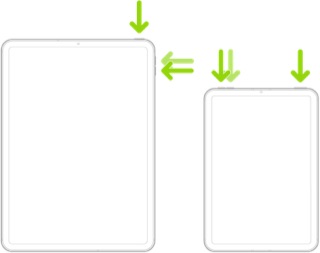


Force restart iPad (models with the Home button)

Press and hold the top button and the Home button at the same time. When the Apple logo appears, release both buttons.


Otherwise, to restore the new Floating Keyboard to the normal on-screen keyboard presentation, use the two-finger “zoom” gesture (i.e., the reverse of the two-finger “pinch”).


If the Split Keyboard is restored instead of the full on-screen keyboard, you can either use two fingers (one on each of the two half-keyboards) and swipe the two halves together - or touch-and-hold the “keyboard” key, then slide your finger to the Merge & Dock option and release.


Use the floating keyboard on your iPad – Apple Support

Split and move the keyboard on your iPad – Apple Support


11 replies
Question marked as Top-ranking reply

Jun 10, 2023 4:15 PM in response to Sliphorn

Perhaps you refer to the on-screen keyboard?


Have you enabled the Scribble feature? This feature uses a different mini-keyboard that does not respond to the two-finger zoom or pinch gestures.


Settings > Apple Pencil > Scribble - set to OFF


After disabling Scribble, you may need to force-restart your iPad:


Force restart iPad (models with Face ID or with Touch ID in the top button)

If your iPad doesn’t have the Home button, do the following:

  1. Press and quickly release the volume button nearest to the top button.
  2. Press and quickly release the volume button farthest from the top button.
  3. Press and hold the top button.
  4. When the Apple logo appears, release the top button.


Force restart iPad (models with the Home button)

Press and hold the top button and the Home button at the same time. When the Apple logo appears, release both buttons.


Otherwise, to restore the new Floating Keyboard to the normal on-screen keyboard presentation, use the two-finger “zoom” gesture (i.e., the reverse of the two-finger “pinch”).


If the Split Keyboard is restored instead of the full on-screen keyboard, you can either use two fingers (one on each of the two half-keyboards) and swipe the two halves together - or touch-and-hold the “keyboard” key, then slide your finger to the Merge & Dock option and release.


Use the floating keyboard on your iPad – Apple Support

Split and move the keyboard on your iPad – Apple Support



Jun 16, 2023 10:18 AM in response to Sliphorn

Sliphorn wrote:

I did not restart as this happens EVERY time when I go to type on this thing.


If there is a protective case or screen-protective film here, remove it all, and try again.


Last thing to try is a backup, factory reset, and restore:

Restore your iPhone, iPad, or iPod to factory settings - Apple Support (links to backup & restore included)


If it persists, contact Apple Support. Use the support link in the lower left corner and chat or call Apple.


I’ve had the on-screen full-size keyboard get stuck a few times, and more often gotten stuck in the mini keyboard or in the external keyboard (and with no external keyboard connected), but nothing nearly as persistent and repeatable as you’re reporting here.


Jun 11, 2023 12:04 PM in response to LotusPilot

I want to make sure folks know the issue. When one goes to type in a given blank, it used to have the keyboard at the bottom and I could see what was going into the blank. Now it shows up exactly halfway down (or up) the page and usually I cannot see the blank as I fill it. I will copy this last set of directions and try it, but I want to make it more clear as to what the issue is. Thanks to all.

This thread has been closed by the system or the community team. You may vote for any posts you find helpful, or search the Community for additional answers.

iPad

Welcome to Apple Support Community
A forum where Apple customers help each other with their products. Get started with your Apple Account.
