Sound Lock

My Macbook air sound is not work. Neither in headphones nor without it. It initially used to work when I updated my OS but now my OS is also up to date and I have re installed my OS but its still not working. What could be the issue? How can it be solved any leads will be appreciated. TIA


MacBook Air 13″, macOS 11.7

Posted on Jun 18, 2023 1:45 AM

Reply
Question marked as Top-ranking reply

Posted on Jun 19, 2023 10:16 AM

Hello MuznaMalik,


To help us get a better understanding of the issue, we’d like to ask a few questions.


1. Is there no sound at all, or only when using certain apps?

2. Were any changes made to your device settings before this happened? If so, what was changed?

3. Is Mute enabled on your device?


The above details will help us plan how to proceed.


Please check out this link, which explains how to check if Mute is enabled, and may help: If you can’t hear sound from your Mac speakers


If you can’t hear sound from your Mac speakers

First, make sure any volume controls in the app you’re using aren’t turned all the way down. Also, try playing a different audio file, CD, or DVD, or try playing the file or disc on another computer or media player to isolate the problem. Then, try the following solutions.

If you’re trying to listen through your computer’s built-in speakers

1. Unplug any headphones or external speakers.
2. On your Mac, choose Apple menu  > System Preferences, click Sound, then click Output. Make sure “Internal Speakers” is selected, the “Output volume” slider is not all the way to the left, and the Mute checkbox is not selected.
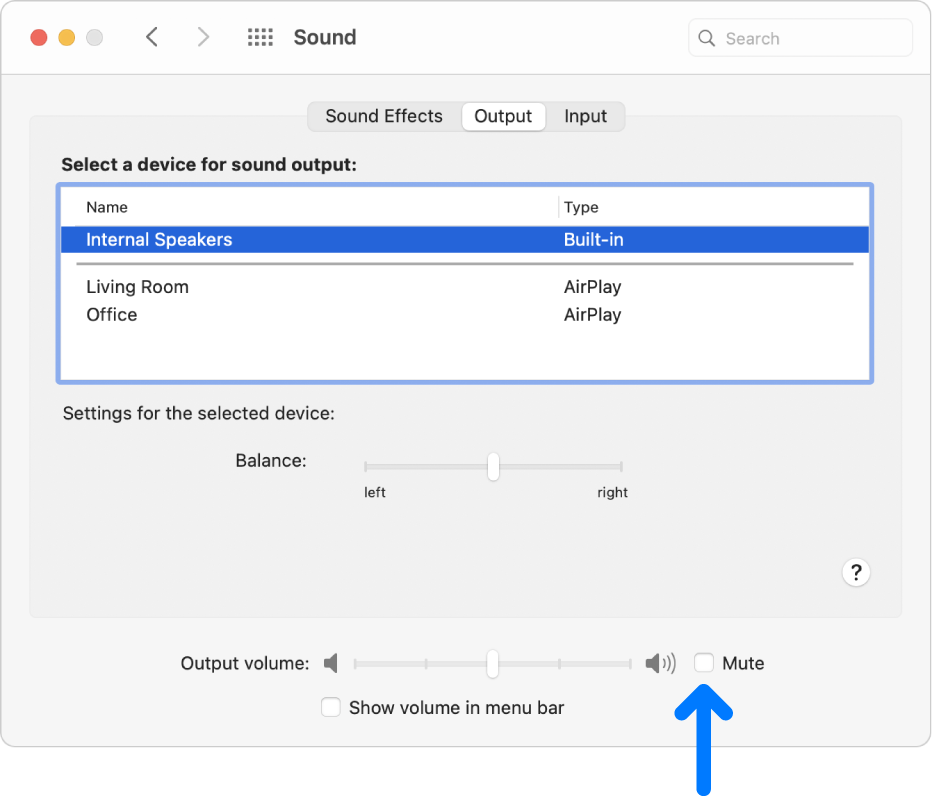
The Mute checkbox at the bottom of the Sound preferences pane.


Thanks!

3 replies
Question marked as Top-ranking reply

Jun 19, 2023 10:16 AM in response to MuznaMalik

Hello MuznaMalik,


To help us get a better understanding of the issue, we’d like to ask a few questions.


1. Is there no sound at all, or only when using certain apps?

2. Were any changes made to your device settings before this happened? If so, what was changed?

3. Is Mute enabled on your device?


The above details will help us plan how to proceed.


Please check out this link, which explains how to check if Mute is enabled, and may help: If you can’t hear sound from your Mac speakers


If you can’t hear sound from your Mac speakers

First, make sure any volume controls in the app you’re using aren’t turned all the way down. Also, try playing a different audio file, CD, or DVD, or try playing the file or disc on another computer or media player to isolate the problem. Then, try the following solutions.

If you’re trying to listen through your computer’s built-in speakers

1. Unplug any headphones or external speakers.
2. On your Mac, choose Apple menu  > System Preferences, click Sound, then click Output. Make sure “Internal Speakers” is selected, the “Output volume” slider is not all the way to the left, and the Mute checkbox is not selected.

The Mute checkbox at the bottom of the Sound preferences pane.


Thanks!

This thread has been closed by the system or the community team. You may vote for any posts you find helpful, or search the Community for additional answers.

Sound Lock

Welcome to Apple Support Community
A forum where Apple customers help each other with their products. Get started with your Apple Account.
