iPhone 14 pro heating problems

Hey sir or Mam I don’t know who are you . but I’m here to telling you that my iPhone 14 pro heats too much while clicking photos and videos , playing games scroll social media and charging what is reason please let me know and help me to delve this problem

iPhone 14 Pro

Posted on Jun 20, 2023 12:50 AM

Reply
Question marked as Top-ranking reply

Posted on Jun 20, 2023 1:33 AM

What I did is given below

  1. Took a backup on iCloud (Which I do regularly)
  2. Logged out of the Apple ID
  3. Erase --> Erase iPhone - Apple Support (IN)
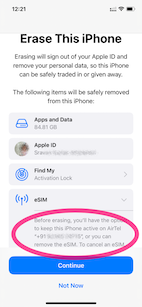
    1. Keep eSIM Data was the option I chose (See the pic)
    2. .
  4. Set up my iPhone and restored it from iCloud Backup
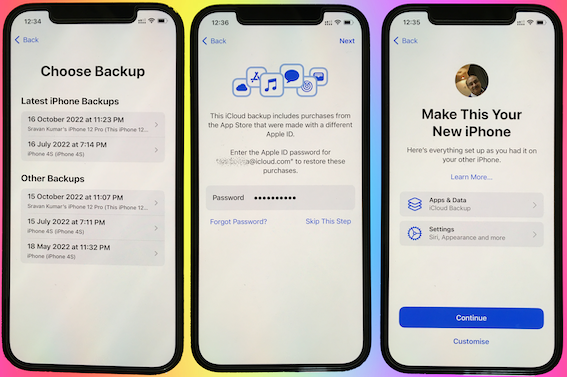

I continued to have the same issue with the heating.


I repeated the above steps but this time I did not restore from the iCloud Backup. I set it up as a new iPhone.


Waited for 3 days. There is no heating issue, now.


Conclusion.:

  • There is no hardware issue!
  • This is not an iOS 16.0.3 issue
  • Some Apps or iPhone storage and some settings may be heating up the device.


Action Plan:

  • I will now slowly get my all data back one by one.
  • Using the elimination process I will try to find out which app or settings were causing this...


Now the heating issue isn't there anymore. I am adding apps one by one and keeping tab on the heating issue.


1 reply
Question marked as Top-ranking reply

Jun 20, 2023 1:33 AM in response to Sran_x

What I did is given below

  1. Took a backup on iCloud (Which I do regularly)
  2. Logged out of the Apple ID
  3. Erase --> Erase iPhone - Apple Support (IN)
    1. Keep eSIM Data was the option I chose (See the pic)
    2. .
  4. Set up my iPhone and restored it from iCloud Backup


I continued to have the same issue with the heating.


I repeated the above steps but this time I did not restore from the iCloud Backup. I set it up as a new iPhone.


Waited for 3 days. There is no heating issue, now.


Conclusion.:

  • There is no hardware issue!
  • This is not an iOS 16.0.3 issue
  • Some Apps or iPhone storage and some settings may be heating up the device.


Action Plan:

  • I will now slowly get my all data back one by one.
  • Using the elimination process I will try to find out which app or settings were causing this...


Now the heating issue isn't there anymore. I am adding apps one by one and keeping tab on the heating issue.

This thread has been closed by the system or the community team. You may vote for any posts you find helpful, or search the Community for additional answers.

iPhone 14 pro heating problems

Welcome to Apple Support Community
A forum where Apple customers help each other with their products. Get started with your Apple Account.