Tabbing not right

I am formatting a TOC in imported text which I tried to remove all formatting from by using the format-clearing tool in Gmail (anyone have a better way?). The page number follows a line of text; each line is a numbered list item. A right tab with leader is set just before the right margin. I press Tab with insertion cursor before the number. The whole line of text moves to the right but there is no space before the number. What am I doing wrong?

iMac 27″ 5K, macOS 13.3

Posted on Jun 20, 2023 1:21 AM

Reply
1 reply

Jun 21, 2023 8:42 AM in response to Kathill7

Hey there Kathill7, 


It sounds like you're having some problems creating a numbered list in Pages. You may find the answer you're looking for here: Format lists in Pages on Mac  


  1. "Select the text you want to format.
  2. In the Format  sidebar, click the Style button near the top.
  3. If the text is in a text box, table, or shape, first click the Text tab at the top of the sidebar, then click the Style button.
  4. Click the pop-up menu next to Bullets & Lists, then choose a list style.
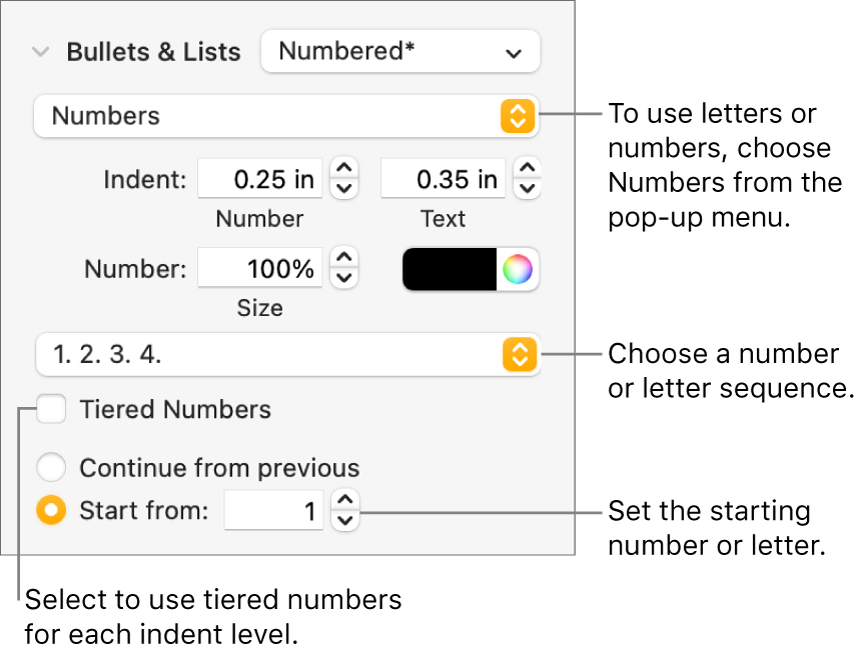
  5. Click the disclosure arrow next to Bullets & Lists, then use the controls shown below to format the list.
  6. Controls for changing the number style and spacing of a list
  7. When you choose Text Bullets, Image Bullets, or Numbers from the pop-up menu below the disclosure arrow, you see more controls that apply to the type of list you chose.


If you want to save these settings to use for other lists in the document, save them as your own list style. See “Create a hierarchical list style” below to learn how." 


Have a good one!

This thread has been closed by the system or the community team. You may vote for any posts you find helpful, or search the Community for additional answers.

Tabbing not right

Welcome to Apple Support Community
A forum where Apple customers help each other with their products. Get started with your Apple Account.