I do not want my Apple Cash balance to pay my Apple Card, how do I change that?

I do not want my Apple Cash balance to pay my Apple Card, how do I change that?

iPhone 14 Pro Max, iOS 16

Posted on Jun 20, 2023 9:07 PM

Reply
Question marked as Top-ranking reply

Posted on Jun 21, 2023 8:15 AM

For information on turning off Apple Cash payments to Apple Card, see the following from: How to make Apple Card payments - Apple Support


Turn payments with Apple Cash on or off

If you want to pay from only your bank account without using your Apple Cash balance:
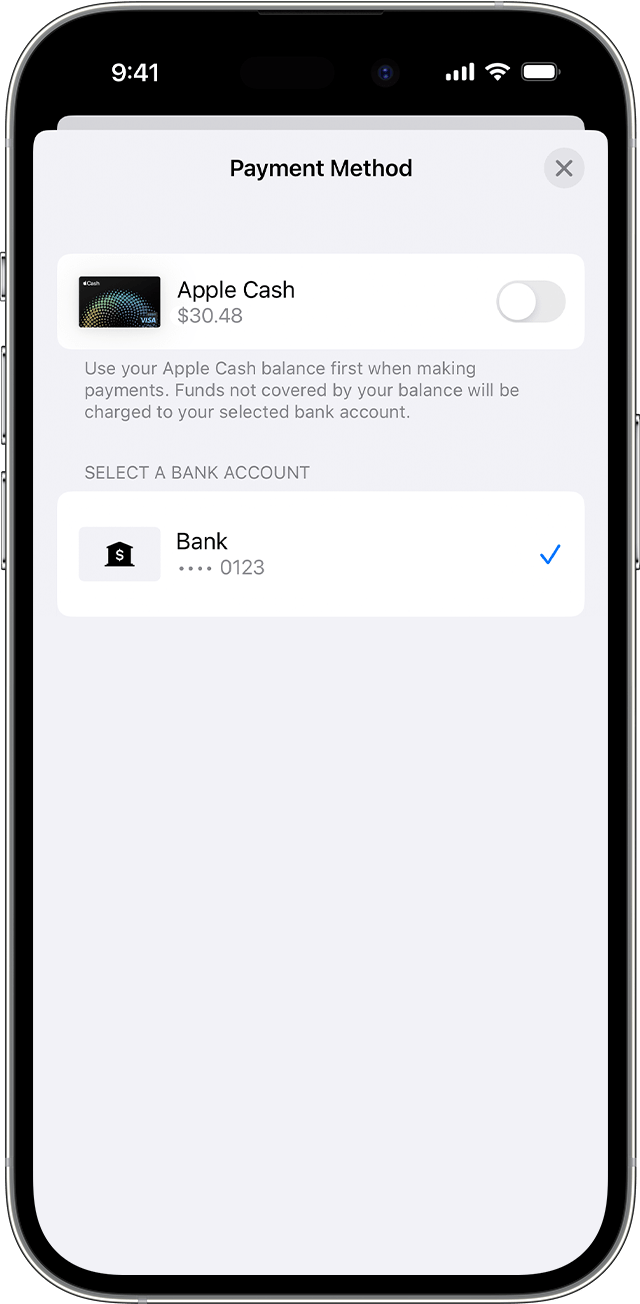
  1. Open the Wallet app on your iPhone and tap Apple Card.
  2. Tap Pay.
  3. Choose a payment amount and tap Pay [amount].
  4. Tap your bank account, then turn Apple Cash on or off.
  5. Tap the Back button, then authenticate with Face ID, Touch ID, or passcode to make a payment.


1 reply
Question marked as Top-ranking reply

Jun 21, 2023 8:15 AM in response to kami127

For information on turning off Apple Cash payments to Apple Card, see the following from: How to make Apple Card payments - Apple Support


Turn payments with Apple Cash on or off

If you want to pay from only your bank account without using your Apple Cash balance:

  1. Open the Wallet app on your iPhone and tap Apple Card.
  2. Tap Pay.
  3. Choose a payment amount and tap Pay [amount].
  4. Tap your bank account, then turn Apple Cash on or off.
  5. Tap the Back button, then authenticate with Face ID, Touch ID, or passcode to make a payment.


This thread has been closed by the system or the community team. You may vote for any posts you find helpful, or search the Community for additional answers.

I do not want my Apple Cash balance to pay my Apple Card, how do I change that?

Welcome to Apple Support Community
A forum where Apple customers help each other with their products. Get started with your Apple Account.