
How can I move photos on a laptop to my iCloud photos?
I have photos on a laptop that I want to move to the cloud. How can I do that?
Windows, Windows 6
I have photos on a laptop that I want to move to the cloud. How can I do that?
Windows, Windows 6
Hey korrie272,
We'd recommend reviewing this article as it provides steps to set up iCloud Photos on a Windows PC so you can upload photos to iCloud: Set up and use iCloud Photos on your Windows PC - Apple Support
"Turn on iCloud Photos
Make sure that you set up iCloud on your iPhone, iPad, or iPod touch or Mac, that you turned on iCloud Photos, and that you're signed in with your Apple ID.
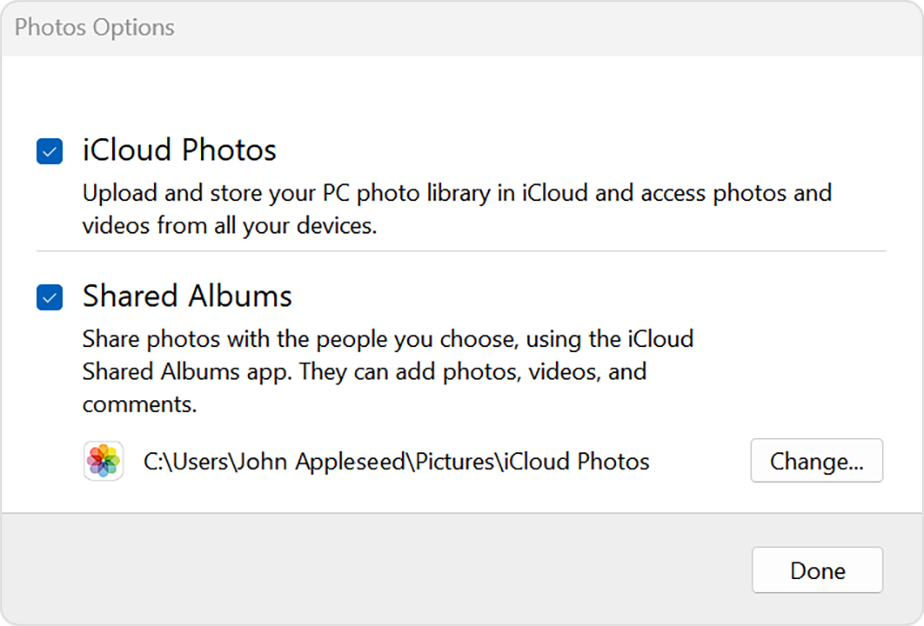
In iCloud for Windows 10 or later, you can also choose to use Shared Albums, and customize the location of your Shared Albums folders.
Find your photos on your PC
To find your photos, follow the steps for the version of Windows you use on your PC.
In Windows 11
In Windows 10 or later
In Windows 8
"Upload your photos and videos to iCloud Photos
You can upload your photos and videos from your PC to iCloud Photos when you follow these steps:
In iCloud for Windows 10 or later
You can view the photos and videos you uploaded in the Photos app on iCloud.com and on all your Apple devices.
In older versions of iCloud for Windows
You can view the photos and videos you uploaded in the Photos app on iCloud.com and on all your Apple devices."
Thanks!
Hey korrie272,
We'd recommend reviewing this article as it provides steps to set up iCloud Photos on a Windows PC so you can upload photos to iCloud: Set up and use iCloud Photos on your Windows PC - Apple Support
"Turn on iCloud Photos
Make sure that you set up iCloud on your iPhone, iPad, or iPod touch or Mac, that you turned on iCloud Photos, and that you're signed in with your Apple ID.
In iCloud for Windows 10 or later, you can also choose to use Shared Albums, and customize the location of your Shared Albums folders.
Find your photos on your PC
To find your photos, follow the steps for the version of Windows you use on your PC.
In Windows 11
In Windows 10 or later
In Windows 8
"Upload your photos and videos to iCloud Photos
You can upload your photos and videos from your PC to iCloud Photos when you follow these steps:
In iCloud for Windows 10 or later
You can view the photos and videos you uploaded in the Photos app on iCloud.com and on all your Apple devices.
In older versions of iCloud for Windows
You can view the photos and videos you uploaded in the Photos app on iCloud.com and on all your Apple devices."
Thanks!
How can I move photos on a laptop to my iCloud photos?

