Family member added, now I am getting charged for their services!

I added my daughter to our Family Plan.

Then I saw that her purchases were showing up on my credit card - for example her extra storage, and her Phish streaming.


How do I prevent this in the future so that she pays for her own stuff?

iPhone 11

Posted on Jun 26, 2023 10:03 AM

Reply
Question marked as Top-ranking reply

Posted on Jun 26, 2023 10:56 AM

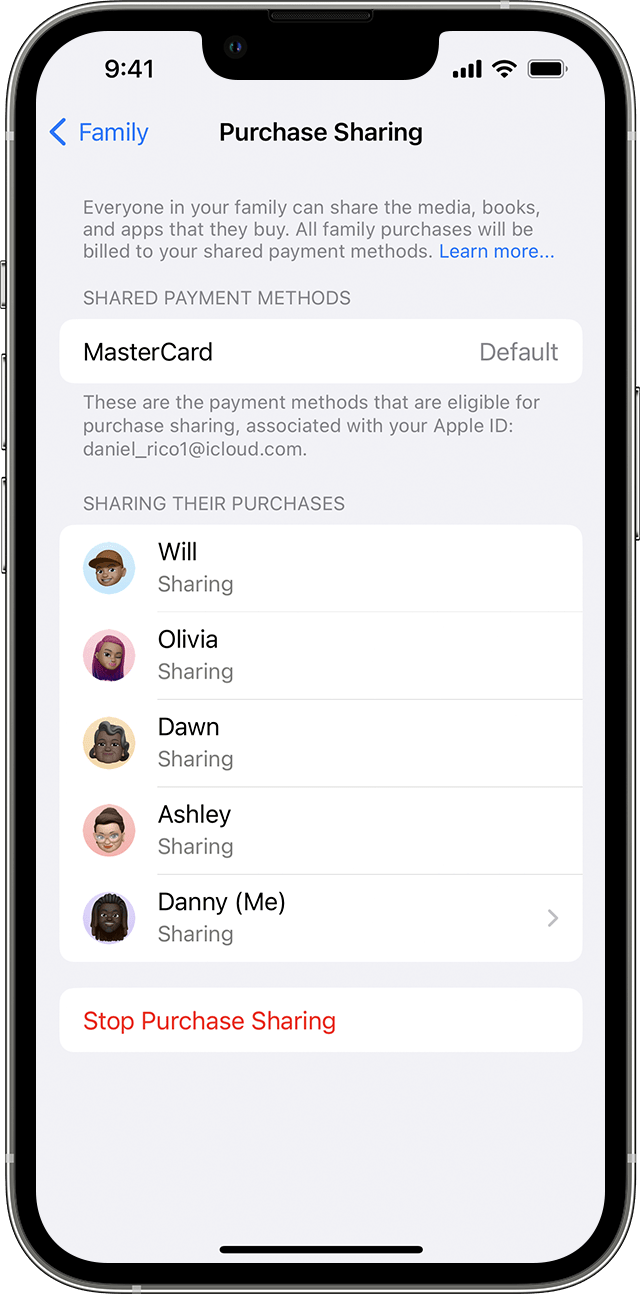
Let me simplify this a little. When you use purchase sharing in Family Sharing, the family organizer must agree to pay for purchases made by family members.


The text below is copied from this support article > Set up Family Sharing - Apple Support

One adult in the family — the family organizer — can set up Family Sharing for the group from their iPhone, iPad, iPod touch, or Mac. If purchase sharing is turned on, the family organizer pays for family members' purchases and must have a valid payment method on file.


The only way for family members to pay for their own purchases is by redeeming Apple Gift cards or by adding funds to their Apple ID balance. As long as they have a sufficient balance in their Apple ID balance, those funds will be used for purchases before the organizer’s card is charged.


The text below is copied from this support article > How apps, content, and subscriptions from Apple are billed - Apple Support

  • If you're in a Family Sharing group, purchases that you make are charged to your personal Apple Account balance. If you don't have enough Apple Account balance to pay for the purchase, the remainder is charged to the family organizer if purchase sharing is turned on.


5 replies
Question marked as Top-ranking reply

Jun 26, 2023 10:56 AM in response to erp4599

Let me simplify this a little. When you use purchase sharing in Family Sharing, the family organizer must agree to pay for purchases made by family members.


The text below is copied from this support article > Set up Family Sharing - Apple Support

One adult in the family — the family organizer — can set up Family Sharing for the group from their iPhone, iPad, iPod touch, or Mac. If purchase sharing is turned on, the family organizer pays for family members' purchases and must have a valid payment method on file.


The only way for family members to pay for their own purchases is by redeeming Apple Gift cards or by adding funds to their Apple ID balance. As long as they have a sufficient balance in their Apple ID balance, those funds will be used for purchases before the organizer’s card is charged.


The text below is copied from this support article > How apps, content, and subscriptions from Apple are billed - Apple Support

  • If you're in a Family Sharing group, purchases that you make are charged to your personal Apple Account balance. If you don't have enough Apple Account balance to pay for the purchase, the remainder is charged to the family organizer if purchase sharing is turned on.


Jun 26, 2023 10:45 AM in response to erp4599

Seems like you failed to read how Family sharing works:


Set up Family Sharing - Apple Support

One adult in the family — the family organizer — can set up Family Sharing for the group from their iPhone, iPad, iPod touch, or Mac. If purchase sharing is turned on, the family organizer pays for family members' purchases and must have a valid payment method on file.

Turn off purchase sharing. Or simply don't invite them to your Family Group.


More information here ➜ How to share purchases with your family - Apple Support


Jun 26, 2023 10:41 AM in response to erp4599

For the member of family sharing, they can have their own payment method with their Apple Account balance.


See -> Make sure that each family member has a unique Apple ID

Make sure that each family member has a unique Apple ID - Apple Support


When the member of family sharing purchase something from the App Store or iTunes Store, the charges will be deducted from their Apple Account balance, before the organizer's credit card is charged.


See the Apple articles below:

What you can buy with your Apple Gift Card or Apple Account balance

What you can buy with your Apple Gift Card or Apple Account balance – Apple Support (UK)

  • You can't use your Apple Account balance to send gifts or gift cards.
  • Some purchases might require you to have a credit card on file, even if you use your Apple Account balance to make the purchase.


How to redeem your Apple Gift Card or App Store & iTunes gift card

How to redeem your Apple Gift Card or App Store & iTunes gift card – Apple Support (UK)


When redeeming a gift card, (1) the amount will be credited to your Apple Account balance and (2) then you need to set your Apple Account balance as your default payment.


(1) See -> Check your Apple Account balance -> Check your Apple Account balance – Apple Support (UK)


(2) See -> Add a payment method to your Apple ID > Add a payment method to your Apple ID – Apple Support (UK)


If they already use your Apple Account balance, the Apple Gift Card or App Store & iTunes gift card is automatically added to your Apple Account balance.


Where to buy a physical Apple gift card:

Actually, you can buy an Apple gift card at many places, it depends of course on where you live.

At an Apple Store or an Apple Authorized Reseller in your region certainly, but also at a good bookstore, supermarket and/or drugstore.


Also read the articles below ⤵️

If you can't redeem your Apple Gift Card or App Store & iTunes Gift Card

If you can't redeem your Apple Gift Card or App Store & iTunes Gift Card - Apple Support

check  ⤵️

Card is not valid

Card has already been redeemed

Card is not activated

Code is unreadable

Code must be redeemed in a different country or region

  • You can't redeem Apple Gift Cards or App Store & iTunes Gift Cards outside the country or region of purchase. For example, if you bought an App Store & iTunes Gift Card in France, you can't redeem it in the App Store in the United States.

Contact Apple Support -> Contact Apple Support.


About Gift Card Scams -> About Gift Card Scams - Official Apple Support


If you still need help, get support from Apple directly -> Get Support or call Apple in your region see -> Contact Apple for support and service or check -> here for more support and assistance.



This thread has been closed by the system or the community team. You may vote for any posts you find helpful, or search the Community for additional answers.

Family member added, now I am getting charged for their services!

Welcome to Apple Support Community
A forum where Apple customers help each other with their products. Get started with your Apple Account.