Country/Region error on only 1 of 3 devices on same ID

One of my devices (iPad mini) will not download a new app ("not available in your country/region"). My other two devices (iPhone, iPad Pro) on the same Apple ID downloaded the same app just fine. It's a standard US app.

The mini's software is up to date. I have restarted. I have logged out of my Apple ID, restarted, logged back in. I have double checked that my country/region is United States. Any ideas?

iPad mini 4, 15

Posted on Jun 28, 2023 2:42 PM

Reply
Question marked as Top-ranking reply

Posted on Jul 1, 2023 8:24 AM

I was able to download the app successfully by going to App Store - my account settings - purchases, where it was listed with a cloud icon.

Thank you for the response, Jeff.

4 replies

Jun 30, 2023 9:57 AM in response to shadowboxer17

Hi shadowboxer17,


We would like to see how we can help you with your iPad mini. Do you receive the same error if you connect to a different Wi-Fi or cellular connection? Are you downloading from your previously purchasesd section of the App Store? Are the date and time correct on your iPad? Go to the Settings app. Tap General, then tap Date & Time. Just to confirm, are you following the steps in this link to check the country? Change your Apple ID country or region - Apple Support


"Use your iPhone or iPad to change your region

  1. Open the Settings app. 
  2. Tap your name, then tap Media & Purchases.
  3. Tap View Account. You might be asked to sign in.
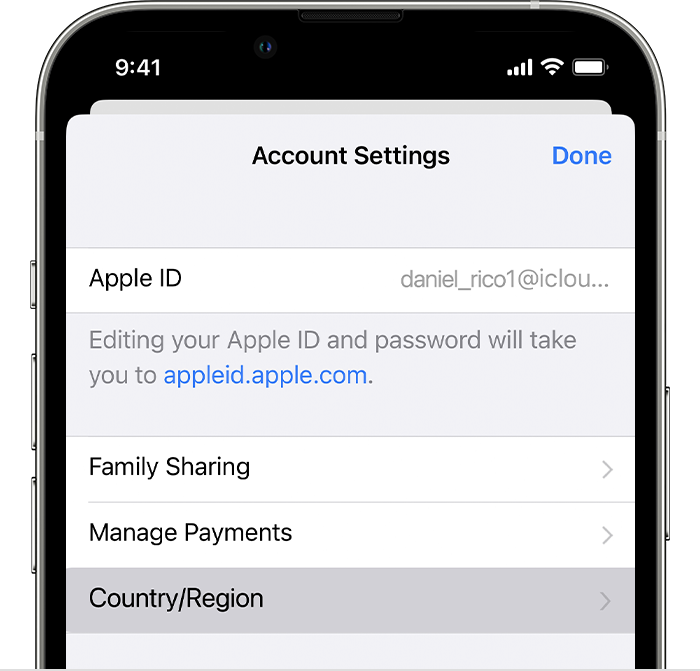
  4. Tap Country/Region.

iPhone showing Country/Region in Account Settings.


5.Tap Change Country or Region.

6.Tap your new country or region, then review the Terms & Conditions.

7.Tap Agree in the upper-right corner, then tap Agree again to confirm.

8.Select a payment method and enter your new payment information and billing address, then tap Next. You must enter a valid payment method for your new country or region."


Get back to us with these details so that we have a better understanding of the issue, and we can go from there.


Cheers!


This thread has been closed by the system or the community team. You may vote for any posts you find helpful, or search the Community for additional answers.

Country/Region error on only 1 of 3 devices on same ID

Welcome to Apple Support Community
A forum where Apple customers help each other with their products. Get started with your Apple Account.