Photos on MacBook Pro (Ventura): is the my photo stream album already saved to photos?

So Apple and others say move the photos in the my photo stream album to the Library in photos *if they are not already there* When I try to move photos from my photo stream to the Library, the Library folder (in the application) will not accept them. I assume that means they are already in the Library. I have thousands of photos in My Photo Stream. How can I tell if the photos in My Photo Stream are already in my Photos Library?


BTW, I am not using iCloud for Photos, yet. I resent having to pay money for it. (5 gb is obviously not enough).

MacBook Pro 13″, macOS 13.4

Posted on Jun 30, 2023 1:19 PM

Reply
4 replies

Jun 30, 2023 2:15 PM in response to Susan Chute

Susan, you wrote " I have thousands of photos in My Photo Stream".

It could not be much more than thousand. My Photo Stream is caching only up to thousand photos in iCloud, and only the new photos added during the last thirty days. The local My Photo Stream album on your Mac might be showing photos that are older than from the last thirty days, space permitting, but in iCloud you will only have the photos from the last thirty days, and not more than thousand items. The older items are automatically purged from iCloud to make space for the new photos.


Photos for Mac is saving the photos from My Photo Stream automatically in the Library. You need only to save the Photo Stream Photos on your mobile devices (iPad, iPhone, iPod Touch) and import them by dragging them to an album.


Are you perhaps keeping photos in shared albums? In Shared albums you can have more than thousand photos, and they are not removed automatically after 30 days. The Shared Album service is not affected by the end of My Photo Stream.


Jul 2, 2023 12:59 AM in response to Susan Chute

Susan, as long as iCloud Photos is enabled on your Mac, the My Photo Stream album will be hidden. On a Mac the checkmark to turn My Photo Stream on, will not even be shown, if iCloud Photos is on.

I checked again in a separate user account on my Mac, and with iCloud Photos disabled I could see the My Photo Stream controls, and the My Photo Stream album appeared in the Library section of the sidebar at the bottom.
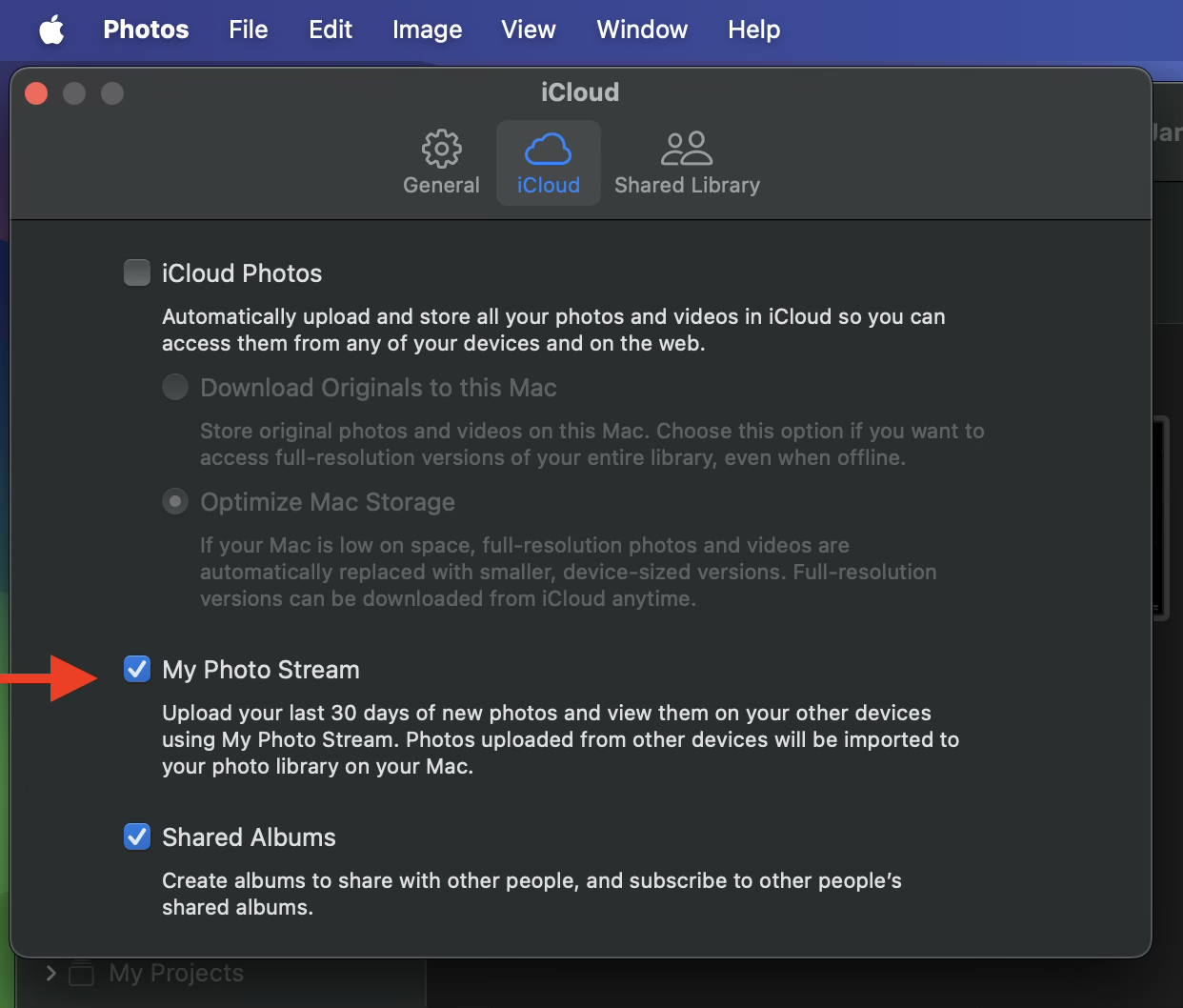

But I cannot recommend to turn off iCloud Photos, just to be able to see My Photo Stream. It will take very long to sync your photos again, once you turn it off. You may want to create a separate user account, using the same AppleID as you have used for My Photo Stream previously and enable only My Photo Stream for Photos in this account. All photos from My Photo Stream should be imported automatically to this new library.


The number of photos you are seeing in My Photo Stream can be confusing. My photo stream is storing definitely only up to 1000 photos in iCloud, but may be caching and showing more photos on your devices, depending on the free storage on your devices and the system version. The local copy of My Photo Stream may have been keeping more photos cached, that are no longer in iCloud, but the excess photos will be removed, when you turn My Photo Stream off and on again. This is explained here: If My Photo Stream isn't updating - Apple Support (The paragraph "I see different photos in the My Photo Stream album on each of my devices"):

"Your device keeps up to 1000 photos, even if they're older than 30 days. Photos older than 30 days are removed from iCloud, so depending on when you enabled My Photo Stream, your devices might not have the same photos. Due to capacity, your Apple TV might display only your most recent photos."


As you can see in the screenshot, your Mac is supposed to have imported the My Photo Stream photos automatically. You can see them in the "All Photos" tab of the Library.


Jul 1, 2023 8:01 PM in response to léonie

Thanks for your help, but....

1) I am not keeping photos in shared albums.

2) Neither on my iPhone or iPad can I find "My Photo Stream"

3) Enclosed screenshot of Photos on my Mac has 2869 photos in My Photo Stream, which includes photos I just shot.

4) System Settings: Mac: iCloud Photos off. Photos Settings: iCloud Photos unchecked. Shared Albums unchecked. My Photo Stream checked. iPhone: Settings-Photos: iCloud Photos ON. Optimize iPhone Storage ON. iPad: Same settings as iPhone.

5) iCloud on the web: No sign of My Photo Stream. Only iCloud Photos.

6) The reason I don't want iCloud Photos on my Mac is that I don't want to store my ENTIRE library in iCloud. Too many photos.


In conclusion, the only place I have My Photo Stream is on my MacBook. I need to know if the photos in My Photo Stream there are duplicated in my Library. Or Not. And if they are not duplicated, how do I get them in the main library?


I really do thank you for your help!

Jul 2, 2023 9:15 AM in response to léonie

Thank you again for your helpful explication, but I’m not entirely sure you understand what I wrote. Here’s a recap. My Photo Stream IS enabled for my Mac. Conversely, iCloud Photos is enabled for my iPhone and iPad. ON MY MAC, My Photo Stream is showing up in the sidebar of Photos with 2800+ photos. I know those are stored in Photos already. The question is, where? In other words, if i delete My Photo Stream in Photos on my Mac, will the photos already be saved in the Photo Library? Or is there some kind of folder within the Library, called My Photo Stream, that contains the only originals of those photos? iCloud Photos is irrelevant to this question, since it just contains photos from my iPhone and iPad, and NOT the photos stored on my computer.

Thanks again.

S

This thread has been closed by the system or the community team. You may vote for any posts you find helpful, or search the Community for additional answers.

Photos on MacBook Pro (Ventura): is the my photo stream album already saved to photos?

Welcome to Apple Support Community
A forum where Apple customers help each other with their products. Get started with your Apple Account.