How do I Reset My Terminal Back To Normal?

So, I attempted to install Rails by following the instructions in the first video tutorial on http://lekkihowto.com/

However, I made a mistake along the way, and now my terminal is malfunctioning.


I must clarify that I have very little knowledge about using the terminal. I'm not a novice; I don't know much about it. However, I know that typing commands like "rails -v" should display the application's version number or inform me that it is not installed.


Whenever I try to execute any command, it says "command not found," except for "mysql -v," which happens to work because I installed it after encountering this issue. My brother suggests that I might have misconfigured the path somewhere. Additionally, bash commands result in a "command not found" error.


So, I have two things I would like assistance with:


1. I want to reset my terminal back to its default state.


2. I still want to learn Rails and related technologies, but I think I will create a Linux partition or use Boot Camp on my MacBook to avoid similar issues in the future. Can you provide any tips on which version of Linux to choose or any other relevant information?


Thank you!

iPhone 14

Posted on Jul 2, 2023 9:28 AM

Reply

Similar questions

8 replies

Jul 5, 2023 2:07 PM in response to aladebinary

What shell are you using? Bash?


I don't have an older system available to determine which configuration file macOS prefers to use, nor to recall the default PATH setting. Look for the Bash profile configuration file in your home folder, may be .bash_profile (the file will be hidden). Post the "export PATH=" line so we can see what is shows.


Until you fix the PATH configuration, you will need to use the full path for all commands.


If you backup your macOS, then you may be able to retrieve an earlier copy of the shell profile before it was damaged to get it working again although your later apps which added items to the shell profile may no longer be functional since those newer changes won't be present.


You can also get the current PATH value by using the following command:

/bin/echo  $PATH


But you will need to locate the shell configuration file (different ones for Bash or Zsh) in order to fix the issue.


Edit: I don't recommend having multiple partitions because that usually ends badly because users later realize one or both of the partitions are no large enough. Better to install another OS to an external drive as it is less likely to cause problems to the main OS. The best option would be to use a Virtual Machine for the other OS assuming the computer has sufficient resources to allow the OS in the VM to run properly since this minimizes potential issues for the main OS boot drive, but some things are just not ideal for using a VM.

Jul 4, 2023 7:07 AM in response to aladebinary

Hello aladebinary,


Thank you for reaching out to Apple Support Communities.


If terminal is not functioning as expected, you may need to reinstall macOS. This is required since terminal is a core function of macOS.


We strongly recommend creating a backup first even if you don't plan on doing an erase and install,


These steps should help:


If you're using a Mac with Apple silicon

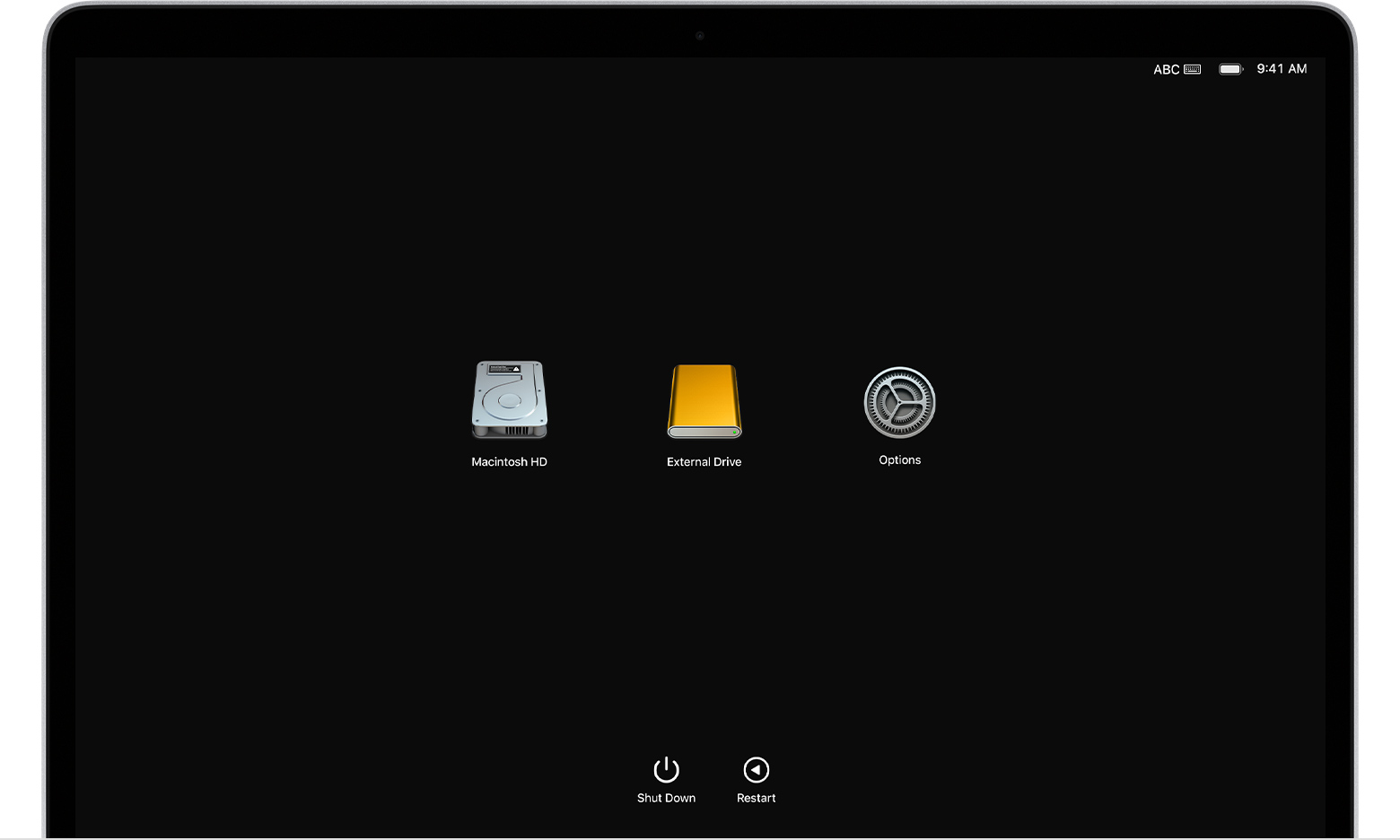
  1. Press and hold the power button on your Mac. As you continue to hold the power button, your Mac turns on and loads startup options. When you see Options, release the power button.Startup Options window
  2. Click Options, then click the Continue button that appears below it.
  3. If you're asked to select a user you know the password for, select the user, click Next, then enter their administrator password.


If you're using an Intel-based Mac

If you're not using a Mac with Apple silicon, then you're using an Intel-based Mac.

  1. Press the power button on your Mac to turn it on, then release the power button and immediately press and hold both the Command (⌘) key and R key until you see an Apple logo or spinning globe. If you can't start up from Recovery in this way, review the guidelines for using startup-key combinations.
  2. If you're asked to select a user you know the password for, select the user, click Next, then enter their administrator password. 


Reinstall macOS from macOS Recovery

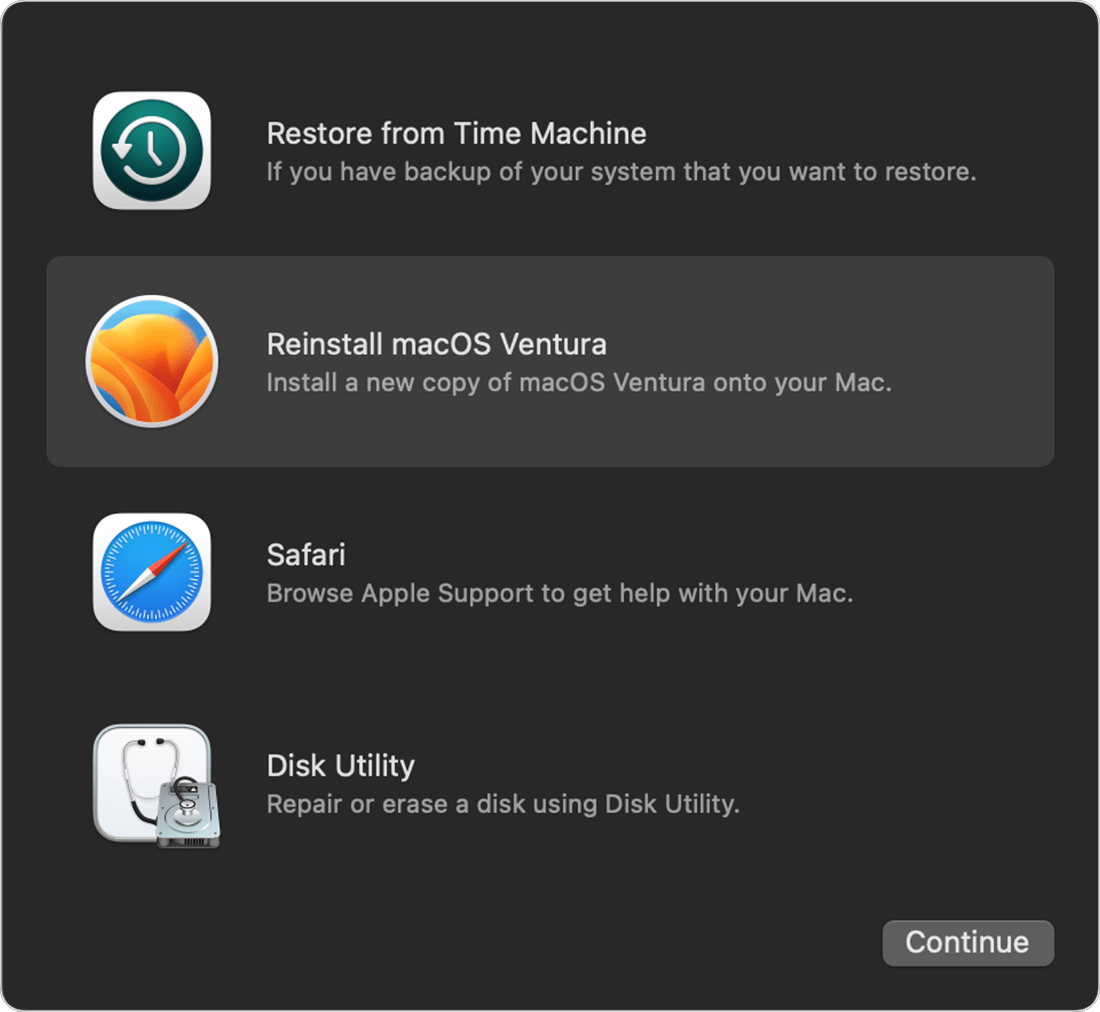
When you see a window with the option to reinstall macOS, your Mac has started up from Recovery.

  1. Select the option to reinstall macOS. Reinstalling macOS doesn't remove your personal data.Utilities window in macOS Recovery
  2. Click Continue, then follow the onscreen instructions.
    • If the installer asks to unlock your disk, enter the password that you use to log in to your Mac.
    • If the installer doesn't see your disk, or it says that it can't install on your computer or volume, you might need to erase your disk first.
    • If the installer offers you the choice between installing on Macintosh HD or Macintosh HD - Data, choose Macintosh HD.
    • Allow installation to complete without putting your Mac to sleep or closing its lid. Your Mac might restart and show a progress bar several times, and the screen might be empty for minutes at a time.

After installation is complete, your Mac might restart to a setup assistant. If you're selling, trading in, or giving away your Mac, press Command-Q to quit the setup assistant without completing setup, then click Shut Down. When the new owner starts up the Mac, they can use their own information to complete setup.


More details can be found here: How to reinstall macOS


As far as your second question we would recommend checking with linux forums to see which version best suits your needs.


Cheers!

Jun 7, 2024 6:28 AM in response to JackEAbel

JackEAbel wrote:

Terminal app is functioning properly. The path Is no longer correct, it needs to be restored.
What file needs to be changed?


Given you’re here and asking this, that usually means either bash (old logins) or zsh (new logins), and not some other shell, and which means .bash_profile, .bash_login, .bashrc, .zprofile, .zlogin, .zshrc, or some local or locally-installed script invoked from one of those scripts.


Launching Finder app, and using the hidden files toggle (Command-Shift-Period), and temporarily renaming the login-related files, is one way to troubleshoot shell login script issues.


Then see the above replies for path and PATH settings.


There are previous discussions of path and PATH for zsh, and of PATH for bash, as well. It’s one of the first mistakes we all make when newly working with the Unix command line.


Jun 7, 2024 9:44 AM in response to JackEAbel

JackEAbel wrote:

Terminal app is functioning properly. The path Is no longer correct, it needs to be restored.
What file needs to be changed?

Until you fix the PATH, you can use the full path to the commands being used in order to fix the issue using the command line. Most of the commands & utilities for this are located in either "/bin" (basic *nix commands like "ls", "echo"), or "/usr/bin" (with most of the other utilities such as "nano", "vim", "less", etc.).

/bin/ls  -hal  ~

sudo nano  ~/.bash_profile


Wondering if this is another Homebrew casualty.....

This thread has been closed by the system or the community team. You may vote for any posts you find helpful, or search the Community for additional answers.

How do I Reset My Terminal Back To Normal?

Welcome to Apple Support Community
A forum where Apple customers help each other with their products. Get started with your Apple Account.