
Wallpapers problem
Why don’t the wallpapers show up on the blocked screen? I set them up correctly but they only can be seen on the screen with apps.
iPhone 11 Pro
Why don’t the wallpapers show up on the blocked screen? I set them up correctly but they only can be seen on the screen with apps.
iPhone 11 Pro
Hello vena_coter,
Thank you for reaching out to Apple Support Communities, and we'll be happy to help in any way we can. We understand you're having issues with your Lock Screen wallpaper. Try the steps here from the article that you viewed prior to posting to set a wallpaper for the Lock Screen: Change the wallpaper on your iPhone - Apple Support
"Change your wallpaper from the Lock Screen
 .
.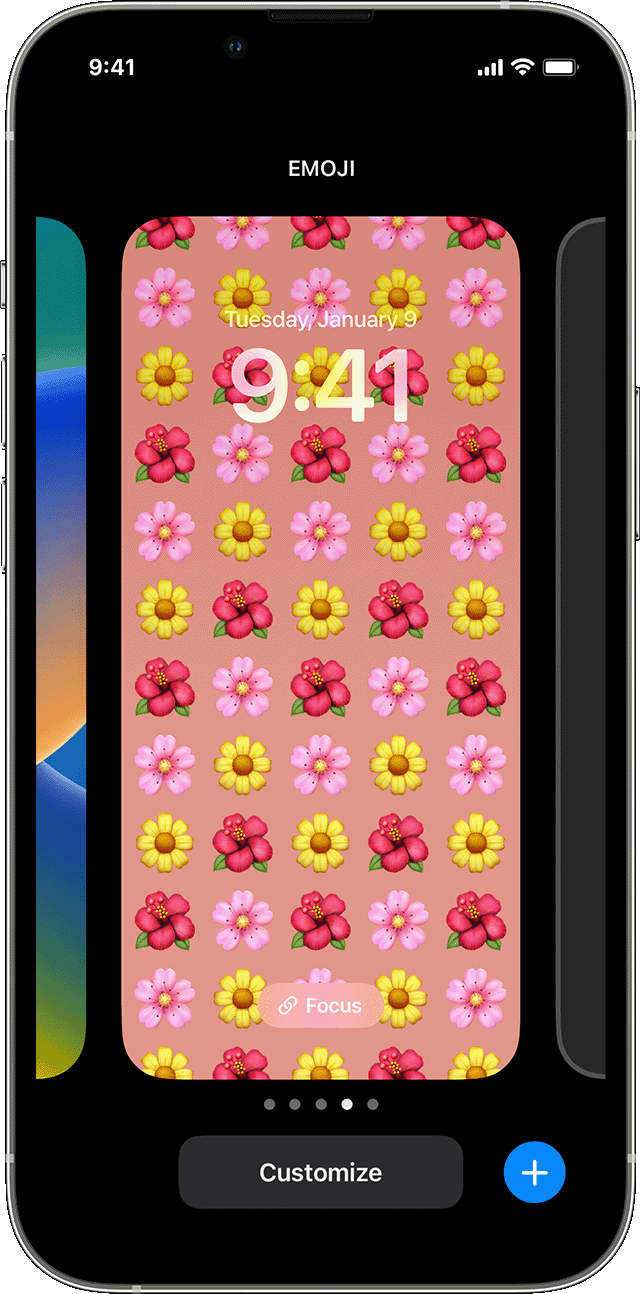
From the Lock Screen wallpaper options, you can also tap the Focus button to link a Focus to a specific wallpaper, customize existing wallpapers, or swipe up on a wallpaper and tap to delete it.
If you can't use Face ID to change your Lock Screen, touch and hold your Lock Screen until the Customize button appears. If the Customize button doesn’t appear, touch and hold the Lock Screen again, then enter your passcode. "
We hope this helps.
Cheers!
Hello vena_coter,
Thank you for reaching out to Apple Support Communities, and we'll be happy to help in any way we can. We understand you're having issues with your Lock Screen wallpaper. Try the steps here from the article that you viewed prior to posting to set a wallpaper for the Lock Screen: Change the wallpaper on your iPhone - Apple Support
"Change your wallpaper from the Lock Screen
.From the Lock Screen wallpaper options, you can also tap the Focus button to link a Focus to a specific wallpaper, customize existing wallpapers, or swipe up on a wallpaper and tap to delete it.
If you can't use Face ID to change your Lock Screen, touch and hold your Lock Screen until the Customize button appears. If the Customize button doesn’t appear, touch and hold the Lock Screen again, then enter your passcode. "
We hope this helps.
Cheers!
Yes, thank you, all the features were on. Later in like half an hour the picture finally appeared. I think it was something with loading the picture itself even though the previous wallpaper had the same “weight”, this one took longer. But now it works well.
Wallpapers problem

