I can’t use FaceTime on my new I phone 13 through my number even I was using it on my old I phone 8 plus

I need to use FaceTime through my mobile number not through the mail

iPhone 13, iOS 16

Posted on Jul 4, 2023 2:29 PM

Reply
Question marked as Top-ranking reply

Posted on Jul 5, 2023 2:06 PM

Hi Islam1979,


If you're unable to use your number for FaceTime, we'd recommend looking over the tips here:


"If you can't see or select your number in Messages or FaceTime
  1. Make sure that you're using the latest software for your Mac or iOS device
  2. Make sure that you correctly followed the iPhone steps to set up your phone number. You should be using the same Apple ID on all of your devices.
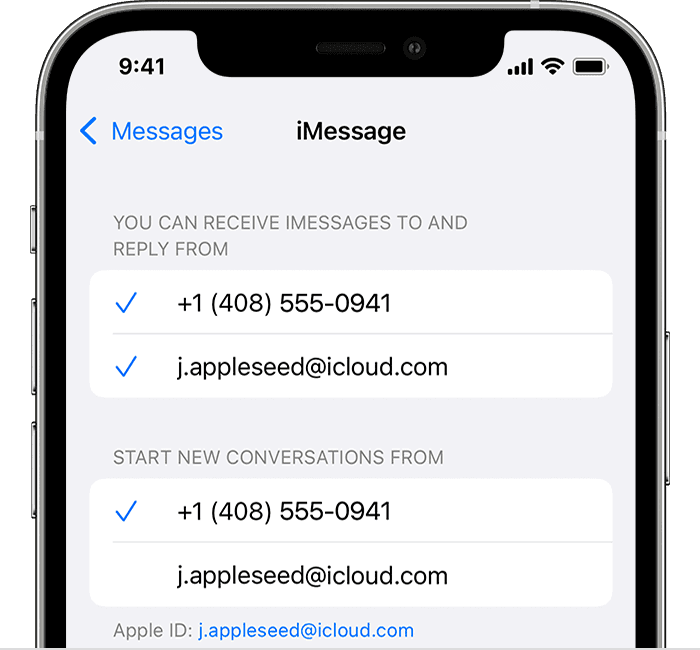
  3. In the “You can be reached” section of Messages and FaceTime settings, make sure that there are checkmarks beside your phone number and Apple ID:
  4. iPhone showing how to choose where you can be reached


If your phone number is unchecked and you can't select it, or you have some other issue, follow these steps:

  1. On your Mac:
    • In Messages, choose Messages > Settings, then click iMessage. Click Sign Out.
    • In FaceTime, choose FaceTime > Settings, then click General. Click Sign Out.
  1. On your iPhone, iPad, and iPod touch:
    • Go to Settings > Messages > Send & Receive. Tap your Apple ID, then tap Sign Out.
    • Go to Settings > FaceTime. Tap your Apple ID, then tap Sign Out.
  1. On your iPhone:
    • Go back to Settings > Messages and make sure that iMessage is turned on.
    • Tap Send & Receive, then choose “Use your Apple ID for iMessage” and sign in with your Apple ID.
  1. Using the same Apple ID, sign back in to Messages and FaceTime on your other devices. 


If you still need help, change your Apple ID password and repeat the setup steps. If that doesn't work, contact Apple Support."


Let us know if you still need assistance after trying those steps.


Cheers!


1 reply
Question marked as Top-ranking reply

Jul 5, 2023 2:06 PM in response to Islam1979

Hi Islam1979,


If you're unable to use your number for FaceTime, we'd recommend looking over the tips here:


"If you can't see or select your number in Messages or FaceTime

  1. Make sure that you're using the latest software for your Mac or iOS device
  2. Make sure that you correctly followed the iPhone steps to set up your phone number. You should be using the same Apple ID on all of your devices.
  3. In the “You can be reached” section of Messages and FaceTime settings, make sure that there are checkmarks beside your phone number and Apple ID:
  4. iPhone showing how to choose where you can be reached


If your phone number is unchecked and you can't select it, or you have some other issue, follow these steps:

  1. On your Mac:
    • In Messages, choose Messages > Settings, then click iMessage. Click Sign Out.
    • In FaceTime, choose FaceTime > Settings, then click General. Click Sign Out.
  1. On your iPhone, iPad, and iPod touch:
    • Go to Settings > Messages > Send & Receive. Tap your Apple ID, then tap Sign Out.
    • Go to Settings > FaceTime. Tap your Apple ID, then tap Sign Out.
  1. On your iPhone:
    • Go back to Settings > Messages and make sure that iMessage is turned on.
    • Tap Send & Receive, then choose “Use your Apple ID for iMessage” and sign in with your Apple ID.
  1. Using the same Apple ID, sign back in to Messages and FaceTime on your other devices. 


If you still need help, change your Apple ID password and repeat the setup steps. If that doesn't work, contact Apple Support."


Let us know if you still need assistance after trying those steps.


Cheers!


This thread has been closed by the system or the community team. You may vote for any posts you find helpful, or search the Community for additional answers.

I can’t use FaceTime on my new I phone 13 through my number even I was using it on my old I phone 8 plus

Welcome to Apple Support Community
A forum where Apple customers help each other with their products. Get started with your Apple Account.