Iphone is findable
I am not able to open the screen
iPad, iPadOS 14
I am not able to open the screen
iPad, iPadOS 14
Hey there Monkeylover5,
You can follow the steps below to help with issues where your iPhone is black or frozen:
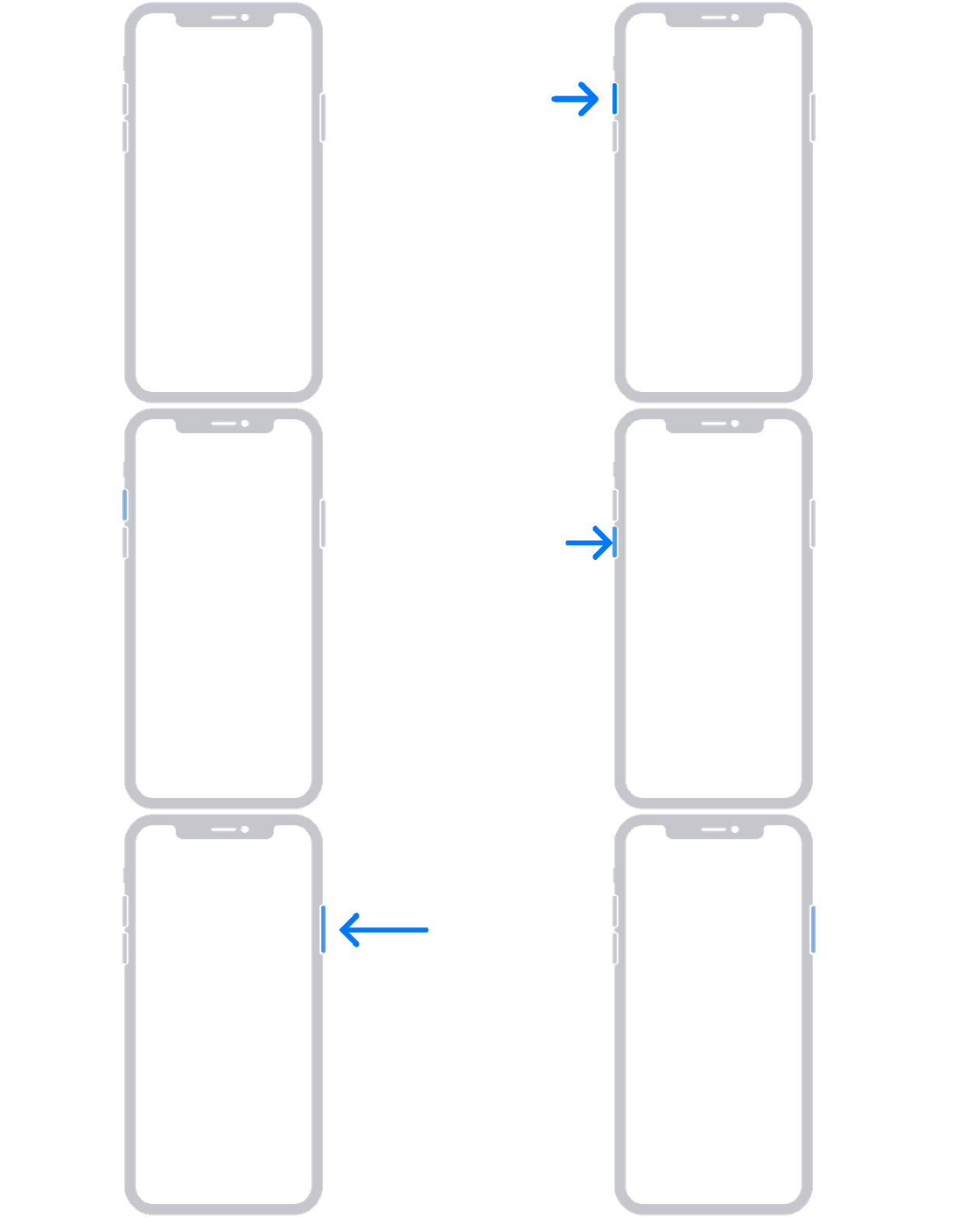
On your iPhone 8 or later, including iPhone SE (2nd and 3rd generation)
1. Press and quickly release the volume up button.
2. Press and quickly release the volume down button.
3. Press and hold the side button until you see the Apple logo.
5. If your phone doesn't turn on, follow these steps to check your hardware and charge your phone. You might need to charge for up to an hour.
6. If your phone still doesn't turn on, contact Apple Support.
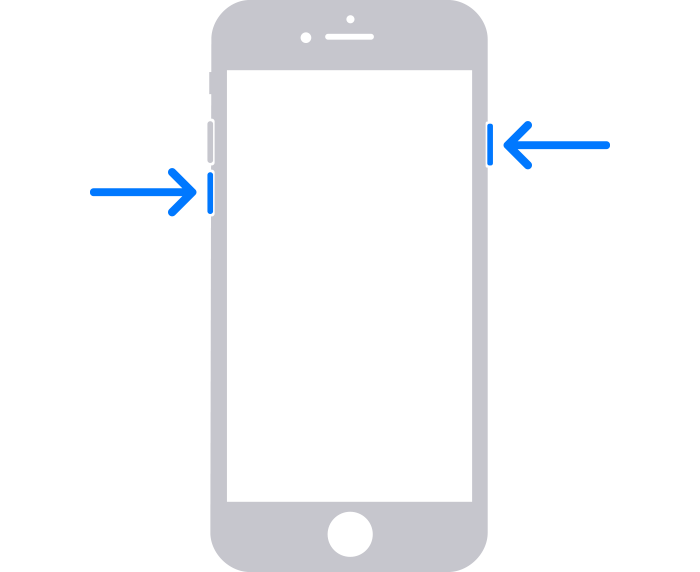
On your iPhone 7 or iPhone 7 Plus
1. Press and hold both the side button and the volume down button until you see the Apple logo.
3. If your phone doesn't turn on, follow these steps to check your hardware and charge your phone. You might need to charge for up to an hour.
4. If your phone still doesn't turn on, contact Apple Support.
On your iPhone 6s and earlier, including iPhone SE (1st generation)
1. Press and hold both the Home button and the side button or the top button until you see the Apple logo.
2. If your phone doesn't turn on, follow these steps to check your hardware and charge your phone. You might need to charge for up to an hour.
3. If your phone still doesn't turn on, contact Apple Support.
If your iPhone won't turn on or is frozen
Take care.
Hey there Monkeylover5,
You can follow the steps below to help with issues where your iPhone is black or frozen:
On your iPhone 8 or later, including iPhone SE (2nd and 3rd generation)
1. Press and quickly release the volume up button.
2. Press and quickly release the volume down button.
3. Press and hold the side button until you see the Apple logo.
5. If your phone doesn't turn on, follow these steps to check your hardware and charge your phone. You might need to charge for up to an hour.
6. If your phone still doesn't turn on, contact Apple Support.
On your iPhone 7 or iPhone 7 Plus
1. Press and hold both the side button and the volume down button until you see the Apple logo.
3. If your phone doesn't turn on, follow these steps to check your hardware and charge your phone. You might need to charge for up to an hour.
4. If your phone still doesn't turn on, contact Apple Support.
On your iPhone 6s and earlier, including iPhone SE (1st generation)
1. Press and hold both the Home button and the side button or the top button until you see the Apple logo.
2. If your phone doesn't turn on, follow these steps to check your hardware and charge your phone. You might need to charge for up to an hour.
3. If your phone still doesn't turn on, contact Apple Support.
If your iPhone won't turn on or is frozen
Take care.
Iphone is findable