
transparency
Hello I have problem with transparency mode it just stopped work. Headphones do not amplify sound in this mode thats the problem
Hello I have problem with transparency mode it just stopped work. Headphones do not amplify sound in this mode thats the problem
Hello Sakrut,
With transparency mode on your AirPods, the feature allows outside sound in, so you can hear what's going on around you. Additionally, with the AirPods Pro (2nd generation) the Adaptive Transparency will reduce loud sounds around you.
While it's not meant to amplify sound, if this feature isn't working as expected test the steps switching between the sound modes to see if you notice a difference. The steps below also found in the article here can get you started: Change the settings of your AirPods and AirPods Pro
"By default, when you press and hold the force sensor on the stem of your left or right AirPod, your AirPods Pro switch between Active Noise Cancellation and Transparency mode. You can change which noise control modes the press-and-hold action uses:
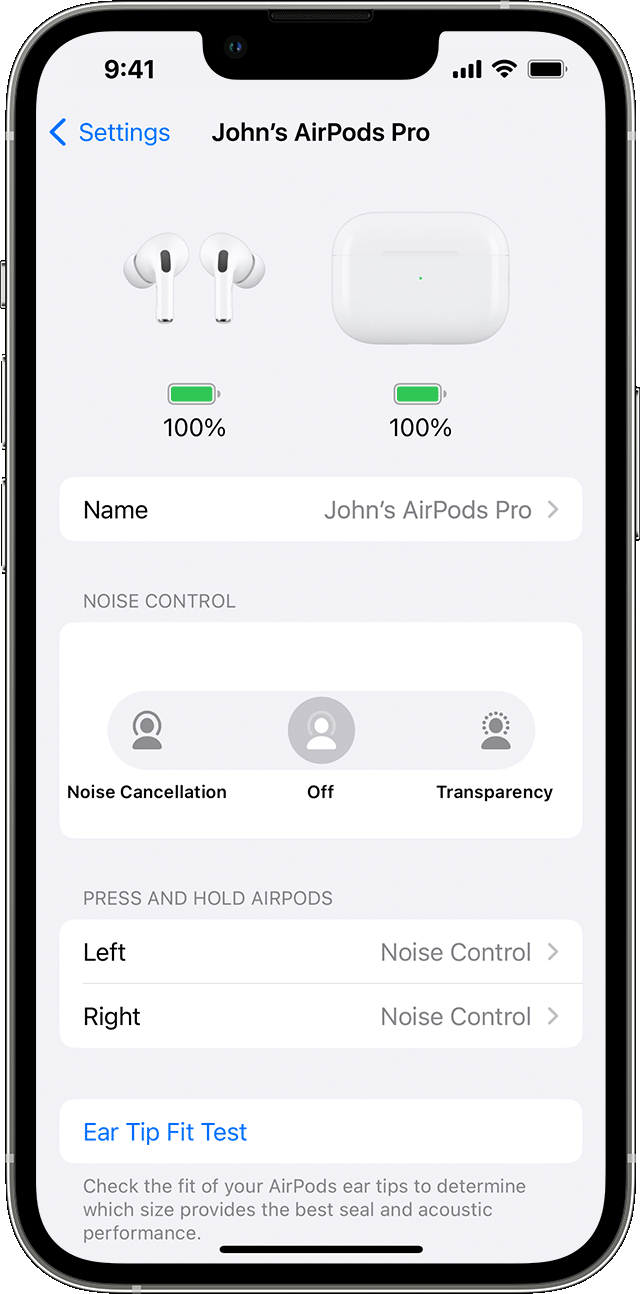
 next to your AirPods in the list of devices.
If you don't notice a difference, be sure you have the correct fit for your AirPods. You can complete a test with the help of this article: Choose your AirPods Pro ear tips and use the Ear Tip Fit Test
If the fit is correct and the steps above don't resolve the issue test a reset of your AirPods. You can find those steps here: How to reset your AirPods and AirPods Pro
Should the issue remain after the reset, reach out to Apple Support directly to further assist and help check on your options.
Cheers.
Hello Sakrut,
With transparency mode on your AirPods, the feature allows outside sound in, so you can hear what's going on around you. Additionally, with the AirPods Pro (2nd generation) the Adaptive Transparency will reduce loud sounds around you.
While it's not meant to amplify sound, if this feature isn't working as expected test the steps switching between the sound modes to see if you notice a difference. The steps below also found in the article here can get you started: Change the settings of your AirPods and AirPods Pro
"By default, when you press and hold the force sensor on the stem of your left or right AirPod, your AirPods Pro switch between Active Noise Cancellation and Transparency mode. You can change which noise control modes the press-and-hold action uses:
next to your AirPods in the list of devices.If you don't notice a difference, be sure you have the correct fit for your AirPods. You can complete a test with the help of this article: Choose your AirPods Pro ear tips and use the Ear Tip Fit Test
If the fit is correct and the steps above don't resolve the issue test a reset of your AirPods. You can find those steps here: How to reset your AirPods and AirPods Pro
Should the issue remain after the reset, reach out to Apple Support directly to further assist and help check on your options.
Cheers.
transparency

