Apple pencil connected but not working since ipad mini (5th gen) OS update 16.5.1 last night

My Apple pencil was working perfectly until I finished work yesterday - then I accepted the OS update (16.5..1) and today the pencil connects ( after rebooting , reconnecting bluetooth etc ) but is not functioning. The battery is showing 81% . Can someone please advise ?

Posted on Jul 7, 2023 4:00 AM

Reply
Question marked as Top-ranking reply

Posted on Jul 7, 2023 5:42 AM

If your iPad is not performing as expected immediately after performing a system software update, try a forced restart - as this will often clear an isolated issue:


Force restart iPad (models with Face ID or with Touch ID in the top button)

If your iPad doesn’t have the Home button, do the following:

  1. Press and quickly release the volume button nearest to the top button.
  2. Press and quickly release the volume button farthest from the top button.
  3. Press and hold the top button.
  4. When the Apple logo appears, release the top button.



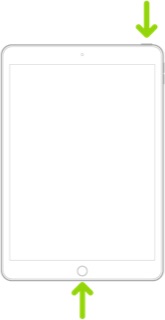
Force restart iPad (models with the Home button)

Press and hold the top button and the Home button at the same time. When the Apple logo appears, release both buttons.


This support page may be helpful with (re)pairing and use of the Pencil with your iPad:

Connect Apple Pencil with your iPad - Apple Support


If you continue to experience difficulties, here is one of the better troubleshooting guides:

https://appletoolbox.com/apple-pencil-not-working-heres-our-troubleshooting-guide/


1 reply
Question marked as Top-ranking reply

Jul 7, 2023 5:42 AM in response to noeldeblaca

If your iPad is not performing as expected immediately after performing a system software update, try a forced restart - as this will often clear an isolated issue:


Force restart iPad (models with Face ID or with Touch ID in the top button)

If your iPad doesn’t have the Home button, do the following:

  1. Press and quickly release the volume button nearest to the top button.
  2. Press and quickly release the volume button farthest from the top button.
  3. Press and hold the top button.
  4. When the Apple logo appears, release the top button.


Force restart iPad (models with the Home button)

Press and hold the top button and the Home button at the same time. When the Apple logo appears, release both buttons.


This support page may be helpful with (re)pairing and use of the Pencil with your iPad:

Connect Apple Pencil with your iPad - Apple Support


If you continue to experience difficulties, here is one of the better troubleshooting guides:

https://appletoolbox.com/apple-pencil-not-working-heres-our-troubleshooting-guide/


This thread has been closed by the system or the community team. You may vote for any posts you find helpful, or search the Community for additional answers.

Apple pencil connected but not working since ipad mini (5th gen) OS update 16.5.1 last night

Welcome to Apple Support Community
A forum where Apple customers help each other with their products. Get started with your Apple Account.