Hi giorgos777,
If you're sure all members are added with the correct Apple ID, check your settings and the settings on their device with the steps below found in the article here: If you can't find your family's shared content - Apple Support
"Check your Family Sharing settings
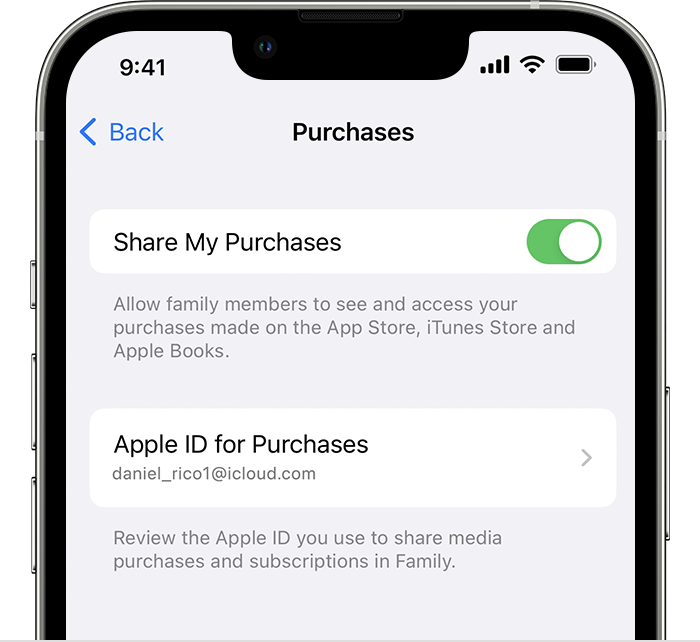
Make sure that you're using the same Apple ID for Family Sharing and Media & Purchases. And make sure that purchase sharing is turned on. Then ask your family members to check their settings too.
On your iPhone or iPad with iOS 16 or later
- Go to Settings > Family.
- Tap your name.
- Make a note of which Apple ID is listed.
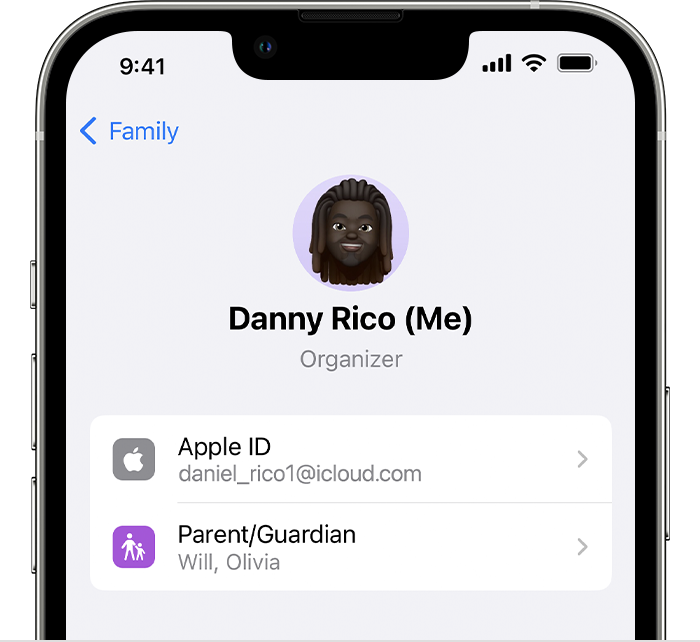 4. Tap Purchases.
5. Tap Apple ID for Purchases and make sure that you're signed in with with the same Apple ID that you use for Family Sharing. If not, tap Share using secondary Apple ID and enter the Apple ID and password for that Apple ID.
 "
"
Should the issue remain, follow the steps in the section "If you still can't find shared content" at the bottom of the same article.
If purchase sharing is enabled, you can also use the steps in the article here to help check your current settings: How to share purchases with your family
Should your family member still only see the option to subscribe after checking all your settings and the setting on their devices with the steps and articles above, reach out to Apple Support directly to further assist.
Get Support
Best!



